
AI Voice Agent Automation Case Study: From Inbound Calls to CRM-Ready Follow-Ups
See how an AI voice agent was engineered to capture inbound calls, understand caller intent, update CRM records, create follow-up tasks, and involve humans when the conversation needed judgment.
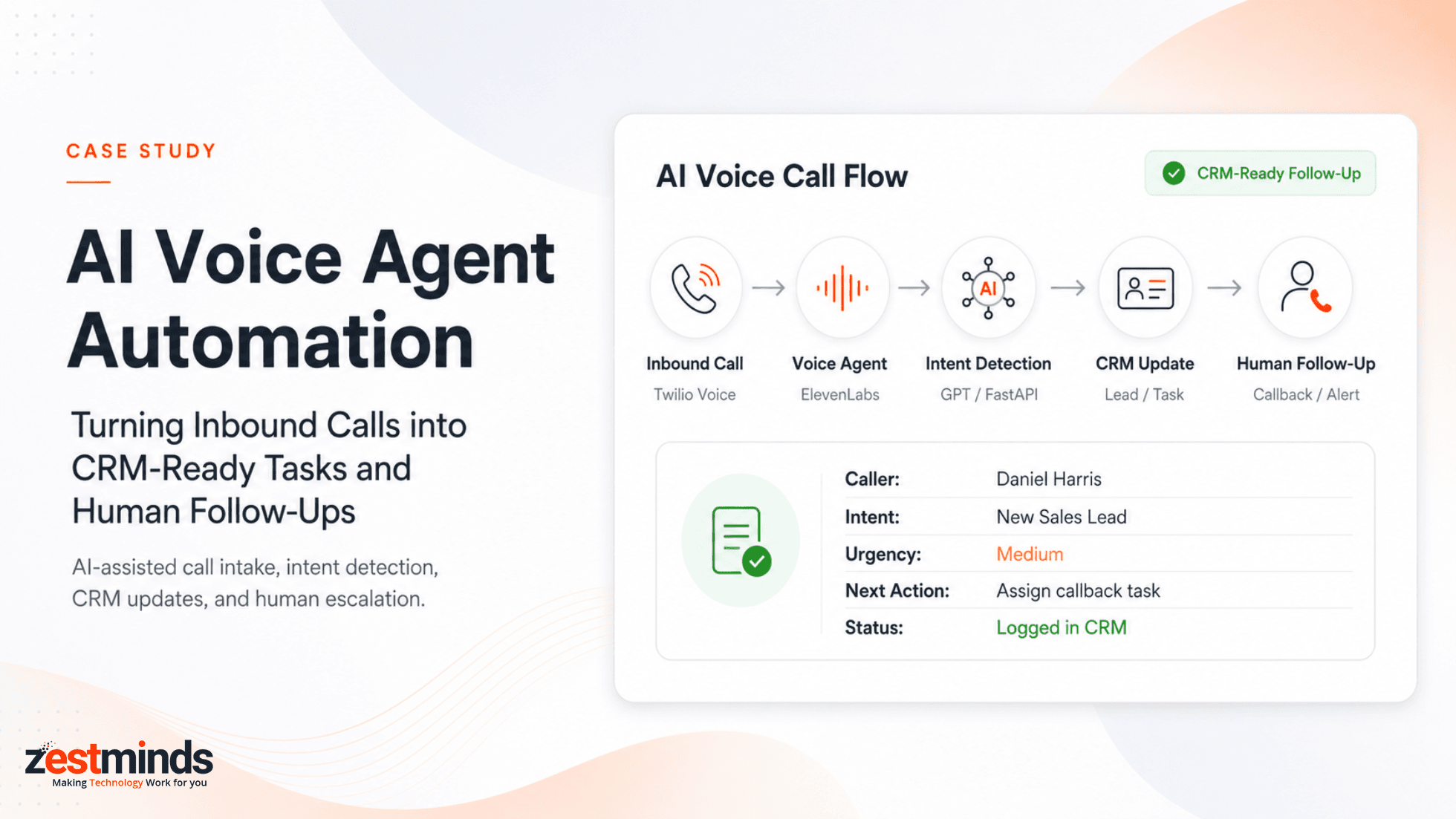
Executive Summary
A service business was receiving recurring inbound calls from prospects, existing customers, and people requesting follow-ups. Answering the calls was only one part of the work. After each conversation, someone still needed to capture the right details, update the CRM, create the next task, assign ownership, and make sure an important call did not disappear into a recording or handwritten note.
Zestminds built an AI voice agent automation workflow using Twilio Voice, ElevenLabs Conversational AI, OpenAI/GPT APIs, FastAPI, CRM integration, Slack and email alerts, human escalation, and workflow logs.
The system did more than transcribe conversations. It turned routine inbound calls into structured business actions while keeping humans involved when a conversation was urgent, sensitive, unclear, or commercially important.
During testing of this implementation, the workflow demonstrated three meaningful operational outcomes:
- approximately 70-80% of standard calls could be captured through the structured AI-assisted workflow,
- manual post-call note-taking was reduced by around 60-70%,
- and CRM follow-up tasks could be created within approximately 1-2 minutes after the call.
These results are specific to this implementation and the call scenarios tested. They are not intended as universal benchmarks for every AI voice agent deployment.
Project Snapshot
| Area | Implementation |
|---|---|
| Client Type | Service business with recurring inbound calls |
| Primary Workflows | Sales intake, customer inquiries, call routing, callback management, and follow-up |
| Operational Problem | Manual call notes, inconsistent CRM updates, delayed callbacks, and follow-ups that depended on manual action |
| Telephony | Twilio Voice |
| Conversational Voice | ElevenLabs Conversational AI |
| AI Understanding | OpenAI/GPT APIs |
| Backend Control Layer | FastAPI |
| Business System | Client CRM integration |
| Notifications | Slack and email alerts |
| Human Control | Live escalation and callback workflows for calls requiring human attention |
| Observability | Call outcome, structured fields, CRM status, escalation status, notifications, and workflow errors |
| Measured Impact | More structured call capture, less manual note-taking, faster CRM follow-up creation, and clearer ownership |
The Operational Problem Was After the Call
The client's team handled different types of inbound conversations every day.
Some callers were new prospects asking about services or pricing. Some were existing customers needing assistance. Others wanted to schedule a conversation, confirm availability, request a callback, or reach the right person.
During each call, the team needed to understand several pieces of business context:
- who was calling,
- why they were calling,
- whether they were a new lead or existing customer,
- which service or issue the conversation related to,
- whether the request was urgent,
- whether a human needed to take over,
- what should happen next,
- and who should own the follow-up.
The problem was not that the team could not answer the phone.
The real operational gap appeared between conversation and action.
After a call ended, someone still had to write notes, update the CRM, create tasks, classify the opportunity or issue, assign ownership, notify another team member, and make sure the caller received the promised follow-up.
As call volume increased, the reliability of that process depended increasingly on individual staff members remembering and completing every step.
The client wanted to automate the repeatable parts of call intake without making AI responsible for conversations that still needed judgment, empathy, commercial ownership, or direct human support.
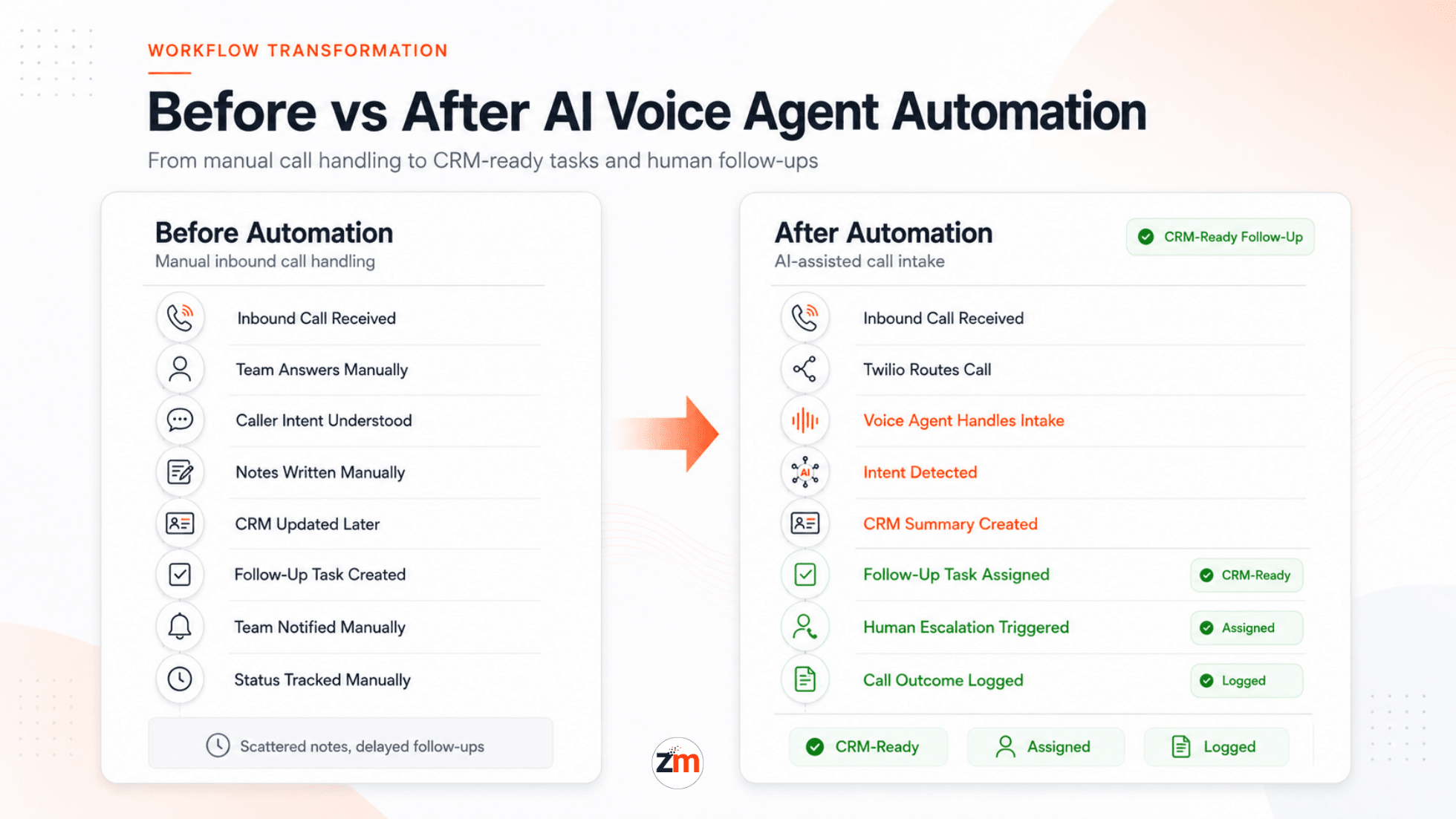
Before Automation: A Conversation Still Created Manual Work
Before the AI voice workflow was introduced, a typical inbound call moved through a mostly manual process:
Inbound call
    |
Team member answers
    |
Caller intent understood manually
    |
Notes written manually
    |
CRM record created or updated
    |
Follow-up task created
    |
Owner notified
    |
Status tracked manually
This created several points where useful information could become delayed, inconsistent, or difficult to track:
- Call notes varied depending on who handled the conversation.
- CRM updates could happen well after the call.
- Callback and follow-up tasks depended on manual creation.
- Missed calls needed separate review.
- Caller intent was not always categorized consistently.
- Routine and high-priority calls could enter the same queue.
- Managers had limited visibility into what happened after a conversation.
- Call recordings, notes, CRM activity, and follow-up ownership were not always connected cleanly.
The Engineering Challenge: Turn Natural Conversation into Safe Business Actions
The project was not simply about making a phone bot answer calls.
The difficult part was converting a live, unpredictable conversation into structured information that other business systems could safely use.
For each call, the system needed to determine:
- the caller's intent,
- the type of inquiry,
- the information that needed to be captured,
- whether an existing CRM record should be matched or updated,
- whether a new follow-up task was required,
- the appropriate owner or workflow,
- whether the conversation required human escalation,
- and what should be stored for later review.
This distinction mattered because a language model can interpret conversation, but business systems still need predictable data, validation, and controlled actions.
The AI was responsible for understanding the conversation. The backend remained responsible for deciding whether that understanding was safe and complete enough to become a business action.
What Was Built
Zestminds designed and implemented an AI voice agent automation workflow connecting telephony, conversational AI, language understanding, backend validation, CRM operations, notifications, human escalation, and workflow logging.
The solution used Twilio Voice as the telephony entry point. Incoming call events were routed into an ElevenLabs Conversational AI voice experience so callers could speak naturally rather than navigate a traditional press-1-style IVR.
OpenAI/GPT APIs helped interpret conversation context, identify intent, extract structured information, summarize calls, detect urgency, and prepare a recommended next action.
The AI output did not bypass the application layer and write directly into business systems.
FastAPI acted as the control boundary between probabilistic AI output and deterministic business actions. The backend received workflow events, validated extracted information, applied routing rules, handled CRM API operations, processed transcript data, triggered escalation logic, and maintained workflow status.
The CRM then became the persistent system of record for the caller, call summary, follow-up task, ownership, and outcome.
Slack and email notifications were used when the workflow needed human attention, including urgent calls, high-value opportunities, callback requests, or conversations that could not be handled safely through the automated path.
This implementation is representative of the type of system we build through our AI workflow automation services, where AI is connected to real operational systems rather than being added as an isolated chatbot or demo.
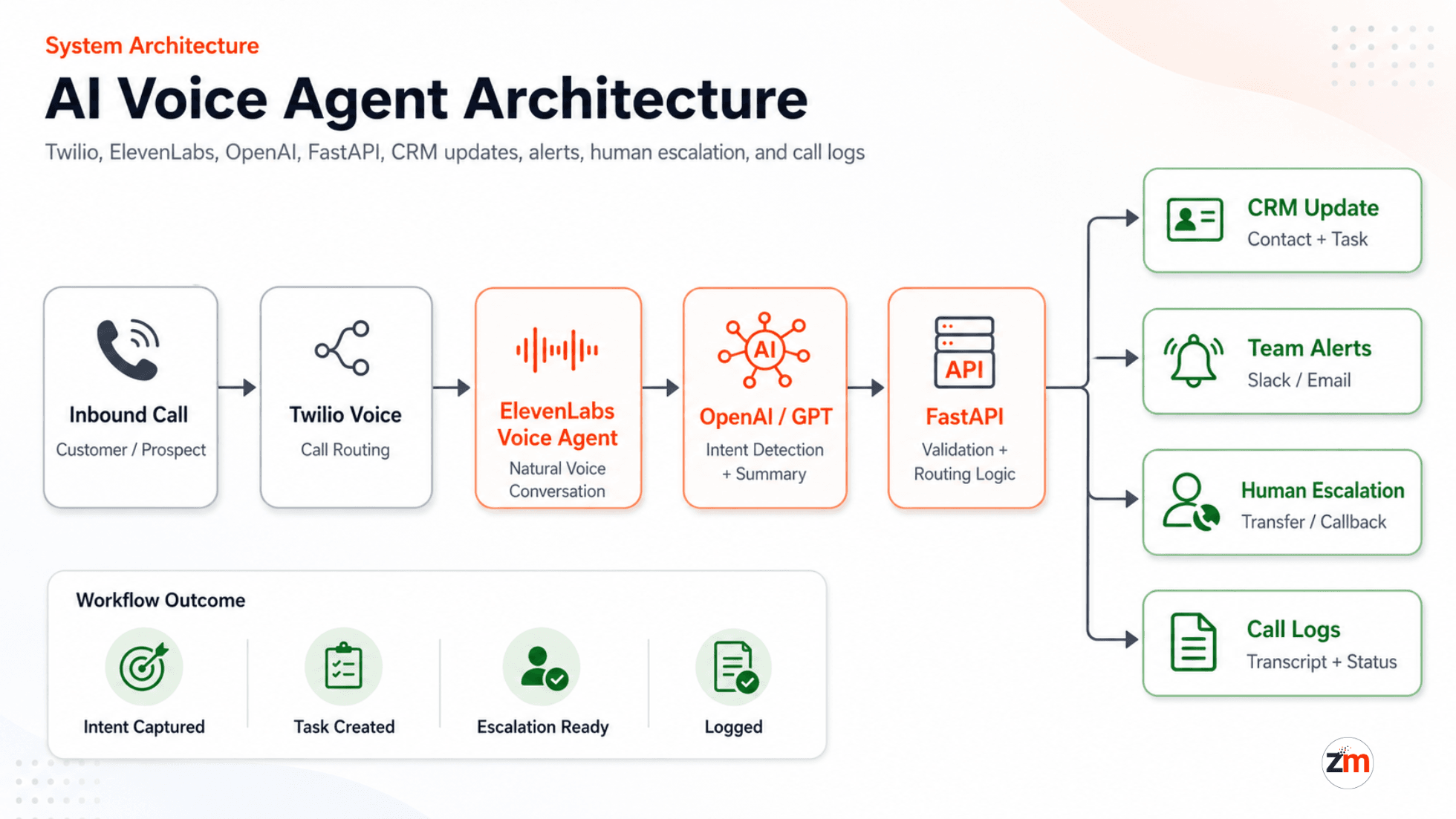
How the AI Voice Agent Architecture Worked
Inbound Phone Call
        |
        v
Twilio Voice
        |
        v
ElevenLabs Conversational AI
        |
        v
Conversation and Call Context
        |
        v
OpenAI/GPT Understanding
        |
        |  Intent
        |  Structured fields
        |  Urgency
        |  Summary
        |  Suggested next action
        v
FastAPI Validation and Routing
        |
        +-----------------------+
        |                       |
        v                       v
CRM Actions                Human Escalation
        |                       |
        v                       v
Contact / Task             Transfer / Callback
 / Call Summary              / Alert
        |                       |
        +-----------+-----------+
                    |
                    v
             Workflow Logs
The architecture deliberately separated natural-language understanding from transactional business logic.
That separation made the workflow easier to validate, debug, extend, and control as additional call types or CRM actions were introduced.
Where AI Was Used and Where Deterministic Software Stayed in Control
One of the most important engineering decisions was deciding which parts of the workflow should rely on AI and which parts should remain controlled by application logic.
| Workflow Responsibility | Primary Control | Reason |
|---|---|---|
| Understanding natural caller language | AI | Callers do not speak in fixed forms or predefined menu options. |
| Intent classification | AI with backend validation | Language interpretation is useful, but downstream actions still require controlled rules. |
| Call summarization | AI | The conversation needed to be converted into concise operational context. |
| Structured field extraction | AI with FastAPI validation | Extracted values needed to be checked before being used by business systems. |
| CRM API operations | FastAPI and application logic | Creating or updating business records required controlled backend execution. |
| Routing and ownership rules | Application logic | Business routing needed predictable behavior. |
| Human escalation triggers | AI signals plus workflow rules | The system needed to recognize conversational context while preserving defined escalation paths. |
| Workflow status and errors | Backend logs | Operational teams needed visibility into what happened after each call. |
This prevented the system from treating a language model response as if it were automatically equivalent to a verified CRM instruction.
What Happened After a Caller Dialed the Number
- The caller placed an inbound call to the business number.
- Twilio received the call and routed it into the AI voice workflow.
- The ElevenLabs voice agent handled the initial conversation and routine intake.
- The workflow captured information such as caller identity, reason for calling, urgency, and preferred follow-up details.
- OpenAI/GPT processed the conversation context and produced structured information.
- A call summary, detected intent, extracted fields, and recommended next action were prepared.
- FastAPI validated the extracted information and applied the relevant workflow rules.
- The CRM contact was created or updated as appropriate.
- A follow-up task was created when the conversation required one.
- The task or callback was routed to the appropriate human owner.
- Urgent, sensitive, unclear, or high-value conversations could trigger escalation.
- The call outcome, CRM status, escalation state, notifications, and errors remained visible through workflow logs.
The result was not just an automated phone conversation.
It was a connected workflow in which the conversation could become an owned and trackable business action within minutes.
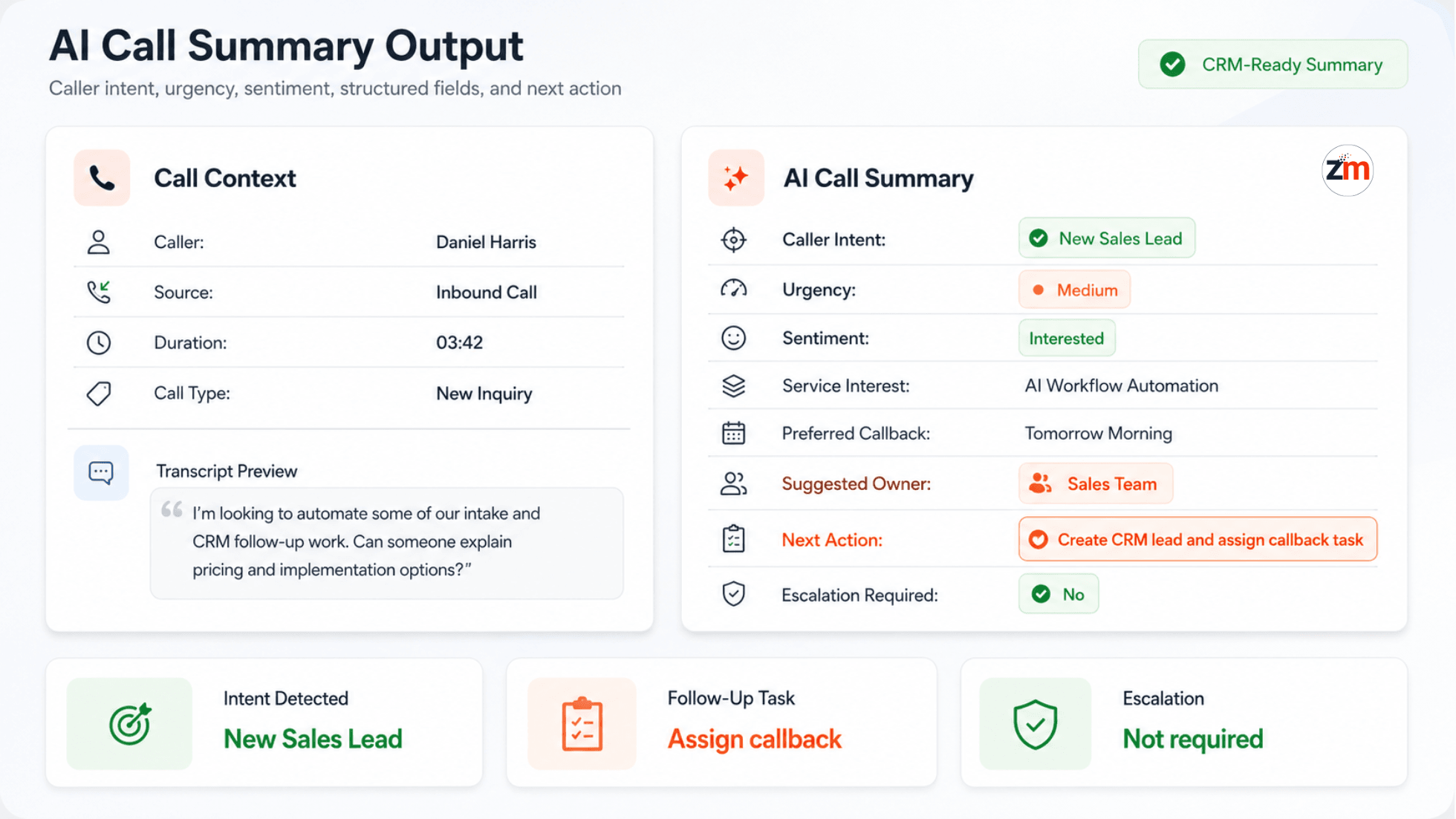
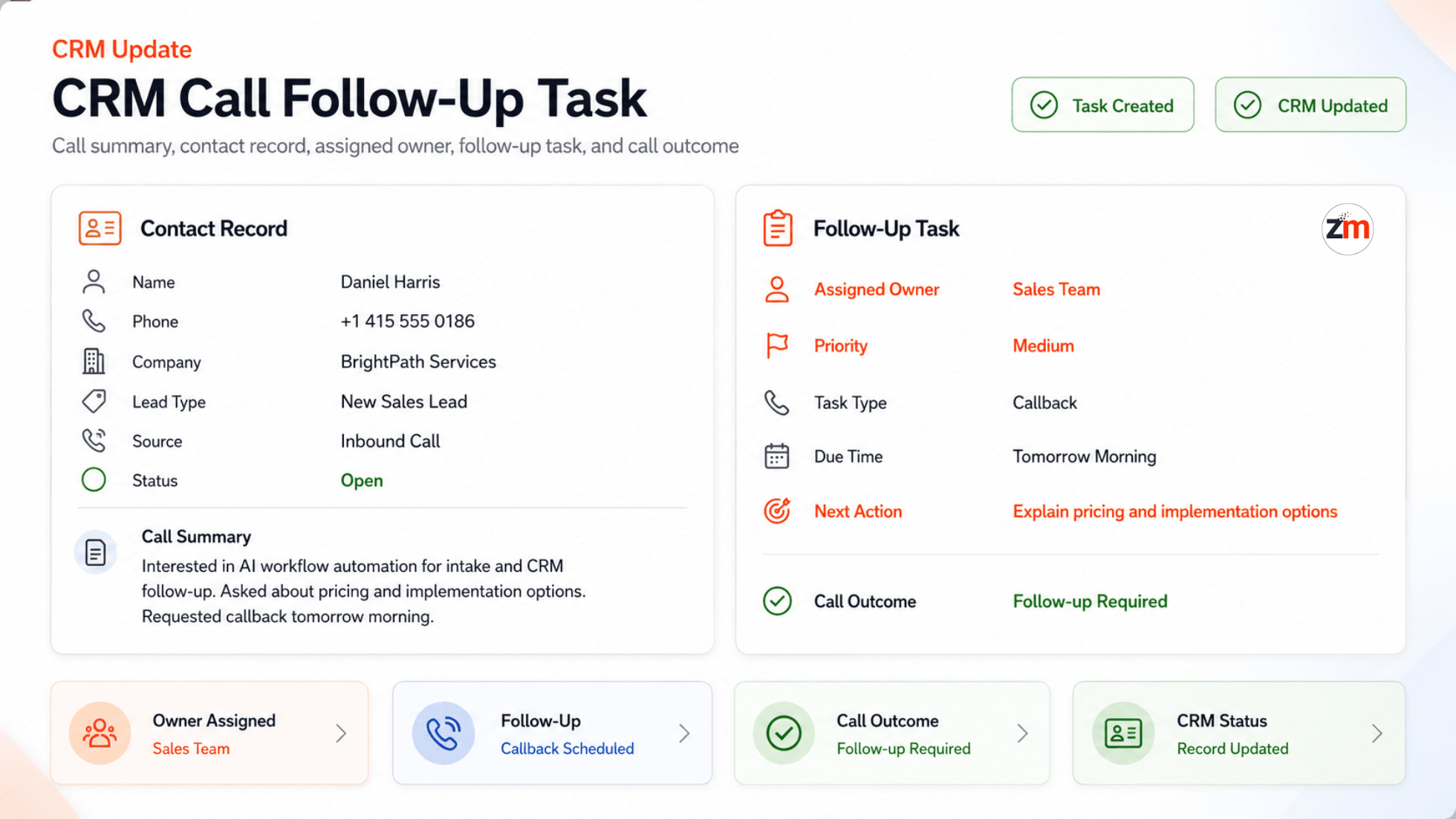
Example: From a Natural Conversation to Structured CRM Context
A caller did not need to speak in a rigid format such as "sales inquiry, medium priority, callback tomorrow morning."
They could speak naturally about what they needed. The AI layer then converted relevant parts of the conversation into structured context for validation and downstream workflow processing.
For example, a structured output could contain:
Caller Name: Daniel Harris
Phone Number: +1 415 XXX XXXX
Call Reason: Pricing and implementation inquiry
Intent: New sales lead
Service Interest: AI workflow automation
Urgency: Medium
Sentiment: Interested
Preferred Callback: Tomorrow morning
Call Summary: Caller wants to understand whether AI automation can reduce manual intake and CRM follow-up work.
Next Action: Create CRM lead and assign callback task to sales team
Escalation Required: No
This example illustrates the structured format used by the workflow. The important engineering step happened after extraction: the backend validated the information before using it in CRM operations.
Turning a Call into an Owned CRM Follow-Up
Capturing a good summary was useful, but the main operational value came from connecting the conversation to the client's follow-up process.
Depending on the call type and validated information, the workflow could:
- create a new CRM contact,
- update an existing contact,
- store the call summary,
- record caller intent,
- apply relevant lead or customer context,
- create a callback or follow-up task,
- assign the task to the appropriate person,
- set follow-up priority,
- and retain the relevant call outcome or transcript context.
For a pricing or implementation inquiry, for example, the workflow could prepare a sales lead, create the required callback task, and assign ownership based on the client's routing rules.
A support-oriented conversation could follow a different path, carrying its summary, urgency, and next action to the appropriate team.
This addressed a common operational gap in phone-based workflows: a useful conversation ending without a clearly owned next step.
Human Handoff Was Part of the Architecture, Not a Fallback Added Later
The system was never designed around the assumption that every conversation should be completed autonomously.
Human escalation was built into the workflow because some calls require judgment, empathy, authority, or direct commercial ownership.
The workflow could trigger human handoff or a priority callback when:
- the caller explicitly asked for a human,
- the caller appeared frustrated,
- the conversation was urgent,
- the issue involved billing or account-related concerns,
- the call represented a high-value opportunity,
- AI confidence was low,
- or required information could not be captured reliably.
Depending on the situation, the workflow could transfer the call, create an urgent callback task, notify the team through Slack or email, preserve the conversation context, and mark the call for human attention.
This changed the purpose of automation.
The goal was not to remove humans from the phone system. The goal was to make sure routine intake did not consume human attention while the calls that genuinely needed people reached them with better context.
What Happened When the Normal Workflow Could Not Continue
Production automation needs a defined behavior for incomplete, uncertain, or exceptional situations.
| Situation | Workflow Response |
|---|---|
| Caller requests a human | Human handoff or callback path is triggered. |
| Required information is incomplete | The conversation attempts to collect the missing context or routes the call for human follow-up. |
| AI confidence is low | The workflow avoids treating uncertain interpretation as a routine completed call and can escalate for review. |
| Conversation is urgent or sensitive | The relevant escalation and notification path is activated. |
| High-value opportunity is detected | The call can be prioritized for human sales follow-up. |
| CRM or workflow operation reports an error | The workflow status and error information are retained in the logs for visibility and follow-up. |
This was an important part of making the automation usable in a real operating environment rather than only demonstrating the happy path.
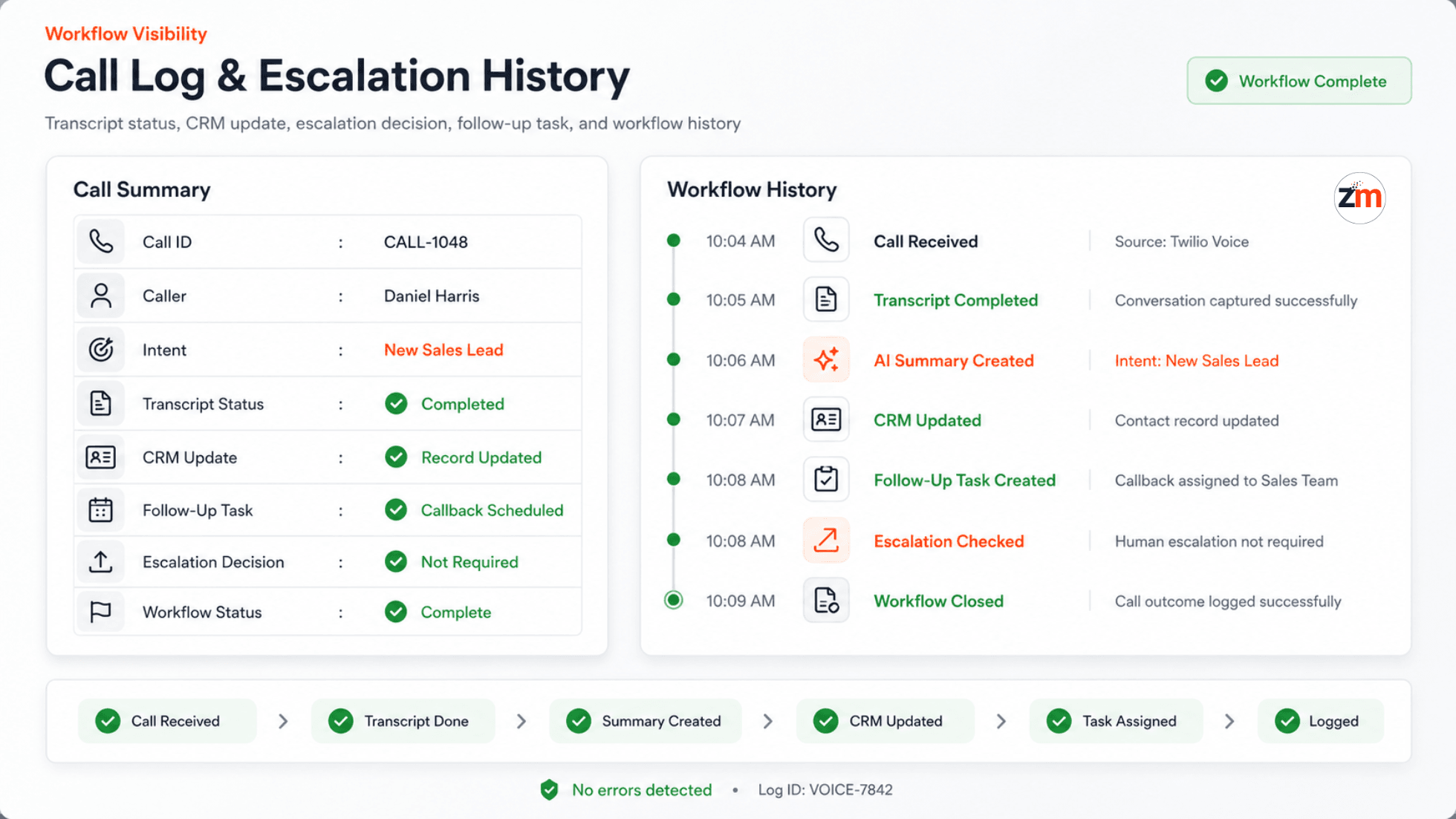
Call Logs Made the Automation Inspectable
A voice agent becomes difficult to operate if the team cannot understand what happened during and after a call.
The implementation therefore retained operational context around each workflow, including:
- call timing,
- caller information,
- detected intent,
- structured fields,
- call summary,
- CRM update status,
- follow-up task status,
- escalation status,
- notification status,
- and workflow errors.
This gave the team a way to inspect the path from conversation to action.
Instead of relying on the question "Did someone follow up?", a manager could see whether the call had been processed, whether the CRM action was completed, whether a task existed, who owned the next step, and whether anything in the workflow required attention.
Technology Choices and Why They Mattered
The stack was chosen around specific responsibilities rather than simply combining popular AI tools.
| Technology | Responsibility in the Workflow |
|---|---|
| Twilio Voice | Received inbound phone calls and provided the telephony event layer. |
| ElevenLabs Conversational AI | Provided the natural conversational voice experience for routine caller interaction. |
| OpenAI/GPT APIs | Interpreted conversation context, detected intent, extracted structured fields, summarized calls, and prepared recommended next actions. |
| FastAPI | Acted as the application and webhook control layer for validation, routing rules, CRM operations, transcript processing, escalation logic, and workflow state. |
| Client CRM | Stored contact context, call summaries, follow-up tasks, ownership, and outcomes. |
| Slack and Email | Alerted team members when a call required human attention or follow-up. |
| Workflow and Database Logs | Provided visibility into processing status, CRM actions, escalation, notifications, and errors. |
The FastAPI layer was particularly important because the project involved much more than conversational AI. Telephony events, model output, validation, routing, external APIs, CRM state, escalation, and observability all needed to operate as one system.
For similar production systems, our FastAPI development services focus on using the backend as a dependable application layer around AI and third-party integrations.
The same principle applies more broadly to our AI development services: the model is only one part of the product. The surrounding software determines whether the AI can be trusted inside a real workflow.
Why This Was More Than a Traditional IVR
A traditional IVR works well when the available choices can be reduced to a small predefined menu such as "press 1 for sales" or "press 2 for support."
This workflow needed to understand callers who described their needs naturally.
A person could explain that they had spoken to someone previously, were interested in a specific service, had a preferred callback time, or were frustrated about an unresolved issue without first translating that situation into a menu option.
The AI layer made that natural-language interpretation possible.
The backend then converted the interpreted context into controlled operational actions.
That combination of conversational understanding and deterministic workflow execution is what made the system different from simply replacing one IVR menu with another.
Measured Results From the Tested Workflow
The implementation was tested against the operational call flows it was designed to handle. The figures below describe this project and should not be treated as guaranteed results for unrelated businesses or call environments.
| Observed Area | Result | Why It Mattered |
|---|---|---|
| Structured routine call handling | Approximately 70-80% of standard calls | A large share of repeatable intake could move through the structured workflow while exceptions remained available for human handling. |
| Manual post-call note-taking | Reduced by around 60-70% | The team received structured summaries and extracted context instead of recreating the conversation manually. |
| CRM follow-up task creation | Approximately 1-2 minutes after the call | Call outcomes could become owned follow-up actions quickly rather than waiting for later administrative work. |
The workflow also improved consistency around call logging, escalation, CRM context, and follow-up ownership.
It did not replace the sales or support team.
It reduced the repetitive work between a conversation and the next business action so the team could spend more attention on calls that actually needed a person.
Client Perspective
The AI voice workflow helped us stop losing context from inbound calls. Instead of manually listening back to conversations and creating follow-up tasks later, our team started receiving structured call summaries, CRM updates, and clear next actions after each call.
The client's name is not published on this case study. The feedback is included because it describes the operational change the project was intended to create: phone conversations became structured, visible, and actionable workflows rather than isolated interactions.
Engineering Decisions That Made the Workflow Practical
This project reinforced several principles that matter when AI is connected to live business operations.
Conversation and business logic should not be the same layer
AI was useful for interpreting how people naturally speak. FastAPI and application rules remained responsible for turning that interpretation into controlled system actions.
Human escalation should be designed from the beginning
Handoff was not treated as an exception to an otherwise autonomous architecture. It was part of the normal system design because some conversations genuinely require people.
Structured output is more useful than transcription alone
A transcript preserves what was said. Structured fields make the conversation usable by CRM workflows, routing rules, notifications, and reporting.
Automation needs observability
Call status, CRM actions, escalation state, notifications, and errors needed to remain visible so the workflow could be operated and reviewed after deployment.
The value appears after the conversation
The most useful result was not that an AI could speak on the phone. It was that the conversation could reliably become an owned CRM action with context and a defined next step.
Where This Type of AI Voice Automation Fits Best
An AI voice agent is most useful when a meaningful portion of inbound conversations follow repeatable patterns but still arrive in natural language.
Examples include:
- new lead intake and qualification,
- appointment and callback requests,
- service inquiries,
- routine customer support triage,
- after-hours or overflow call handling,
- call routing based on intent,
- CRM data capture,
- and structured post-call follow-up.
It is a weaker fit when every conversation requires specialist judgment, call volume is too low to justify the operational change, or the underlying CRM and follow-up process is not defined well enough for automation to act on it reliably.
For teams still deciding what should and should not be automated, our AI workflow automation guide explains how to evaluate workflows, integration points, human review, and implementation boundaries before development begins.
Our AI voice receptionist guide also explores how conversational voice systems differ from traditional call handling and where they can fit into business operations.
Frequently Asked Questions
What is AI voice agent automation?
AI voice agent automation combines telephony, conversational voice AI, language understanding, APIs, backend application logic, and business system integrations to turn phone conversations into structured actions such as CRM updates, follow-up tasks, routing decisions, or human escalation.
Can an AI voice agent update a CRM automatically?
Yes, but the architecture matters. In this implementation, conversation data was interpreted by the AI layer and then passed through FastAPI validation and workflow logic before CRM actions were performed. This kept business system operations under application control rather than treating raw model output as a direct CRM instruction.
Which technologies were used in this AI voice agent workflow?
The system used Twilio Voice for telephony, ElevenLabs Conversational AI for voice interaction, OpenAI/GPT APIs for language understanding and structured extraction, FastAPI for backend validation and orchestration, a client CRM for contacts and follow-up actions, and Slack and email for human notifications.
How did the AI voice agent hand a call to a human?
Human escalation could be triggered when the caller requested a person, the situation was urgent or sensitive, the call represented a high-value opportunity, AI confidence was low, or required information was incomplete. Depending on the workflow, the system could support a handoff, create a priority callback, and notify the appropriate team with the available call context.
Did the AI voice agent replace the client's sales or support team?
No. The system handled repeatable intake and post-call structuring while humans remained responsible for conversations that required judgment, empathy, direct ownership, or escalation.
What was the main business benefit of the workflow?
The main benefit was reducing the operational gap between a phone conversation and the next business action. Routine call details became structured more consistently, manual note-taking decreased, CRM follow-up tasks were created faster, and ownership became easier to track.
How is an AI voice agent different from a traditional IVR?
A traditional IVR usually depends on predefined menu choices. An AI voice agent can interpret natural language, allowing callers to explain what they need conversationally. Application logic can then use the interpreted context to route the call, update business systems, create follow-up actions, or involve a human.
Can this type of AI voice agent work with an existing CRM?
Yes, provided the CRM exposes the APIs or integration capabilities required for the workflow. The exact architecture depends on the CRM, existing data model, authentication requirements, routing rules, and the actions that should happen after each type of call.
Considering AI Voice Automation for Your Call Workflow?
Start with the workflow, not the voice model.
Tell us what kinds of calls your team receives, what information staff currently capture, what happens after each call, which CRM or operational system you use, and where follow-up tends to slow down or break.
We can help you determine which parts are suitable for AI-assisted automation, which decisions should remain deterministic, where human handoff belongs, and what the production architecture would need to support.
Discuss Your AI Voice Automation Workflow
You can also explore our AI workflow automation services, AI development services, or review more implementation work in our case studies.
Table of Contents
- Project Snapshot
- The Operational Problem Was After the Call
- Before Automation: A Conversation Still Created Manual Work
- The Engineering Challenge
- What Was Built
- How the AI Voice Agent Architecture Worked
- Where AI Was Used and Where Software Stayed in Control
- What Happened After a Caller Dialed the Number
- Example: From Conversation to Structured CRM Context
- Turning a Call into an Owned CRM Follow-Up
- Human Handoff and Escalation
- Failure Handling and Exception Paths
- Call Logs and Workflow Visibility
- Technology Choices and Why They Mattered
- Why This Was More Than a Traditional IVR
- Measured Results From the Tested Workflow
- Client Perspective
- Engineering Decisions That Made the Workflow Practical
- Where This Type of AI Voice Automation Fits Best
- Frequently Asked Questions
- Considering AI Voice Automation for Your Call Workflow?
Before You Scale Further, Review the Architecture.
Let’s evaluate where your system stands — and where it may break under growth.
Schedule an Architecture Review 30-minute technical discussion. No obligation.