
Best AI Automation Tools in 2026: How to Choose the Right Platform
AI automation in 2026 is no longer about connecting apps and hoping workflows hold together. It is about automating decisions, judgment, and context-aware actions across messy, real-world systems.
The tool you choose today can either help your team scale calmly or create quiet friction that becomes expensive later. This guide explains how to compare AI automation tools based on real business workflows, not just feature checklists.
Before choosing between n8n, Make, GoHighLevel, Zapier, or a custom automation stack, first understand your workflow complexity, data sensitivity, integration depth, human-review needs, and long-term scalability. That simple clarity can save months of rework later.

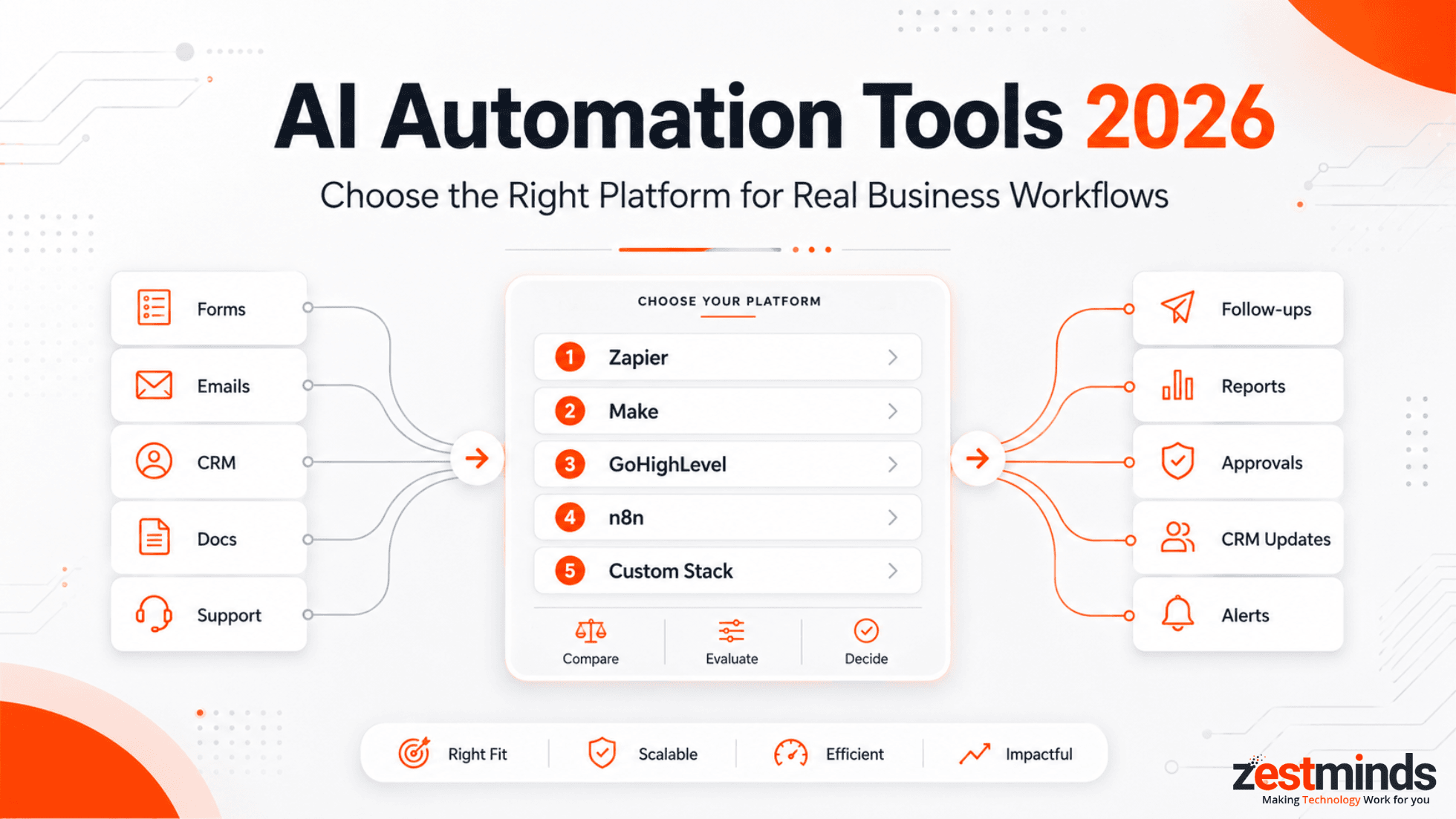
Quick Answer: Best AI Automation Tools in 2026 by Use Case
There is no single best AI automation tool for every business. The right platform depends on what you are trying to automate, how much control you need, and how important reliability, data ownership, and human review are to the workflow.
| Use Case | Best-Fit Tools | Why It Fits |
|---|---|---|
| Simple app automation | Zapier, Make | Good for quick trigger-and-action workflows across common SaaS apps. |
| Visual multi-step workflows | Make | Useful when teams need a visual builder for structured, predictable workflows. |
| AI-heavy workflow orchestration | n8n, Pipedream, Composio | Better when workflows need API control, branching logic, and custom AI steps. |
| CRM and sales automation | GoHighLevel, HubSpot, Zapier | Best when lead capture, follow-ups, appointment booking, and pipeline actions are central. |
| Agentic task automation | Lindy, Gumloop, Relevance AI | Useful for AI agent workflows where the system performs multi-step tasks with prompts and tools. |
| Enterprise automation | Workato, UiPath | Stronger fit where governance, large-scale integrations, and enterprise controls matter. |
| AI product or internal platform automation | n8n, Vellum, custom stack | Better when automation becomes part of the product, backend, or internal operating system. |
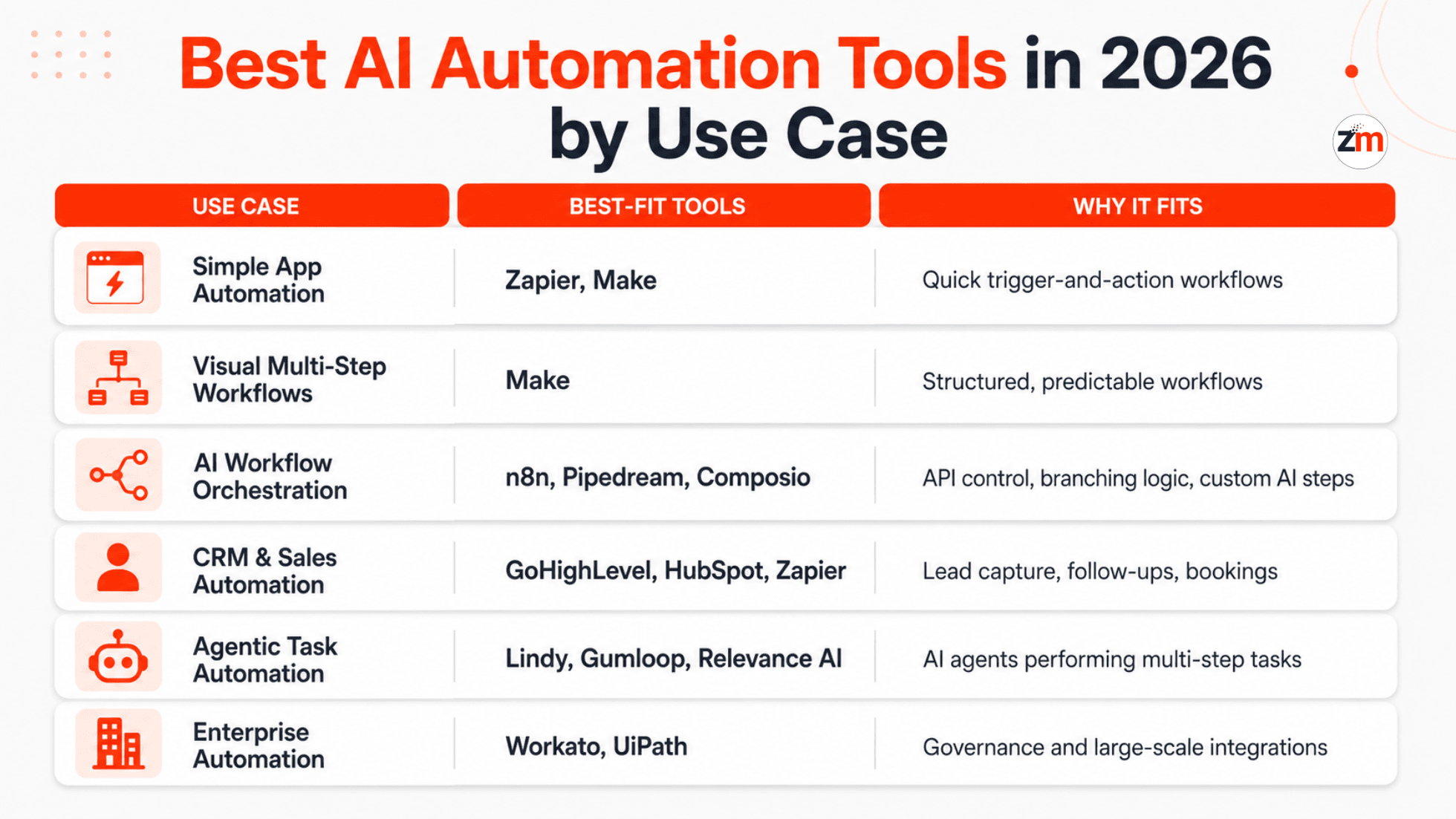
For many growing teams, the safest answer is not “one tool.” It is a practical stack where the automation tool handles execution, AI handles reasoning, custom logic handles edge cases, and humans review risky decisions.
What Changed in AI Automation Tools in 2026?
AI automation tools in 2026 are moving beyond basic “if this happens, do that” workflows. The stronger platforms now support more context, more flexible decision paths, and better control over how AI interacts with business systems.
The biggest shifts are:
- Agentic workflows: AI agents can now perform multi-step tasks using tools, prompts, APIs, and business rules.
- Human-in-the-loop controls: More teams are adding approval steps for low-confidence or high-risk AI decisions.
- Self-hosted and private workflows: Data-sensitive teams increasingly want control over where automation runs.
- Multi-model AI workflows: Businesses may use different AI models for classification, summarization, extraction, and decision support.
- Browser and desktop automation: Some tools now automate tasks across apps that do not have clean APIs.
- Governance and auditability: Teams want logs, error handling, access control, and clear explanations for automated decisions.
That is why choosing an AI automation tool in 2026 is not just a software decision. For many teams, it is a workflow architecture decision.
Why AI Automation in 2026 Is Different From Traditional Automation
Not long ago, automation was simple and predictable.
"If a lead fills a form → send an email."
"If an order is placed → update a spreadsheet."
That approach worked when businesses were smaller, data was structured, and edge cases were rare.
In 2026, that world does not exist anymore.
Today, most organizations deal with:
- Unstructured data like emails, chats, documents, voice notes, and support tickets
- Multiple tools that do not share the same source of truth
- Customers who expect faster and more personalized responses
- Teams that need better visibility into errors, risks, and handoffs
- Increasing pressure around privacy, compliance, and auditability
Traditional automation tools were built to follow instructions.
AI automation tools are expected to understand situations.
That distinction is subtle, but critical.
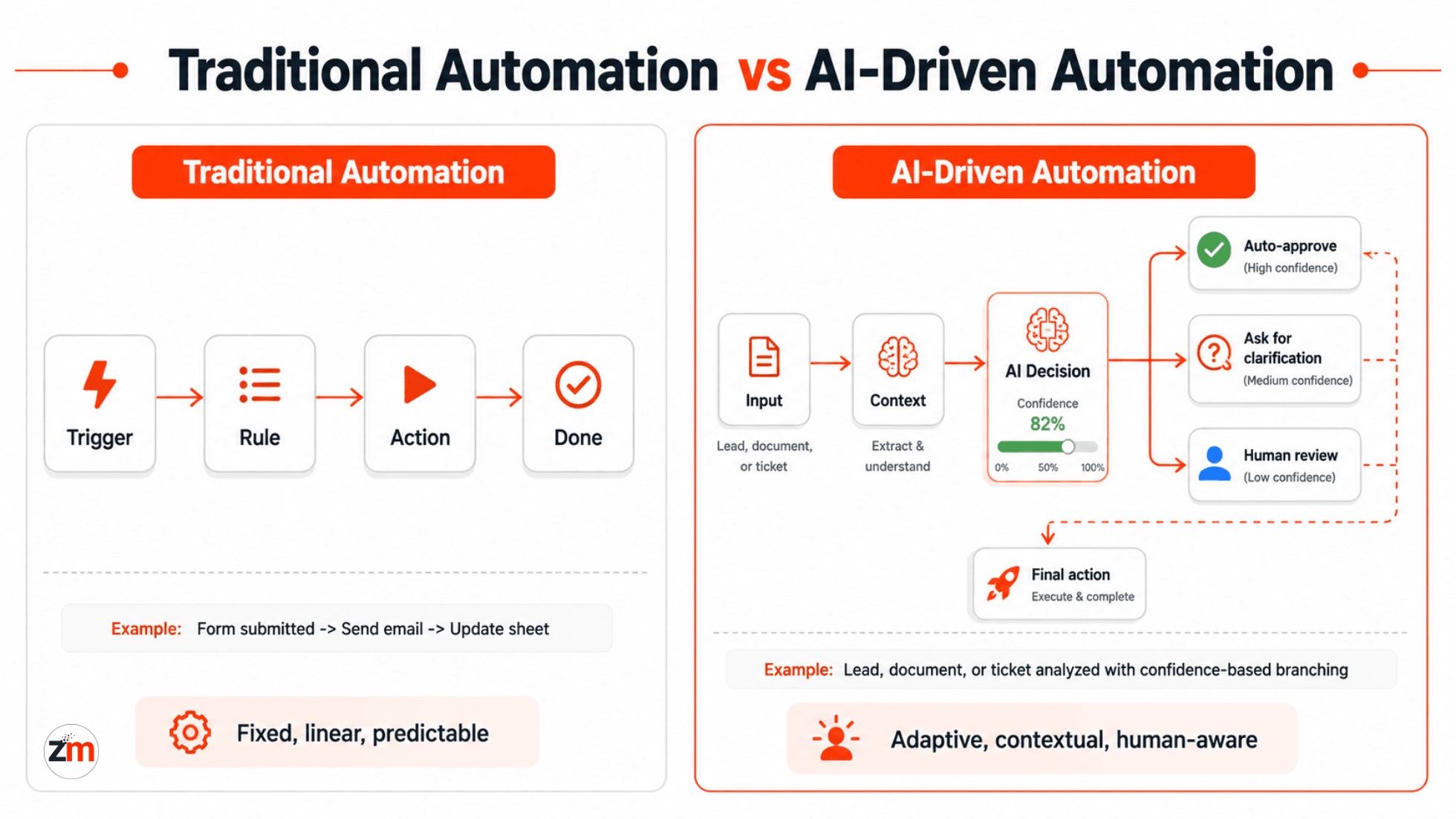
A traditional workflow behaves like a fixed railway track.
An AI-enabled workflow behaves more like a GPS, constantly recalculating based on context, data, and exceptions.
This is why many teams feel uneasy about their current setups:
- "Our automations technically work, but they do not feel smart."
- "We still need humans to step in far too often."
- "Every unusual scenario breaks the flow."
- "We cannot clearly explain why the automation made a certain decision."
The issue is not automation itself.
It is that many tools were never designed for decision-heavy, AI-assisted workflows.
Many teams discover this gap when they move from simple task automation to AI automation for real business processes that must handle exceptions, judgment, and cross-system context. This is where a broader AI automation for business processes strategy becomes more useful than isolated tool setup.
That shift defines AI automation in 2026.
What Is an AI Workflow Automation Platform?
An AI workflow automation platform connects apps, APIs, data, and AI models so businesses can automate multi-step processes with logic, context, and human review.
A basic automation tool may move data from one app to another. An AI workflow automation platform can classify information, summarize content, route decisions, trigger follow-ups, call APIs, and pause for review when confidence is low.
A practical AI workflow automation platform should help with:
- Moving data between CRMs, SaaS tools, databases, and internal systems
- Calling AI models for classification, extraction, summarization, or recommendations
- Applying business rules before actions are taken
- Handling failures, retries, and exceptions
- Adding human approval when risk or uncertainty is high
- Keeping enough logs to understand what happened and why
For teams building serious operational workflows, AI workflow automation services often start with mapping the process before choosing the tool. Without that map, even a powerful platform can become messy.
What Makes an Automation Tool Truly AI-Ready?
Not every platform that connects to an AI API is AI-ready.
In practice, an AI-ready automation tool must support how AI actually behaves in production, not just how it looks in demos.
There are five capabilities that separate modern platforms from legacy automation tools.
1. Context Handling
AI systems do not work well in isolation.
They rely on context, often spread across systems and time.
That context may include:
- Past customer interactions
- Business rules and policies
- Historical decisions
- CRM, ERP, LMS, or support desk data
- The current state of multiple tools
If your automation platform cannot reliably pass, store, and transform this context, AI outputs become inconsistent or misleading.
This is where many “simple” automation tools quietly fail.
2. Branching Based on Uncertainty
AI outputs are probabilistic, not absolute.
An AI-ready workflow must handle:
- Confidence scores
- Fallback logic
- Clarification requests
- Human review when needed
A realistic example looks like this:
- Confidence > 90% → auto-approve
- Confidence 60–90% → request clarification
- Confidence < 60% → route to a human
If your tool forces every decision into a yes/no path, it is not built for serious AI-driven logic.
3. Long-Running Workflows
Many AI-driven processes do not finish in seconds.
Think about:
- Multi-step sales follow-ups
- Compliance reviews
- Document analysis across departments
- Customer onboarding flows
- Internal approval processes
These workflows may span hours or days. Your automation platform must support retries, delays, state persistence, and recovery without breaking silently.
This is why modern platforms increasingly move toward event-driven, stateful models aligned with reliability practices described in resources such as the Google Cloud Well-Architected Framework reliability pillar.
Stateless automation struggles here, and the failure is often invisible until something goes wrong.
4. Data Ownership and Control
As AI touches sensitive business and customer data, practical questions surface.
Teams need to ask:
- Where is this data stored?
- Who can access it?
- Can parts of this workflow run inside private infrastructure?
- Can logs be reviewed later?
- Can sensitive data be masked, filtered, or restricted?
In 2026, these are not edge concerns, especially for regulated industries and global businesses.
5. Integration Depth, Not Just Quantity
Hundreds of integrations look impressive on a pricing page.
In reality, AI workflows often require:
- Payload restructuring
- Conditional logic
- Custom API behavior
- Error handling
- Validation before execution
- Different actions based on confidence level or business risk
Shallow integrations create fragile automations that break under real-world conditions.
An AI-ready tool prioritizes depth and flexibility, not just logos.
In short: an AI-ready automation platform must manage context, uncertainty, long-running state, and data control together. Anything less will eventually cap how far AI can be trusted in real operations.
AI-Readiness Checklist for 2026:
- Context Persistence: Can the system carry memory across steps and time?
- Uncertainty Handling: Does it support confidence thresholds and fallbacks?
- Stateful Execution: Can workflows pause, resume, retry, and recover?
- Data Control and Deployment Options: Is self-hosting or private execution possible?
- Deep Integration Logic: Can payloads be transformed, validated, and rerouted?
- Observability: Can your team see what happened when something fails?
Helpful next step: If you are already comparing tools, map the workflow first. A workflow map should show the trigger, data source, AI decision point, fallback path, human-review step, final action, and error recovery path.
Best AI Automation Tools in 2026: Use-Case Based Comparison
Instead of ranking tools from best to worst, it is more useful to understand where each tool fits.
Different platforms solve different problems, and choosing the wrong one usually fails slowly, not instantly.
| Tool | Best For | AI Control | Technical Ownership | Risk at Scale |
|---|---|---|---|---|
| n8n | AI-heavy operations, compliance workflows, internal systems, custom API logic | High | Medium to high | Low when owned and maintained properly |
| Make | Structured multi-app workflows, marketing ops, ecommerce ops, data sync | Medium | Low to medium | Medium due to cost, volume, and logic limits |
| GoHighLevel | CRM automation, sales follow-ups, appointment booking, agency workflows | Low to medium | Low to medium | Medium due to platform lock-in |
| Zapier | Simple app automation and low-risk task workflows | Low | Low | High when workflows become complex |
| Gumloop | AI-native task flows and agentic workflows | Medium | Low to medium | Depends on workflow complexity and governance needs |
| Lindy | AI assistant-style task automation and operational agents | Medium | Low to medium | Medium when business rules become complex |
| Workato | Enterprise workflow automation and governed integrations | Medium to high | Medium | Lower for enterprise teams with proper governance |
| UiPath | Enterprise RPA, document workflows, and legacy process automation | Medium | Medium to high | Depends on process design and maintenance |
| Pipedream / Composio | Developer-friendly automation, API orchestration, and AI tool integrations | High | Medium to high | Lower when engineering ownership is available |
| Vellum | AI product workflows, prompt orchestration, and model evaluation | High | Medium to high | Lower for product teams managing AI workflows carefully |
This wider landscape matters because AI automation in 2026 is not limited to one category. Some tools are better for business users, some for technical teams, and some for enterprise process automation.
In practical implementation projects, the most common stack decisions usually sit around n8n, Make, GoHighLevel, custom APIs, AI model integration, and backend orchestration.
n8n: When Control and Intelligence Matter
n8n is best thought of as an automation framework, not just an automation tool.
It performs best when:
- Workflows are complex
- Logic is not linear
- AI plays an active role in decision-making
- APIs, databases, CRMs, and internal systems need to work together
- Self-hosting, auditability, or data control matters
Common use cases include:
- AI-based lead qualification
- Multi-step document processing
- Internal operational tooling
- Compliance-heavy automation flows
- AI support triage and escalation workflows
Key strengths:
- Self-hosted or cloud deployment
- Deep control over workflow logic
- Strong fit for custom APIs and AI model integrations
- Better flexibility for technical teams
Practical limitations:
- Requires technical ownership
- Less friendly for non-technical teams without support
- Needs careful monitoring when workflows become business-critical
n8n is a strong fit when automation is part of how your business operates, not just a convenience layer. For deeper implementation support, explore n8n AI workflow automation services.
Make: When Visual Scale Is Key
Make sits in the middle ground between simplicity and power.
It works well when:
- Workflows are structured but non-trivial
- Teams value visual clarity
- AI is used for enrichment rather than full orchestration
- The process has clear triggers, actions, and predictable branches
Typical scenarios include:
- Marketing operations
- Ecommerce automation
- Data synchronization with AI enrichment
- Multi-app operational workflows
- CRM updates, notifications, and reporting workflows
Strengths teams appreciate:
- Visual scenario builder
- Robust error handling for many common workflows
- Faster onboarding than more technical platforms
- Good fit for teams validating processes before custom development
Trade-offs to consider:
- Costs can increase with volume
- Less flexibility for deep custom logic
- Limited control over underlying infrastructure
- Complex scenarios can become difficult to maintain without clear structure
Make is ideal when you want capability without heavy engineering overhead. It is often a practical first step before investing in custom automation architecture. For implementation support, review Make.com AI workflow automation services.
GoHighLevel: When CRM and Sales Automation Are the Core
GoHighLevel is not a general-purpose automation platform.
It is better understood as a business operating system for sales-driven teams.
It excels when:
- CRM is central to operations
- Automation directly supports sales and marketing
- Speed matters more than deep customization
- Follow-ups, appointments, missed calls, and lead nurturing are the main problems
Common use cases include:
- AI receptionists
- Lead nurturing sequences
- Appointment booking
- Pipeline follow-ups
- Missed-call text back workflows
- Agency white-label offerings
Strengths:
- All-in-one CRM and automation platform
- Fast deployment
- Strong fit for agencies and local businesses
- Useful for revenue response and appointment-focused workflows
Limitations:
- Less flexible outside CRM-centric workflows
- AI logic is constrained to platform patterns
- Not ideal for deep backend orchestration or compliance-heavy infrastructure
This is why platforms like GoHighLevel are often chosen for AI voice receptionists and front-line automation, where speed, consistency, and sales responsiveness matter more than deep infrastructure control.
GoHighLevel works best when automation is revenue-facing, not infrastructure-facing. For CRM automation setup, explore GoHighLevel integration services.
Zapier: When Simplicity Is the Priority
Zapier still has a role, but a narrower one than before.
It is best suited for:
- Simple task automation
- Non-technical teams
- Low-risk, low-complexity workflows
- Quick app-to-app triggers
It struggles when:
- AI decisions become nuanced
- Scale increases
- Workflow state matters
- There are many edge cases
- Audit trails, private data handling, or custom logic become important
In 2026, Zapier is often a starting point, not the final architecture.
Quick comparison recap: Zapier optimizes for simplicity, Make for structured scale, GoHighLevel for revenue workflows, and n8n for deep AI-driven control.
Related Zestminds services: If your automation needs are moving beyond simple workflows, these service pages may help you choose the right implementation path.
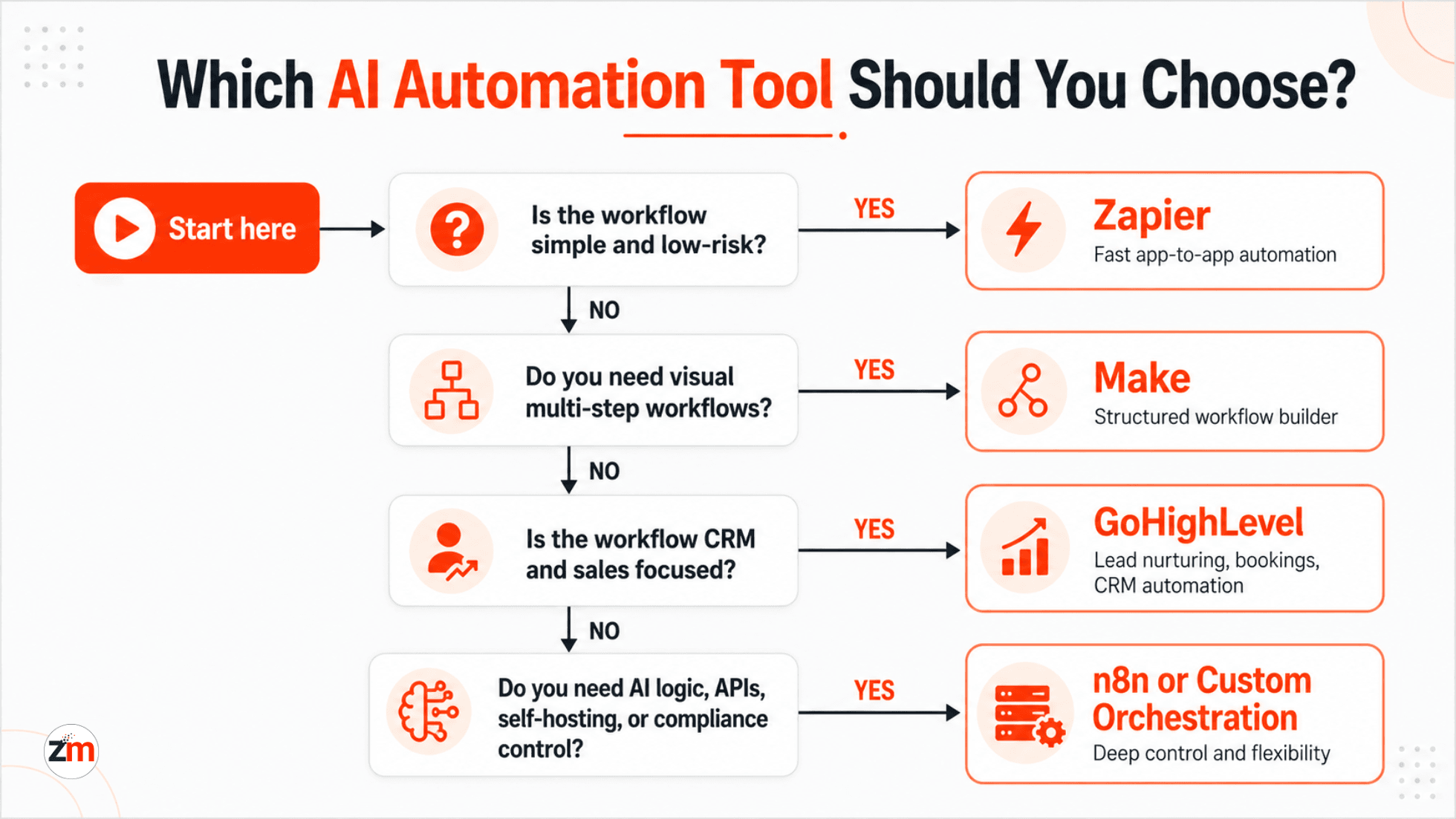
n8n vs Make vs GoHighLevel vs Zapier: Which One Fits Your Business?
Choosing the wrong tool rarely causes immediate failure.
Instead, it creates friction, workarounds, and hidden operational costs over time.
| Scenario | Best Fit | Why |
|---|---|---|
| Simple app-to-app task automation | Zapier | Fast setup and low learning curve. |
| Structured operational workflows | Make | Good visual builder and practical multi-step workflow control. |
| Sales, CRM, and appointment workflows | GoHighLevel | Built around lead capture, follow-ups, pipelines, and sales actions. |
| Complex AI decision flows | n8n | Better control over APIs, branching, custom logic, and deployment. |
| Compliance-heavy workflows | n8n or custom orchestration | More control over data, audit trails, and human review. |
| AI automation inside a SaaS product | n8n plus custom backend | Useful when automation becomes part of the product architecture. |
| Enterprise process automation | Workato or UiPath | Better fit for governance, process standardization, and enterprise scale. |
If You Are a Startup Founder
Focus on two things:
- Today’s complexity
- Tomorrow’s ambition
If speed and sales automation matter most, GoHighLevel may be enough.
If AI-powered operations are core to your product, n8n or a custom orchestration layer is safer.
If you are validating processes quickly, Make can be a practical starting point.
Avoid over-engineering early, but do not lock yourself into a platform that cannot grow with you. If the automation is part of a product roadmap, connect the decision with your broader SaaS product development strategy.
If You Are a CTO or Tech Lead
Ask yourself one question:
"Where does intelligence live in our system?"
If AI is:
- Peripheral → Make may be sufficient
- Sales-facing → GoHighLevel may be enough
- Central to the workflow → n8n or custom orchestration is safer
- Part of a product experience → custom backend logic may be required
Many CTOs underestimate how quickly AI logic evolves. Flexibility becomes critical sooner than expected.
If You Run an Agency
Your priorities are usually:
- Reusability
- White-labeling
- Client isolation
- Repeatable delivery
- Clear support and maintenance
GoHighLevel works well for standardized offerings.
n8n supports more differentiated, high-value automation services.
In practice, many successful agencies use both, depending on the client tier.
If Compliance Matters
When auditability, data control, and self-hosting matter more than UX, SaaS-first tools often fall short.
In these environments, guidance from standards bodies such as the NIST AI Risk Management Framework can influence how AI automation systems are designed, monitored, and audited.
n8n, or a custom stack built around it, tends to perform better here.
This is where teams most often regret early tool decisions.
Common Business Use Cases for AI Automation Tools
AI automation tools are easiest to evaluate when you map them to business use cases instead of comparing them only by feature lists.
| Business Use Case | Common Workflow | Best-Fit Direction |
|---|---|---|
| Lead qualification | Lead captured → AI scores intent → CRM updates → sales team notified | GoHighLevel, n8n, or custom CRM automation |
| Document processing | Document uploaded → AI extracts data → human reviews low-confidence fields | n8n, UiPath, or custom AI document workflow |
| Customer support triage | Ticket received → AI categorizes → urgent cases escalate → response drafted | n8n, Make, or custom support automation |
| Sales follow-ups | CRM stage changes → AI creates message → follow-up sequence starts | GoHighLevel, HubSpot, Make |
| Internal reporting | Data collected → AI summarizes → report shared with stakeholders | Make, n8n, custom reporting automation |
| Compliance review | Data checked → AI flags risk → reviewer approves → audit log saved | n8n or custom orchestration |
| Ecommerce operations | Order, inventory, support, and marketing data sync across tools | Make, n8n, or custom API automation |
If the use case touches multiple departments, sensitive data, or customer-facing decisions, it should be treated as a business process automation problem rather than a quick tool setup.
When Automation Tools Are Not Enough
There is a pattern we see repeatedly across growing organizations.
Phase 1: "Automation saved us time."
Phase 2: "Automation created edge cases."
Phase 3: "Automation is now limiting us."
This usually happens when:
- AI decisions become business-critical
- Workflows span multiple systems
- Compliance and audit requirements increase
- Reliability and explainability matter
- Workflow errors can affect revenue, customers, or operations
At this stage, tools alone are not enough.
The answer is not abandoning automation tools. It is re-architecting how they are used.
Common warning signs include:
- Frequent manual overrides
- Increasingly complex workarounds
- Growing operational risk
- Difficulty explaining why systems behave the way they do
- No clear owner for workflow failures
- Too many critical automations living inside one person’s account
We see this clearly in regulated environments, where a HIPAA-compliant AI system case study shows why self-hosting, audit trails, and explainable automation matter when off-the-shelf tools cannot support the required level of control.
This is when teams move toward custom AI orchestration, placing tools inside a broader, more resilient architecture.
For these situations, AI development services may be needed alongside automation tools, especially when custom AI logic, model integration, APIs, or secure backend workflows are involved.
How to Choose an AI Automation Provider, Not Just a Tool
A tool can execute a workflow, but a provider should help you design the right workflow.
That difference matters when automation touches customer experience, revenue, compliance, internal operations, or product functionality.
Before choosing an AI automation provider, ask:
- Do they map the workflow before recommending a tool?
- Can they integrate with your CRM, ERP, SaaS tools, databases, and internal APIs?
- Can they handle custom logic when no-code tools hit limits?
- Can they design fallback paths and human-review steps?
- Can they support security, access control, audit logs, and compliance needs?
- Can they maintain and improve the workflow after launch?
- Can they explain total cost beyond tool subscription pricing?
For simple automations, tool setup may be enough.
For AI workflows that make decisions, move sensitive data, or affect customers, provider experience matters more.
Practical rule: If an automation only saves time, a tool may be enough. If it affects revenue, risk, compliance, or customer experience, treat it as architecture.
Choosing the Right AI Automation Strategy for 2026
The most useful question is not:
"Which tool is best?"
It is:
"What role should automation play in our business?"
A practical strategy often looks like this:
- Tools handle execution
- AI handles reasoning
- Custom logic handles orchestration
- Humans supervise exceptions
In a mature setup, each layer has a clear job:
| Layer | Role | Example |
|---|---|---|
| Apps, CRM, ERP, SaaS tools | Store and execute business actions | HubSpot, GoHighLevel, Shopify, Monday, Odoo |
| Automation platform | Moves data and triggers workflows | n8n, Make, Zapier, Workato |
| AI model | Classifies, summarizes, extracts, recommends, or drafts | OpenAI, Claude, Gemini, custom models |
| Custom logic | Handles validation, rules, exceptions, and fallback paths | FastAPI, Node.js, Laravel, custom backend services |
| Human review | Approves risky, low-confidence, or sensitive decisions | Operations team, compliance reviewer, sales manager |
| Monitoring and logs | Shows what happened, where it failed, and what needs review | Dashboards, alerts, audit trails, workflow logs |
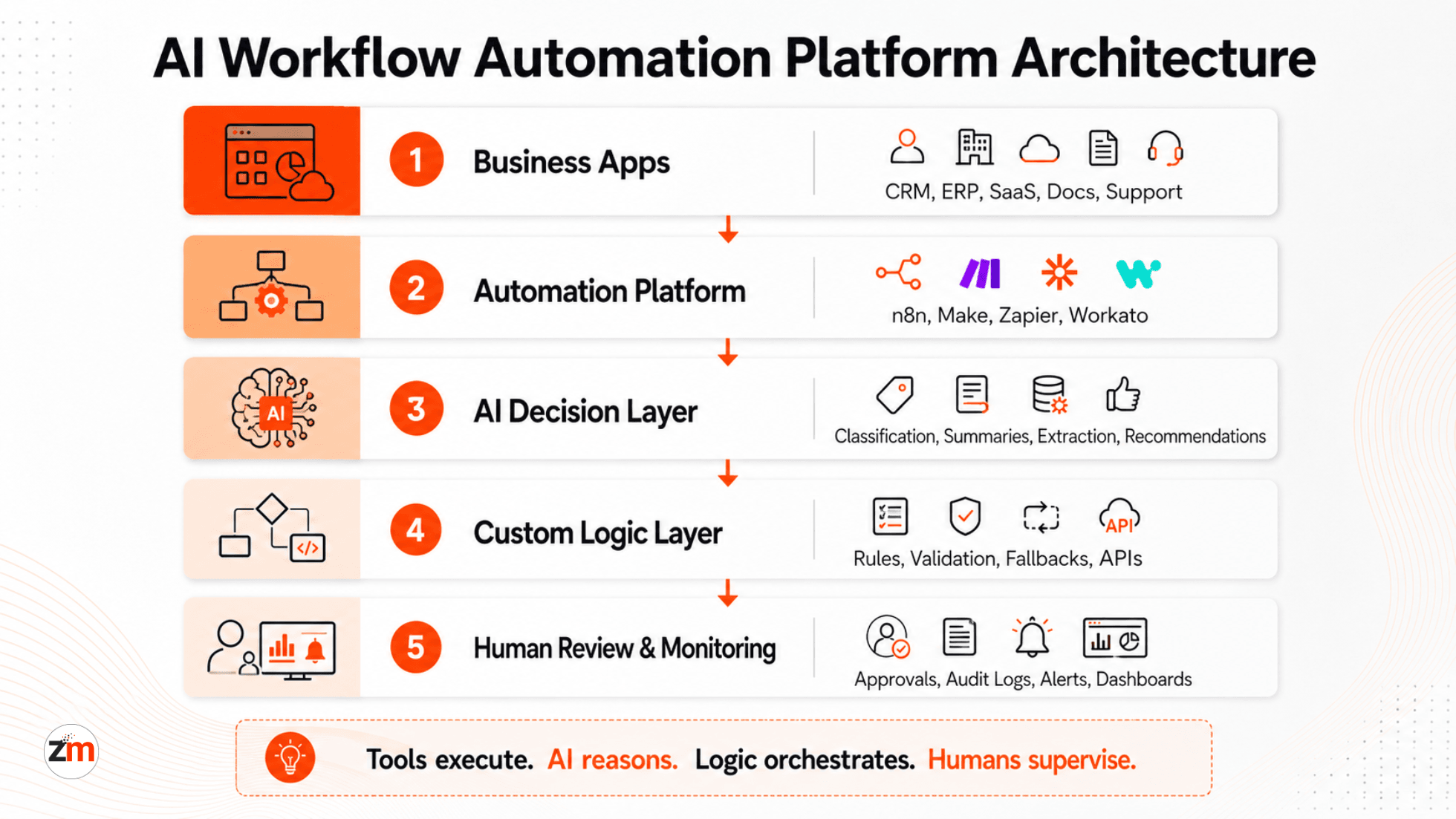
This hybrid approach scales better and reduces long-term risk.
Most businesses do not need more tools.
They need clear automation architecture.
That clarity is what separates automation that helps from automation that quietly holds teams back.
One Practical Next Step
If you are unsure whether your current automation setup will scale into 2026, a structured review is often the safest move.
Not a generic sales call.
A useful AI automation stack review should look at your workflow, tools, integrations, data flow, AI decision points, fallback paths, risks, and maintenance needs.
A practical review should answer:
- Which workflow should be automated first?
- Is n8n, Make, GoHighLevel, Zapier, or a custom stack the better fit?
- Where should AI make decisions, and where should humans review?
- What systems need to be integrated?
- What data should not leave your infrastructure?
- Where can automation fail silently?
- What will the workflow cost to run and maintain over time?
That clarity alone can save months of rework and prevent expensive missteps.
Need a second technical opinion? Zestminds can review your current workflow, compare tool options, and suggest whether no-code, low-code, n8n, Make, GoHighLevel, or custom AI orchestration is the safer path for your business.
Start with AI workflow automation services or contact the team when you are ready to discuss your automation stack.
Frequently Asked Questions
What are the best AI automation tools in 2026?
The best AI automation tool depends on the workflow. Zapier is useful for simple app automation, Make works well for visual multi-step workflows, GoHighLevel fits CRM and sales automation, and n8n is stronger for custom, AI-heavy, or self-hosted workflows.
What is an AI workflow automation platform?
An AI workflow automation platform connects apps, APIs, data, and AI models so businesses can automate multi-step processes with logic, context, and human review. It is more advanced than basic trigger-and-action automation.
How do I choose the right AI automation tool for my business?
Start with your workflow complexity, data sensitivity, integration needs, AI decision logic, and long-term scale. A simple sales workflow may fit GoHighLevel or Make, while compliance-heavy or custom AI workflows may need n8n or custom orchestration.
Is n8n better than Make or Zapier for AI automation?
n8n is usually better for complex AI workflows, self-hosting, custom logic, and deeper API control. Make is easier for visual workflow building, while Zapier is best for simple, low-risk automations.
When should a business move beyond no-code automation tools?
Move beyond basic no-code tools when workflows need custom business logic, audit trails, human review, private data handling, error recovery, or AI decisions that directly affect customers, revenue, or compliance.
What changed in AI automation tools in 2026?
AI automation in 2026 is shifting from simple task automation to agentic workflows, AI-assisted decisions, browser automation, self-hosted options, human-in-the-loop controls, and stronger governance requirements.
Are AI automation tools safe for compliance-heavy workflows?
They can be, but only if the workflow supports data control, access permissions, audit logs, human review, and secure deployment. For healthcare, finance, legal, or enterprise workflows, tool choice should be reviewed carefully.
Do I need an AI automation provider or can I set up tools myself?
You can set up simple automations yourself. A provider becomes useful when workflows involve multiple systems, sensitive data, custom APIs, AI decision-making, compliance needs, or long-term maintenance.
Table of Contents
- Quick Answer: Best AI Automation Tools in 2026 by Use Case
- What Changed in AI Automation Tools in 2026?
- Why AI Automation in 2026 Is Different From Traditional Automation
- What Is an AI Workflow Automation Platform?
- What Makes an Automation Tool Truly AI-Ready?
- Best AI Automation Tools in 2026: Use-Case Based Comparison
- n8n vs Make vs GoHighLevel vs Zapier: Which One Fits Your Business?
- Common Business Use Cases for AI Automation Tools
- When Automation Tools Are Not Enough
- How to Choose an AI Automation Provider, Not Just a Tool
- Choosing the Right AI Automation Strategy for 2026
- One Practical Next Step
- Frequently Asked Questions
Shivam Sharma
Before You Scale Further, Review the Architecture.
Let’s evaluate where your system stands — and where it may break under growth.
Schedule an Architecture Review 30-minute technical discussion. No obligation.