
AI MVP Development Cost, Timeline & Tech Stack Guide for Startups
Thinking about building your own AI product but not sure where to start? This guide breaks down what it usually takes to launch a practical AI MVP, including realistic timelines, cost ranges, tech stack choices, build approaches, and proof from a real AI product project.

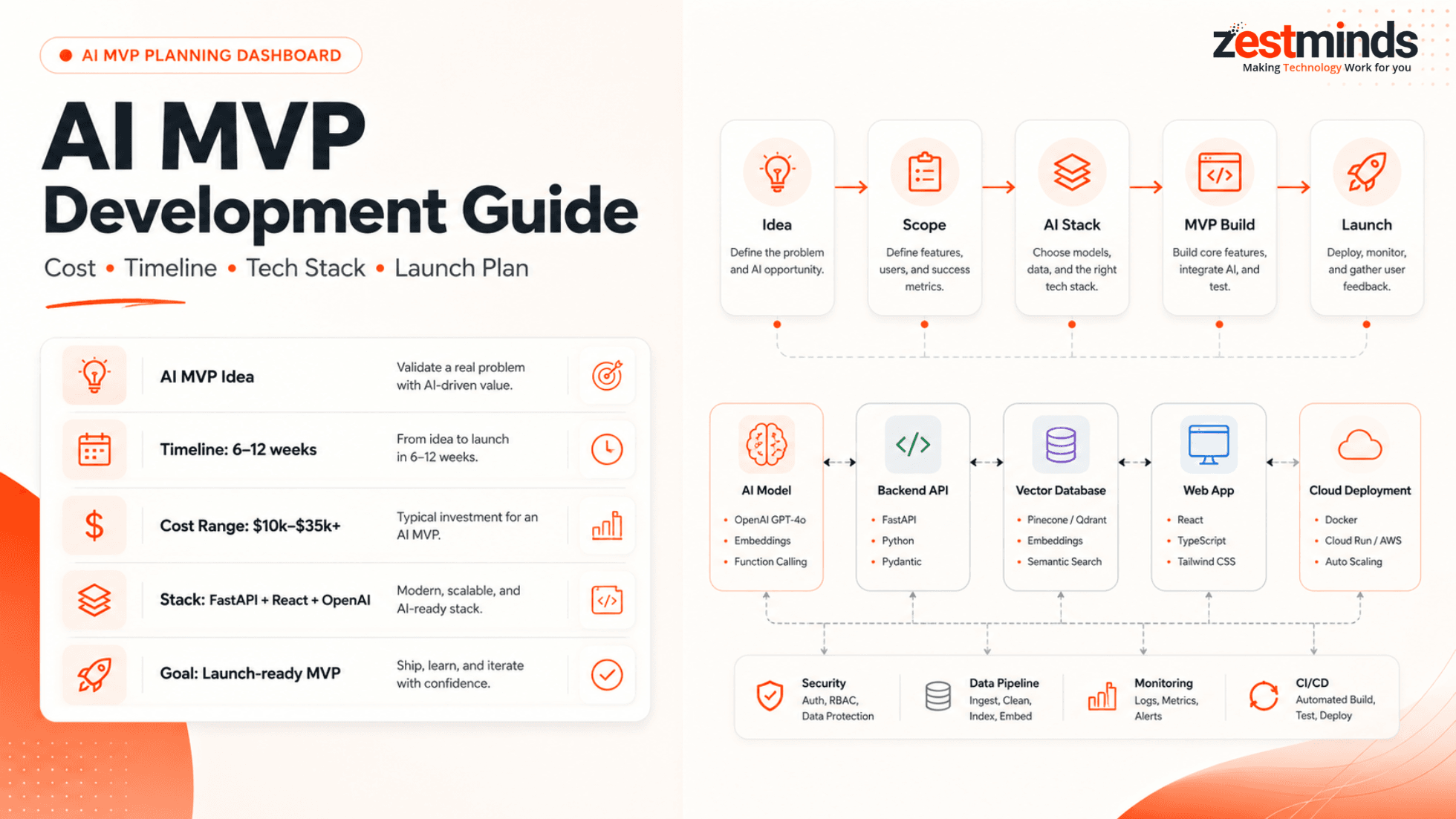
If you are a founder, product manager, or CTO exploring an AI product idea, the first big challenge is not just choosing a model. It is deciding what should go into version one, what should wait, how much budget to plan, and which technical route will help you launch without overbuilding.
Great AI ideas are everywhere. Useful AI products are harder. The difference usually comes down to clear scope, focused execution, good data planning, and a stack that supports learning fast without creating technical debt from day one.
This guide will help you understand the AI MVP development cost, timeline, tech stack, process, and practical trade-offs before you start building.
Quick answer:
- A simple AI prototype can take around 2–4 weeks.
- A usable AI MVP usually takes around 6–12 weeks.
- A lean AI MVP may start around $10,000–$35,000, depending on scope.
- RAG systems, SaaS features, third-party integrations, security needs, and regulated data can increase both cost and timeline.
- A practical AI MVP stack often includes FastAPI or Node.js, React or Next.js, PostgreSQL or Supabase, OpenAI or Claude, and a vector database such as Pinecone, Weaviate, or Chroma when document search is needed.
What Is an AI MVP?
An AI MVP is a focused first version of an AI-powered product that solves one clear user problem. It may use AI for chat, document search, workflow automation, recommendations, summarization, lead scoring, internal assistance, or data analysis.
An AI MVP is not a full product with every possible feature. It is also not just a static prototype with "AI" written on a screen. It should be usable enough for real users, internal teams, investors, or early customers to test the core value.
Think of it like building a bicycle with one gear instead of a Tesla. It still gets you from point A to point B. The goal is learning, not luxury.
Why Founders Choose AI MVPs
- Validate a risky product idea before spending heavily.
- Launch early and collect real usage feedback.
- Show investors or stakeholders a working product, not just wireframes.
- Understand whether AI improves the workflow or only adds noise.
- Build a cleaner roadmap based on user behavior instead of assumptions.
For example, if you want to build an AI hiring assistant, the MVP should not start with 20 dashboards, complex analytics, and a custom model. A better first version may compare resumes with job descriptions, explain candidate fit, and let recruiters provide feedback on the output.
AI MVP Development Timeline: From Idea to Launch
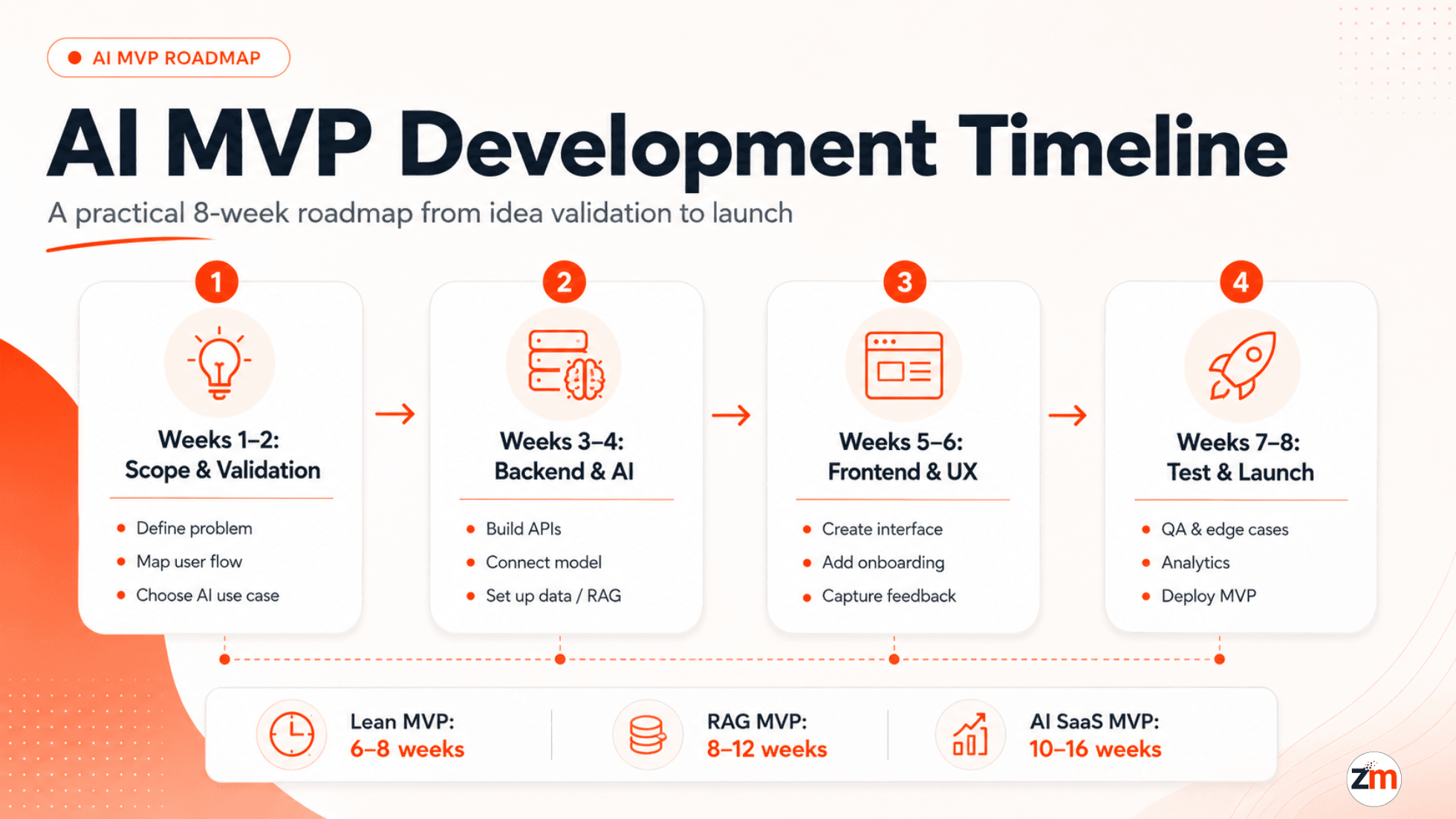
So how long does it take to go from idea to "It's live"?
For many startups, a focused AI MVP can be built in 6–12 weeks. A simple demo may be faster, while a secure AI SaaS product with integrations, user roles, payments, or RAG-based document search may need more time.
Here is a founder-friendly 8-week playbook you can use as a planning baseline.
Weeks 1–2: Sharpen the Idea
- Map the exact problem you are solving.
- Define the user journey, not just screens.
- Identify what AI should actually do in version one.
- Decide whether the MVP needs chat, search, summarization, automation, or recommendations.
- Choose the first AI model or API direction, such as OpenAI, Claude, Gemini, or an open-source model.
Example: Want to build an AI job coach? Start with one user goal: generate a tailored resume or interview plan from a LinkedIn profile and job description.
Weeks 3–4: Backend and AI Integration
- Build the API layer using FastAPI, Node.js, or another practical backend framework.
- Connect the AI model or LLM API.
- Store user activity, prompts, outputs, and feedback in a secure database.
- Add RAG or vector search if the AI needs to answer from documents or private knowledge.
- Set up basic guardrails so the AI output is more consistent and useful.
Weeks 5–6: Frontend and User Flow
- Create a simple product interface using React, Next.js, or Flutter.
- Build onboarding, core AI interaction, result screens, and feedback capture.
- Keep the UI simple enough for users to test the value quickly.
- Avoid adding advanced dashboards unless they are needed for the first learning cycle.
Weeks 7–8: Testing and Shipping
- Run tests with 5–10 early users or internal stakeholders.
- Check output quality, response speed, edge cases, and confusing user flows.
- Set up analytics and feedback capture.
- Deploy the MVP on a reliable cloud setup such as AWS, Vercel, Render, or similar infrastructure.
- Create a post-launch improvement list based on real usage.
By the end of Week 8, the goal is not to have a perfect product. The goal is to have a working AI product that real users can try, question, and improve.
Timeline by MVP Complexity
Not every AI MVP fits into the same timeline. A chatbot demo and a secure AI SaaS product are two very different builds.
| AI MVP Type | Typical Timeline | Best Fit |
|---|---|---|
| AI demo or prototype | 2–4 weeks | Pitch demos, internal validation, early concept testing |
| Lean AI MVP | 6–8 weeks | Focused startup MVP with one core AI workflow |
| RAG or document-based AI MVP | 8–12 weeks | Knowledge base assistants, document search, internal support tools |
| AI SaaS MVP | 10–16 weeks | User accounts, dashboards, billing, admin panel, analytics |
| Regulated or enterprise AI MVP | 12–20+ weeks | Healthcare, finance, compliance-sensitive, or complex integration-heavy products |
An 8-week AI MVP is realistic when the scope is focused, the first use case is clear, and the product does not require too many integrations or heavy compliance workflows in version one.
If you are still defining scope, our MVP development services page explains how we approach early product planning, feature prioritization, and launch-focused MVP delivery.
AI MVP Development Cost Breakdown
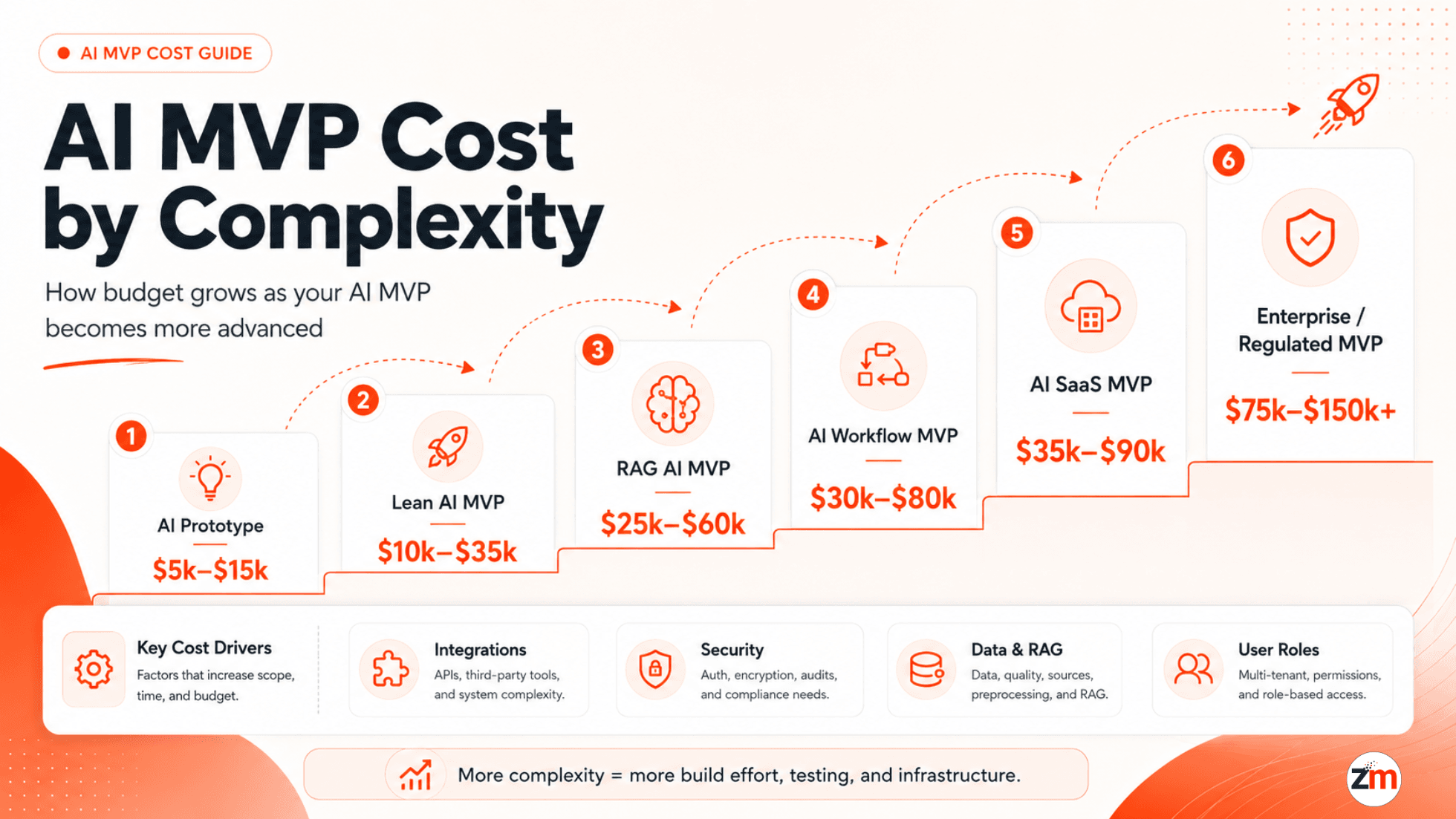
The question most founders ask first is simple: How much will this cost?
A lean AI MVP may fall around $10,000–$35,000 when the scope is focused and the build uses pre-trained models or AI APIs. More advanced AI products can cost more, especially when they include RAG, SaaS features, complex integrations, custom workflows, strict security, or regulated data handling.
AI MVP Cost by Complexity
| AI MVP Type | Estimated Cost Range | Common Use Case |
|---|---|---|
| Simple AI prototype | $5,000–$15,000 | Demo, proof of concept, pitch validation |
| Lean AI MVP | $10,000–$35,000 | Single core AI workflow with basic product UI |
| RAG or document AI MVP | $25,000–$60,000 | Knowledge base assistant, document search, internal AI support |
| AI workflow automation MVP | $30,000–$80,000 | AI connected with CRM, email, Slack, dashboards, or business tools |
| AI SaaS MVP | $35,000–$90,000 | Multi-user product with accounts, dashboard, billing, and admin features |
| Regulated or enterprise AI MVP | $75,000–$150,000+ | Security-heavy products in healthcare, finance, legal, or enterprise environments |
These ranges are planning estimates, not fixed quotes. The final cost depends on product scope, data readiness, integrations, user roles, model behavior, QA expectations, and launch requirements.
Cost Components
Whether you are building a healthcare assistant in the US, a SaaS product for Europe, or an internal AI workflow tool, understanding the cost structure early helps avoid painful surprises later.
| Area | Estimated Cost | What It Covers |
|---|---|---|
| Discovery and Strategy | $1,000–$3,000 | Use case validation, feature scope, roadmap, risk mapping |
| UI/UX Design | $1,500–$5,000 | User flows, wireframes, product screens, clickable prototype |
| Backend APIs and Database | $3,000–$10,000 | APIs, database schema, user data, business logic |
| AI Integration | $1,000–$8,000 | LLM API, prompt workflows, model response handling, guardrails |
| RAG and Vector Search | $5,000–$20,000 | Embeddings, document ingestion, vector database, retrieval logic |
| Frontend App | $2,000–$12,000 | Web app, dashboard, onboarding, AI interaction screens |
| Integrations | $3,000–$20,000 | CRM, Slack, Gmail, payment systems, third-party APIs, internal tools |
| Testing and QA | $1,500–$6,000 | Functional testing, AI output testing, edge cases, user testing |
| Infrastructure and Deployment | $1,000–$8,000 | Hosting, cloud setup, monitoring, storage, basic DevOps |
| Post-launch Support | $1,500–$10,000+ | Bug fixes, usage analysis, prompt improvements, feature iterations |
Use pre-trained models and AI APIs for early MVPs whenever possible. Training your own model too early can increase cost, complexity, and delivery risk before you even validate the product.
What Makes AI MVPs More Expensive?
AI MVP cost usually increases when the product needs more than a simple prompt-and-response flow. The cost is not only about the AI model. It is about the product, data, workflows, reliability, and security around the model.
- Data preparation: Cleaning, structuring, and importing data can take time, especially with documents, PDFs, CRM records, or internal knowledge bases.
- RAG and vector search: If the AI must answer from private documents, you may need embeddings, a vector database, retrieval logic, and quality testing.
- Third-party integrations: CRM, email, Slack, payment systems, calendars, internal tools, and analytics can increase scope.
- User roles and permissions: Admins, customers, staff, managers, and auditors may need different access levels.
- Security and compliance: Encryption, audit logs, access control, cloud region, retention rules, and privacy requirements add work.
- AI output quality: Prompt testing, hallucination checks, evaluation workflows, and human review flows take planning.
- SaaS features: Billing, subscriptions, onboarding, team accounts, dashboards, and usage limits increase build time.
Before hiring a team, separate your must-have AI behavior from nice-to-have automation. That one step can reduce MVP cost and keep the first version focused.
Choosing the Right Tech Stack for AI MVPs
Picking your tech stack is like choosing the car for a road trip. Pick the wrong one, and you may break down halfway. But picking the most expensive one on day one can also slow you down.
The best AI MVP stack is not the trendiest stack. It is the stack that lets you validate the AI use case quickly while keeping enough room for security, scale, and post-launch changes.
Recommended AI MVP Stack
| Layer | Tools | Why It Helps |
|---|---|---|
| AI Engine | OpenAI, Claude, Gemini, Whisper | Fast access to LLM, vision, speech, or summarization features |
| Backend | FastAPI, Node.js, Django | APIs, business logic, AI orchestration, user data handling |
| Frontend | React, Next.js, Flutter | Product UI, dashboards, onboarding, AI interaction screens |
| Auth | Clerk, Auth0, Firebase Auth | User login, access control, team accounts, permissions |
| Database | PostgreSQL, Supabase, Firebase | User records, app data, activity logs, product workflows |
| Vector Search | Pinecone, Weaviate, Chroma | Document search, knowledge base answers, RAG workflows |
| Deployment | AWS, Vercel, Render, Supabase | Hosting, scalability, monitoring, cloud infrastructure |
Tech Stack by AI MVP Type
| MVP Goal | Suggested Stack | Best For |
|---|---|---|
| Quick AI prototype | AI-assisted builder, Supabase, simple frontend | Demo validation, early pitch, internal testing |
| Custom AI web MVP | React or Next.js, FastAPI or Node.js, PostgreSQL, OpenAI or Claude | Founder-led product with real users and product workflows |
| RAG knowledge base MVP | FastAPI, OpenAI or Claude, Weaviate or Pinecone, PostgreSQL | Document assistants, internal knowledge search, support automation |
| AI workflow automation MVP | Node.js or FastAPI, OpenAI, Make or Zapier, CRM integrations | Sales, support, operations, reporting, and back-office workflows |
| AI SaaS MVP | Next.js, FastAPI or Node.js, PostgreSQL, Stripe, cloud deployment | Subscription-based products with users, dashboards, and admin flows |
| Secure AI MVP | AWS, encrypted storage, role-based access, audit logs, controlled data flows | Healthcare, finance, legal, enterprise, or privacy-sensitive products |
If your AI MVP is moving toward a SaaS product with user accounts, dashboards, subscriptions, and admin workflows, explore how we approach AI SaaS MVP development.
For deeper technical reading, see how we build custom GPT apps using OpenAI and Pinecone.
AI MVP Builder vs Custom AI MVP Development
AI MVP builders can be useful when you need a quick demo, landing page, mock workflow, or internal prototype. They are fast, affordable, and helpful for testing rough ideas.
But a builder may not be enough when the product needs real users, authentication, secure data handling, workflow logic, third-party integrations, custom dashboards, or long-term scalability.
| Option | Best For | Limitations |
|---|---|---|
| AI MVP builder | Quick demos, simple prototypes, landing pages, internal concept testing | Limited customization, weaker security control, harder to scale into a full product |
| Custom AI MVP development | Real users, SaaS workflows, secure data, integrations, investor-ready products | Higher planning effort and development cost compared with simple builders |
Use a builder if you only need to show the idea. Choose custom development when users will log in, upload data, connect tools, depend on accurate outputs, or pay for the product.
When you need custom AI logic, RAG, workflow automation, or product-specific architecture, our AI development services can support the build from idea to launch-ready MVP.
AI MVP Development Process
A good AI MVP process is not "connect an API and hope users love it." It should reduce uncertainty step by step.
- Validate the problem: Identify the one user pain that AI can realistically improve.
- Define the AI use case: Decide whether the MVP needs chat, search, recommendations, automation, summarization, or analysis.
- Map the data: Identify what data the AI needs, where it comes from, and how sensitive it is.
- Choose the model approach: Start with pre-trained models where possible. Use RAG when answers need to come from your documents or internal knowledge.
- Design the user flow: Keep the first version simple enough for users to understand and test.
- Build the core product: Create the backend, frontend, authentication, AI workflow, database, and deployment setup.
- Test AI quality: Review output accuracy, hallucination risk, edge cases, response time, and fallback handling.
- Launch and improve: Use real feedback, analytics, and user behavior to decide the next version.
What Should Be Included in the First Version?
The first AI MVP version should be useful, not overloaded. If everything feels important, version one will become slow and expensive.
| Include in Version One | Usually Delay Until Later |
|---|---|
| One clear AI use case | Multiple unrelated AI workflows |
| Simple onboarding and user flow | Complex personalization rules |
| Basic user accounts and permissions if needed | Advanced organization/team management |
| Core AI interaction and feedback capture | Large admin dashboards with every possible metric |
| Essential integrations only | Every CRM, email, calendar, or internal tool connection |
| Basic analytics and error tracking | Advanced BI reporting and forecasting |
| Security basics based on data sensitivity | Enterprise compliance workflows unless required for launch |
The best MVP is not the smallest product. It is the smallest version that can test the riskiest assumption.
Popular Tools and Frameworks That Speed Up AI MVP Development
Here is a practical builder's toolbox for founders and product teams planning an AI MVP.
- OpenAI or Claude: Useful for LLM-based chat, summarization, extraction, reasoning, and content generation.
- LangChain or LlamaIndex: Helpful for building RAG flows, document search, and multi-step AI workflows.
- Supabase or PostgreSQL: Good for storing users, product data, activity, and structured workflows.
- Pinecone, Weaviate, or Chroma: Useful when the AI needs to retrieve answers from documents or private knowledge bases.
- FastAPI or Node.js: Practical choices for AI APIs, orchestration, integrations, and backend logic.
- React or Next.js: Strong frontend options for dashboards, SaaS products, and interactive AI experiences.
- Make or Zapier: Useful for early automation workflows when custom integration is not yet needed.
- AWS, Vercel, or Render: Common deployment options depending on product complexity and infrastructure needs.
Do not choose tools because they sound impressive. Choose tools based on your first AI use case, data flow, security needs, and post-launch roadmap.
Case Study: AI MVP in 45 Days
Client: A US-based hospital group with 5+ locations.
Problem: Staff were dealing with training material, SOP documents, internal questions, and compliance-sensitive workflows. The client needed an AI assistant that could help staff find answers faster while keeping access control and data handling in mind.
What We Built
- Secure GPT-powered internal assistant.
- Role-based login for doctors, admins, and staff.
- Encrypted chat logs for audit-friendly review.
- Vector database for private hospital documents.
- Simple user interface focused on quick answers and internal adoption.
Stack We Used
- Backend: FastAPI
- Frontend: React and Tailwind
- AI Engine: OpenAI GPT model
- Search: Weaviate
- Infrastructure: AWS, S3, Load Balancer, PostgreSQL
How Scope Was Controlled
- Version one focused on internal staff questions, not every hospital workflow.
- The product used existing documents instead of custom model training.
- Role-based access and encrypted logs were included early because the data was sensitive.
- Advanced analytics and non-essential integrations were pushed to later phases.
Results in 45 Days
- The AI assistant answered a large share of recurring staff questions.
- Reduced onboarding friction for internal teams.
- Supported faster access to SOP and training information.
- Created a demo-ready internal AI product for leadership review.
- Built with HIPAA-sensitive architecture considerations such as access control, encrypted logs, and secure document handling.
Read the full secure AI assistant case study.
How to Choose an AI MVP Development Partner
If you are comparing teams or agencies, do not look only at hourly rate or tool names. AI MVPs need product thinking, architecture clarity, and scope discipline.
Look for a team that can help with:
- Defining what should and should not be in version one.
- Choosing between API-based AI, RAG, workflow automation, or custom ML.
- Designing user flows that make AI useful, not confusing.
- Planning data privacy, role-based access, and security from the start.
- Testing AI output quality before real users depend on it.
- Improving the product after launch based on feedback and usage.
Plan Your AI MVP Before You Overbuild
You do not need a full product to test an AI idea. You need a focused product that solves one real problem well enough to learn from users.
Before writing a large feature list, define your first AI use case, expected user flow, data source, budget range, and success metric. That will make your MVP easier to estimate, build, and improve.
- Need help planning scope, cost, and timeline? Discuss your AI MVP scope.
- Want to understand the build approach first? See how our product development process works.
Conclusion: You Do Not Need a Full Product First
Startups do not usually fail because the first product has fewer features. They fail when they build the wrong thing for too long.
A focused AI MVP helps you validate the idea, test real workflows, learn from users, and decide what deserves more investment. Keep the first version practical. Build enough to prove value. Then improve based on evidence.
People Also Ask
1. What is an AI MVP?
An AI MVP is a focused first version of an AI-powered product that solves one clear user problem. It may use AI for chat, search, automation, recommendations, summarization, or workflow support.
2. How much does it cost to build an AI MVP?
A lean AI MVP may cost around $10,000–$35,000, but RAG systems, SaaS features, complex integrations, security needs, or regulated data can increase the cost.
3. How long does it take to build an AI MVP?
A simple AI prototype can take 2–4 weeks. A usable AI MVP usually takes 6–12 weeks, depending on scope, data readiness, integrations, testing, and security needs.
4. What affects AI MVP cost and timeline the most?
The biggest factors are product scope, AI use case, data quality, RAG or vector search, third-party integrations, user roles, compliance needs, QA, and post-launch iteration.
5. What tech stack is best for an AI MVP?
A practical AI MVP stack often includes FastAPI or Node.js, React or Next.js, PostgreSQL or Supabase, OpenAI or Claude, and Pinecone, Weaviate, or Chroma for vector search.
6. Should I use an AI MVP builder or custom development?
Use an AI MVP builder for quick demos or simple prototypes. Choose custom development when users need login, data security, integrations, reliable workflows, or a scalable SaaS product.
7. Do I need to train my own AI model for an MVP?
Usually, no. Most AI MVPs can start with pre-trained models, prompts, RAG, and workflow logic. Custom training is usually needed later, if the MVP proves demand.
8. What should be included in the first version of an AI MVP?
The first version should include one core AI use case, a simple user flow, required data sources, basic security, feedback capture, analytics, and enough functionality to test real user demand.
Table of contents
- What Is an AI MVP?
- AI MVP Development Timeline: From Idea to Launch
- Timeline by MVP Complexity
- AI MVP Development Cost Breakdown
- What Makes AI MVPs More Expensive?
- Choosing the Right Tech Stack for AI MVPs
- AI MVP Builder vs Custom AI MVP Development
- AI MVP Development Process
- What Should Be Included in the First Version?
- Popular Tools and Frameworks
- Case Study: AI MVP in 45 Days
- How to Choose an AI MVP Development Partner
- Plan Your AI MVP Before You Overbuild
- People Also Ask
Shivam Sharma
Before You Scale Further, Review the Architecture.
Let’s evaluate where your system stands — and where it may break under growth.
Schedule an Architecture Review 30-minute technical discussion. No obligation.