
Top Real-World Computer Vision Applications in 2026 (By Industry)
Computer vision applications in 2026 go far beyond face recognition. Vision AI now helps businesses automate inspection, extract intelligence from images and video, and make faster, more reliable decisions at scale.Across factories, hospitals, retail environments, and smart cities, computer vision has become a practical, ROI-driven technology, not a lab experiment.
What this guide covers
- High-impact computer vision applications used in real production systems
- Industry-wise use cases across manufacturing, healthcare, retail, logistics, and smart cities
- How teams evaluate ROI before scaling vision AI


In 2026, the most successful computer vision applications are not experiments. They are production systems delivering measurable business value across industries.
For many years, computer vision was almost synonymous with face recognition. Unlock your phone, tag photos, verify identities, that was the dominant narrative.
In 2026, that narrative feels incomplete.
Computer vision applications are now embedded deeply inside real business workflows. They inspect products, monitor safety, read documents, track inventory, guide robots, and analyze traffic, often operating quietly in the background.

For product managers, startup founders, and digital transformation teams, the question has shifted. It's no longer "Is computer vision possible?"
It's "Where does computer vision create measurable business value?"
This guide answers that question through practical, real-world computer vision use cases, grounded examples, and clear decision frameworks, so you can move from curiosity to confident execution.
What Computer Vision Really Solves in 2026 (Beyond Face Recognition)

At its core, computer vision teaches machines to see, understand, and act on visual data, a foundation explained in more detail in this overview of computer vision in AI.
What matters for decision-makers is how this capability translates into operational impact.
The business problems computer vision solves
- Manual visual work that is slow, expensive, or inconsistent
- Decisions delayed because humans cannot process images and video at scale
- Errors caused by fatigue, subjectivity, or missed details
- Limited real-time visibility into physical operations
Think of computer vision as a tireless visual analyst.
It does not get distracted, fatigued, or rushed, and it processes every frame.
By 2026, most high-impact computer vision applications share three characteristics:
- They automate a visual decision
- They integrate directly into operational workflows
- They deliver measurable ROI within months, not years
This is why manufacturing, healthcare, retail, logistics, and urban infrastructure continue to lead adoption worldwide.
Manufacturing & Industrial: Quality Inspection, Safety, and Anomaly Detection
Manufacturing remains the strongest real-world use case for computer vision applications because even small accuracy gains compound quickly at scale.
Factories are filled with visual checks that humans struggle to perform consistently at speed.
1. Automated Quality Inspection
Traditionally, quality inspection depends on human eyesight.
That approach works, until fatigue, production volume, and tight margins come into play.
Modern computer vision systems can:
- Detect surface defects, scratches, cracks, and misalignments
- Compare products against golden-reference images
- Flag deviations in milliseconds
In automotive and electronics manufacturing, vision AI often detects issues that are nearly invisible to the human eye.
Enterprise platforms such as IBM's work in industrial computer vision for quality inspection show how these systems now operate reliably in live production environments.
A simple way to think about it:
Humans notice obvious dents.
Computer vision notices subtle pixel-level inconsistencies.

2. Predictive Maintenance Through Visual Signals
Not all failures are dramatic or immediate.
- Abnormal vibrations
- Leaks, corrosion, or wear
- Gradual visual drift or heat signatures
When combined with IoT data, vision-based predictive maintenance reduces downtime and extends equipment life, without increasing manual inspections.
3. Workplace Safety & PPE Detection
Safety rules are only effective when they are consistently followed.
Modern computer vision systems can:
- Detect whether workers are wearing helmets, gloves, or safety vests
- Identify unsafe behavior near heavy machinery
- Trigger real-time alerts without invading privacy
Unlike periodic audits, vision AI enforces safety continuously.
Many teams validate these systems first through a focused MVP before scaling across facilities, reducing both operational risk and rollout friction.
Healthcare: Medical Imaging, Clinical Support, and Monitoring
In healthcare, the value of computer vision is measured in prioritization, consistency, and clinician support, not replacement.
1. Medical Imaging Analysis
Radiology and pathology teams review enormous volumes of images every day.
Computer vision helps by:
- Highlighting anomalies in X-rays, CT scans, and MRIs
- Prioritizing urgent cases for faster review
- Reducing diagnostic oversight during peak workloads
Peer-reviewed research on the clinical use of computer vision in medical imaging consistently shows that AI improves diagnostic support while keeping physicians firmly in control.
The system does not decide, it assists.
Clinical accountability remains with the doctor.

2. Patient Monitoring & Fall Detection
In hospitals and elder-care facilities, continuous monitoring is critical.
Vision AI systems can:
- Detect patient falls or unusual movement patterns
- Monitor recovery progress through posture and mobility
- Alert staff without requiring wearable devices
This capability is particularly valuable in aging populations across the US, UK, and EU, where staffing constraints are common.
3. Surgical Assistance & Workflow Optimization
During procedures, computer vision can:
- Track instruments
- Monitor sterile fields
- Support robotic-assisted surgeries
Healthcare organizations typically adopt these tools gradually, starting with narrow workflows.
This approach is reflected in real deployments such as a HIPAA-compliant AI hospital system, where compliance and clinical trust are non-negotiable.
Retail & E-commerce: Shelf Intelligence, Visual Search, and Fraud Prevention
In retail, computer vision success is tied directly to speed of action and in-store visibility.
1. Shelf Analytics & Inventory Tracking
Retailers lose revenue when shelves are empty or incorrectly stocked.
Vision AI enables teams to:
- Monitor shelf availability in real time
- Detect misplaced or incorrectly priced products
- Track planogram compliance across locations
Decisions move from delayed audits to immediate action at store level.
2. Visual Search & Product Discovery
Customers increasingly search with images rather than text.
Computer vision supports:
- Image-based product search
- Style and similarity recommendations
- Faster discovery across large catalogs
Platforms built on visual search and image recognition in retail demonstrate how image-first discovery improves engagement and conversion.

3. Loss Prevention Without Intrusion
Modern vision AI focuses on behavior, not surveillance.
These systems:
- Identify suspicious behavior patterns
- Detect concealment or unusual movement
- Reduce false positives compared to rule-based approaches
Many retailers align these initiatives with their MVP development roadmap to validate ROI before scaling across locations.
Logistics & Warehousing: Automation, OCR, and Real-Time Visibility
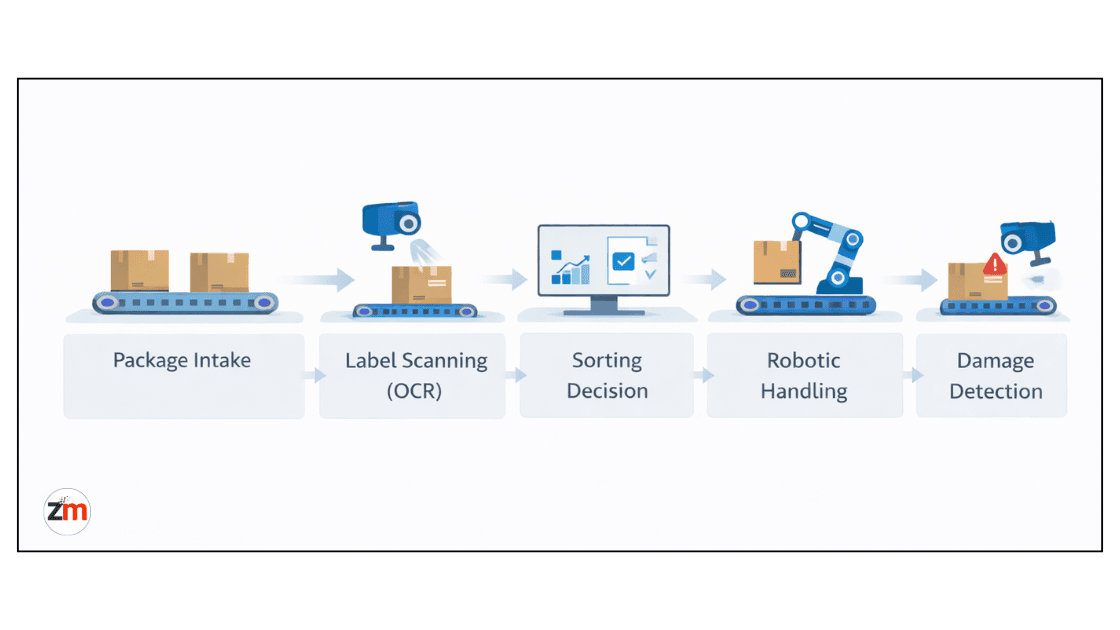
Logistics environments generate constant visual data, making them ideal for vision-driven automation.
1. Automated Sorting & Package Handling
Computer vision reads labels, guides robotic arms, and reduces handling errors, critical in high-volume warehouses where milliseconds matter.
2. OCR for Documents and Invoices
Vision-based OCR now reads invoices, bills of lading, and customs forms, extracting structured data and integrating directly into ERP systems.
3. Damage Detection & Claims Automation
Vision AI inspects packages during transit, creates visual proof for claims, and speeds up dispute resolution, often becoming a competitive advantage rather than a cost center.
Smart Cities & Mobility: Traffic Analytics, Safety, and Infrastructure Monitoring
For cities, computer vision enables earlier intervention rather than reactive fixes.
Traffic and Infrastructure Intelligence
Computer vision supports traffic flow analysis, pedestrian safety monitoring, and infrastructure health tracking, helping city planners act proactively and allocate budgets more effectively.
Edge Computer Vision vs Cloud Vision: Choosing the Right Deployment

One of the most important decisions in any computer vision project is where processing happens.
Cloud platforms such as edge versus cloud computer vision architectures illustrate how centralized services support scale, while edge deployments enable real-time, low-latency decisions.
In practice, the most successful systems use a hybrid approach, edge for speed, cloud for learning.
This is where experienced architecture planning through computer vision and image analysis services often makes the difference between successful rollouts and stalled pilots.
How to Pick the Right Computer Vision Use Case (A Practical Framework)

Before committing resources, decision-makers should ask:
- Is the problem visual?
- Is the decision repeatable?
- Do you have, or can you generate, the right data?
- Can success be measured with clear KPIs?
- Can you start with a small, focused MVP?
Answering these questions early helps avoid pilots that never reach production.
Computer Vision ROI: What Real Success Looks Like
By 2026, ROI is no longer theoretical.
Across industries, adoption trends tracked by industry benchmarks for computer vision adoption show that organizations focus on faster decisions, reduced manual effort, and operational consistency rather than experimental gains.
Successful teams consistently report:
- 20-40% reductions in inspection costs
- Faster time-to-decision
- Lower error rates
- Improved safety compliance
When computer vision is directly tied to operational outcomes, it becomes a profit center rather than a cost line.
Common Mistakes Teams Still Make
- Starting with technology instead of the problem
- Overtraining models without deployment planning
- Ignoring data quality
- Underestimating integration effort
Avoiding these mistakes often matters more than incremental gains in model accuracy.
Next Steps for Product & Operations Leaders
If you are a product leader, operations head, or digital transformation owner exploring computer vision applications and want a practical starting point:
- Explore how Zestminds designs and deploys production-ready vision AI systems through our AI development services
Both options are designed to help you move from ideas to execution, without wasted effort.
Frequently Asked Questions (FAQs)
What are the most practical computer vision applications in 2026?
Manufacturing inspection, healthcare imaging support, retail shelf analytics, logistics automation, and smart city traffic analysis lead real-world adoption.
Is computer vision expensive to implement?
Costs vary, but focused MVPs often deliver ROI within months when scoped around a clear business problem.
Do startups need large datasets to use computer vision?
Not always. Many startups succeed using transfer learning, synthetic data, or limited datasets combined with strong problem framing.
How is computer vision different from traditional image processing?
Traditional image processing relies on fixed rules and manual thresholds, while computer vision uses machine learning models that learn patterns from data. This makes computer vision more adaptable, accurate, and scalable for real-world business environments.
Which industries benefit the most from computer vision in 2026?
Manufacturing, healthcare, retail, logistics, and smart cities benefit the most from computer vision because they rely heavily on visual inspection, monitoring, and real-time decision-making.
Can computer vision work in real time for live operations?
Yes. With edge or hybrid deployments, computer vision systems can process images and video in real time, enabling instant decisions for quality inspection, safety monitoring, traffic analysis, and warehouse automation.
What data is required to start a computer vision project?
Most projects start with images or video from existing cameras. Many teams use transfer learning or pre-trained models, so large datasets are not always required, especially when building an MVP.
How do you measure ROI for computer vision initiatives?
ROI is measured through reduced manual effort, faster decision-making, lower error rates, improved safety compliance, and operational cost savings linked directly to business KPIs.
Table of Contents
- What Computer Vision Really Solves in 2026
- Manufacturing & Industrial: Quality Inspection, Safety, and Anomaly Detection
- Healthcare: Medical Imaging, Clinical Support, and Monitoring
- Retail & E-commerce: Shelf Intelligence, Visual Search, and Fraud Prevention
- Logistics & Warehousing: Automation, OCR, and Real-Time Visibility
- Smart Cities & Mobility: Traffic Analytics, Safety, and Infrastructure Monitoring
- Edge Computer Vision vs Cloud Vision: Choosing the Right Deployment
- How to Pick the Right Computer Vision Use Case
- Computer Vision ROI: What Real Success Looks Like
- Common Mistakes Teams Still Make
- Next Steps for Product & Operations Leaders
- Frequently Asked Questions (FAQs)
Shivam Sharma
Before You Scale Further, Review the Architecture.
Let’s evaluate where your system stands — and where it may break under growth.
Schedule an Architecture Review 30-minute technical discussion. No obligation.