
Building Scalable AI Workflows That Survive Real Production
Scalable AI workflows in production require more than a working demo or a clever model. They depend on system design choices that account for failure, cost, latency, and change over time. Most AI initiatives stall not because the idea was wrong, but because "production" was underestimated. In practical terms, scalable AI workflows in production are end-to-end systems designed to remain reliable, observable, and cost-controlled as usage, data, and failure conditions evolve.
This guide explains how experienced teams move from impressive demos to durable AI systems.


AI demos are easy to get excited about. A notebook runs. An API responds. A stakeholder nods in approval. Production is where that excitement gets stress-tested.
If you're a CTO or senior engineer responsible for shipping and operating real systems, you've probably lived this moment: the demo works, usage grows, and suddenly the system feels fragile, slow, expensive, or unpredictable. Not because the model failed—but because everything around the model was never built to scale.
At a high level, the gap between demo and production isn't about model quality. It's about system behavior under load, failure, and change. That's why this article focuses on AI workflows, not just models—the orchestration, data flow, failure handling, and operational decisions that decide whether an AI system survives real-world use or quietly collapses under it.
Why AI Demos Don't Survive Production
A demo answers one question: "Can this idea work?" Production answers a very different one: "Can this system keep working when things go wrong?"
Most AI demos fail in production because they're built on assumptions that simply don't hold outside controlled environments.
The demo mindset
In demos:
- Inputs are clean
- Load is predictable
- Failures are rare or conveniently ignored
- Costs don't matter yet
- A human is always nearby to intervene
This is fine for exploration. It's risky for systems.
A demo is like a prototype bridge tested with one car at a time. Production is when thousands of vehicles cross it daily—at speed, in bad weather, with no engineer standing underneath.
The hidden production realities
Once an AI workflow goes live:
- Input data becomes messy and inconsistent
- Traffic spikes at inconvenient times
- Third-party APIs slow down or fail
- Latency stacks up across steps
- Costs rise faster than usage
- Models quietly degrade as data changes
None of this shows up in a notebook or a single API call. It only shows up once users arrive.
Why teams misjudge readiness
Many CTOs share a similar hindsight lesson. Three traps show up again and again:
- Model-first thinking – treating the model as the system
- Happy-path design – assuming failures are edge cases
- Linear scaling assumptions – expecting costs and latency to grow predictably
In reality, AI workflows are non-linear systems. Small changes in input volume or model behavior can create outsized downstream effects, a pattern well documented in the reliability principles for distributed and production systems outlined by Google Cloud (https://cloud.google.com/architecture/reliability).
If you don't design for that early, you often end up rewriting major parts of the system later—usually when the business can least afford it. The core lesson is simple: production exposes assumptions that demos never test.
- Demo assumptions: clean inputs, happy path, low load, no cost pressure
- Production realities: messy inputs, failures, scale, cost, latency
Core Components of a Production-Grade AI Workflow
A scalable AI workflow is not a single service. It's a coordinated system, where each component has a clear responsibility.
It helps to think less in terms of a "smart API" and more like a distributed application with intelligence embedded inside.

1. Ingestion and validation
Every production workflow starts with input control.
Before data ever reaches a model:
- Inputs are validated
- Formats are normalized
- Edge cases are handled explicitly
Production systems don't assume "reasonable" inputs. They assume hostile reality.
A simple example: an LLM prompt that works perfectly in testing can break the moment a user pastes a long document, malformed text, or content in an unexpected language.
Validation isn't overhead. It's protection.
2. Deterministic pre-processing
One of the most common scaling mistakes is pushing everything into the model.
Not everything needs AI.
Rule-based steps are:
- Faster
- Cheaper
- Easier to debug
Common examples include:
- Keyword filters before classification
- Routing logic based on metadata
- Threshold-based decisions before LLM calls
The more work you can do deterministically, the calmer your system behaves at scale—especially when you're designing production-ready AI workflows with FastAPI and orchestration layers as part of a broader backend architecture (https://www.zestminds.com/blog/build-ai-workflows-fastapi-langgraph/).
3. Model execution layer
This is the part everyone focuses on—and often over-focuses on.
Key production considerations include:
- Stateless execution
- Timeouts and controlled retries
- Versioned prompts and models
- Clear contracts for inputs and outputs
In production, a model should be treated like any other dependency: useful, powerful, and unreliable by default.
4. Post-processing and decisioning
Raw model output is rarely production-ready.
Most workflows need:
- Confidence scoring
- Output normalization
- Guardrails and constraints
- Explicit fallback logic
For example, if an LLM fails to extract structured data, does the workflow retry, fall back to a simpler method, or flag the case for human review?
Those choices define how reliable the system feels to users.

5. Persistence and state management
Production workflows need memory.
That usually means:
- Storing inputs and outputs
- Tracking decisions over time
- Maintaining workflow state across steps
Stateless demos don't scale. Stateful systems do—but only when state is explicit and well-controlled.
Scaling Challenges You Only See After Launch
Some problems don't appear until real users arrive.
By the time you notice them, they're already expensive.
| Scaling Area | What Breaks First | What Teams Miss |
|---|---|---|
| Latency | Chained model calls | Latency budgets per step |
| Cost | Retry storms | Cost per workflow run |
| Reliability | API timeouts | Graceful degradation |
| Data Drift | Quiet quality decay | Input/output monitoring |
| Operations | Silent failures | Alerting and visibility |
Latency compounds quickly
Each AI step adds latency:
- Data fetch
- Pre-processing
- Model inference
- Post-processing
A single one- or two-second delay feels acceptable in isolation. Chain several together, and the experience becomes frustrating fast.
At scale, users don't tolerate "thinking time."
That's why experienced teams:
- Measure latency per step
- Set hard latency budgets
- Aggressively simplify or remove steps
Cost curves surprise teams
AI costs rarely scale the way spreadsheets suggest.
Common surprises include:
- Token usage growing faster than request volume
- Retry storms multiplying inference costs
- Long-tail inputs triggering worst-case paths
A system that costs cents per request at 100 users can quietly cost dollars per request at 10,000 users if left unchecked.
Production-grade workflows always include cost discipline aligned with operational and cost-management practices for production ML systems described in AWS MLOps guidance (https://aws.amazon.com/what-is/mlops/):
- Cost tracking per step
- Usage caps and throttles
- Early exits for low-value requests
Data drift erodes performance
Models don't fail loudly when reality changes. They fail quietly.
Over time:
- User behavior shifts
- Input distributions change
- Language evolves
- Edge cases become normal cases
Without monitoring, you won't notice until quality drops enough for users to complain.
The fix isn't constant retraining. It's visibility:
- Track input characteristics
- Monitor output confidence
- Regularly sample real-world cases
Failure becomes the default
In production, something is always broken:
- APIs rate-limit
- Models time out
- Networks glitch
The real question isn't if failure happens, but how your workflow responds.
Well-designed systems degrade gracefully. Poorly designed ones cascade—an issue that becomes even more pronounced in agentic AI systems that face real-world scaling and reliability challenges (https://www.zestminds.com/blog/ai-influencer-agentic-ai-platforms-2025/). At scale, resilience becomes a product feature whether you plan for it or not.
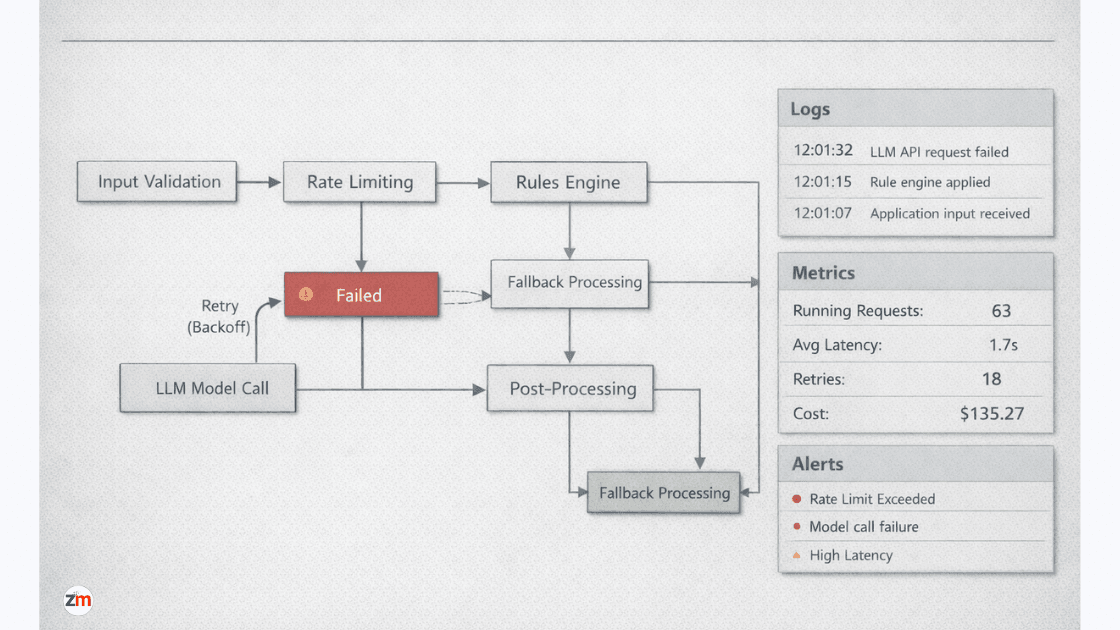
Orchestration, Monitoring, and Failure Handling
This is where most demos collapse—and where production systems earn trust.
Why orchestration matters
As workflows grow, implicit control flow becomes impossible to reason about.
Orchestration provides:
- Explicit step sequencing
- Defined retry policies
- Conditional branching
- Clear visibility into execution
Without orchestration, debugging production issues turns into guesswork.
It's the difference between:
- A shell script stitched together with &&
- A workflow engine you can actually observe and control
Retries are not enough
Blind retries tend to amplify failures.
More effective strategies include:
- Backoff policies
- Retry limits
- Context-aware retry rules
Sometimes failing fast is better than retrying.
For example, retrying an expensive LLM call during an outage can multiply costs without improving outcomes.
Observability is non-negotiable
You can't scale what you can't see.
Production AI workflows need:
- Step-level logs
- Input and output samples
- Latency metrics
- Cost attribution
Not just for debugging, but for making informed trade-offs.
Observability turns AI from a black box into an operable system, especially when combined with production-grade authentication and state management patterns that keep execution paths secure and traceable (https://www.zestminds.com/blog/supabase-auth-nextjs-setup-guide/).
Human-in-the-loop is a feature
Automation doesn't mean autonomy.
High-performing teams design explicit handoffs:
- When confidence is low
- When outputs conflict
- When edge cases appear
Human review isn't a failure. It's a pressure valve that keeps systems stable as they scale.
When to Refactor vs When to Rebuild
At some point, every growing AI system hits a wall.
The hard question is whether to fix what you have—or start over.
- Refactor when: core assumptions still hold, failures are localized, and costs can be optimized.
- Rebuild when: demo shortcuts are everywhere, state is implicit, and failures cascade unpredictably.
Signals you need a refactor
Refactoring makes sense when:
- Core assumptions still hold
- Data flows are fundamentally correct
- Failures are localized
- Costs can be optimized
In these cases, better orchestration, caching, or decision logic can unlock meaningful gains.
Signals you need a rebuild
Rebuilding is painful—but sometimes unavoidable.
Common signals include:
- Demo architecture leaking into every layer
- Business logic tangled with model code
- State that's implicit and scattered
- Failures that cascade unpredictably
If adding features makes the system more fragile instead of more capable, you're likely past refactoring.
The cost of waiting too long
The biggest risk usually isn't rebuilding—it's delaying the decision.
Teams accumulate:
- Operational debt
- Debugging fatigue
- Feature paralysis
At that point, even small changes feel risky.
Experienced teams rebuild earlier than feels comfortable, because they recognize when an architecture has reached its natural limit.
A practical next step
If you're evaluating whether your AI workflow is truly production-ready, a structured review helps. A simple checklist covering orchestration, failure handling, cost controls, and monitoring often surfaces issues early—before they turn into expensive surprises—especially when working with experienced teams building and operating production-grade AI systems (https://www.zestminds.com/ai-development-services).
Closing Thoughts: Treat AI Like Infrastructure, Not a Feature
Most AI failures in production aren't caused by bad models. They're caused by under-designed systems.
There's one mindset shift experienced founders and CTOs consistently point to:
AI is not a feature you add. It's infrastructure you operate.
Demos optimize for impression. Production systems optimize for behavior over time.
When you design AI workflows as systems—with orchestration, failure handling, observability, and cost controls—you stop firefighting and start compounding value. The model becomes just one component, not the single point of failure.
For CTOs and senior engineers, this is less about tools and more about discipline:
- Explicit workflows instead of implicit chains
- Guardrails instead of optimism
- Measurability instead of assumptions
That discipline is what allows AI to scale quietly, reliably, and profitably—long after the demo excitement fades.
Frequently Asked Questions
What makes an AI workflow scalable in real production environments?
A scalable AI workflow is built as an end-to-end system that remains reliable, observable, and cost-controlled as usage, data, and failure conditions evolve. It includes validation, deterministic logic, controlled model execution, retries, monitoring, and clear fallback paths—not just a working model.
How is a production AI workflow different from a successful AI demo?
An AI demo proves that an idea can work under ideal conditions. A production AI workflow must continue working under load, handle failures, manage costs, and adapt to changing inputs, which requires orchestration, state management, and observability.
Why do many AI systems break after moving from demo to production?
Most AI systems break because demos assume clean data, predictable traffic, and a single happy path. Production introduces messy inputs, traffic spikes, third-party failures, latency constraints, and data drift that were never designed for.
What are the most common production risks in AI workflows?
The most common risks include unbounded latency, rapidly escalating inference costs, silent model degradation due to data drift, and cascading failures caused by retries without safeguards.
How should production AI workflows handle failures and retries?
Production AI workflows treat failure as normal. They use bounded retries with backoff, explicit fallback paths, circuit breakers, and human review when confidence is low to prevent cascading failures and runaway costs.
Why is observability essential for AI systems in production?
Without observability, AI systems fail silently. Logs, metrics, traces, and cost attribution allow teams to detect performance issues, data drift, reliability problems, and cost anomalies before users are impacted.
When should a team refactor an AI workflow versus rebuilding it?
Refactoring is appropriate when core assumptions still hold and failures are localized. Rebuilding becomes necessary when demo shortcuts are embedded throughout the system, state is implicit, and adding features increases fragility instead of reliability.
Shivam Sharma
Before You Scale Further, Review the Architecture.
Let’s evaluate where your system stands — and where it may break under growth.
Schedule an Architecture Review 30-minute technical discussion. No obligation.