
Laravel API Best Practices: Security, Versioning & Performance Checklist
Build Laravel APIs your stakeholders can trust. This guide covers practical Laravel API best practices for production teams, including security, authentication, versioning, caching, performance, OpenAPI documentation, testing, observability, and launch readiness.
Use it to review an existing API, plan a new backend, validate a development partner, or turn technical requirements into sprint-ready tasks without making the API harder to scale later.

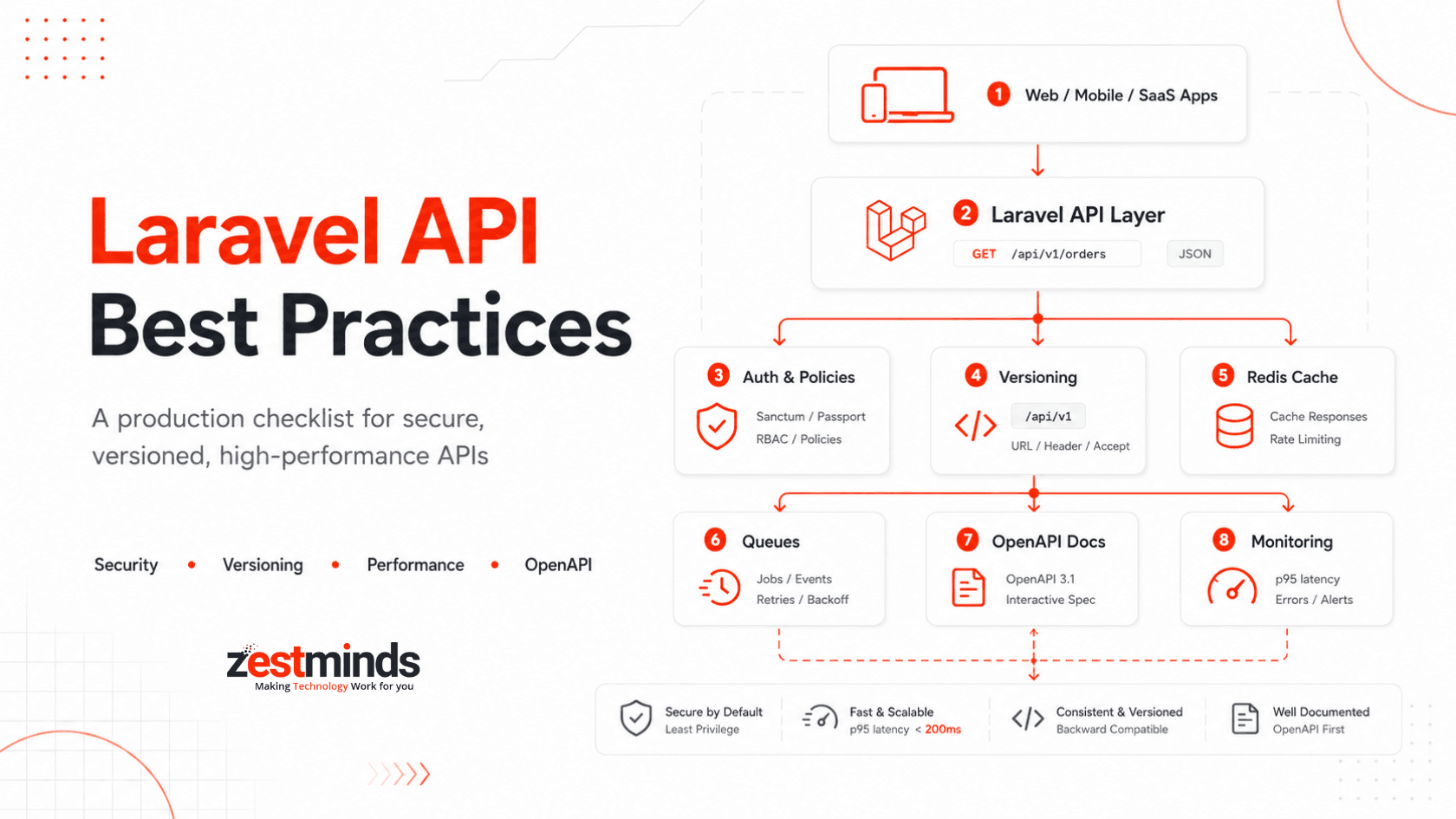
Who This Laravel API Guide Is For
Audience: CTOs, technical founders, backend leads, product managers, and senior Laravel developers who need APIs that are secure, scalable, documented, and maintainable.
Outcome: A practical framework for planning, reviewing, or improving production Laravel APIs across authentication, authorization, versioning, caching, testing, monitoring, documentation, and release governance.
Use it to: standardize delivery across teams, review vendor quality, reduce production risk, and identify weak points before they become expensive API problems.
If you are planning or modernizing a production Laravel backend, Zestminds provides Laravel API development services for teams that need secure, scalable, and maintainable APIs.
What This Guide Covers
- Laravel REST API structure and routing practices.
- Sanctum vs Passport authentication decisions.
- Policy-based authorization and tenant-level access control.
- FormRequest validation and safe payload handling.
- API Resources for consistent response formatting.
- Rate limiting, CORS, HTTPS, secrets, and OWASP API risk controls.
- Versioning, deprecation windows, Sunset headers, and migration plans.
- Redis caching, HTTP caching, pagination, queues, and database optimization.
- OpenAPI documentation, contract testing, CI checks, and SDK generation.
- Observability, SLOs, runbooks, launch checklists, and partner evaluation.
Positioning note: This is not a beginner CRUD tutorial. It is a production-focused Laravel API guide for teams building SaaS platforms, marketplaces, mobile app backends, dashboards, internal tools, and partner integrations.
Executive Laravel API Checklist
Use this checklist before launch, during sprint planning, or when reviewing a Laravel API built by an internal team or external partner.
Security
- Enforce HTTPS and HSTS in production.
- Keep APP_DEBUG=false outside local development.
- Choose Sanctum for first-party apps or Passport for OAuth2 partner ecosystems.
- Use Policies and Gates for object-level and feature-level authorization.
- Validate requests through FormRequest classes.
- Restrict CORS to known frontend domains.
- Apply layered rate limits by IP, user, token, and route.
- Store secrets in a secure manager and rotate them on a schedule.
- Log authentication failures, policy denies, admin actions, and sensitive workflow changes.
- Map OWASP API Top 10 risks to explicit Laravel controls.
Versioning
- Use URL-based major versions such as /api/v1 for public or partner-facing APIs.
- Document additive vs breaking changes clearly.
- Publish migration notes before releasing a breaking version.
- Use Sunset headers when retiring old versions.
- Maintain old and new versions in parallel during migration windows.
Performance
- Define target p95 latency for read and write endpoints.
- Use Redis for hot data, rate limits, queues, and session-related workloads where relevant.
- Use ETags, Last-Modified, and Cache-Control for safe GET endpoints.
- Use cursor pagination for large datasets.
- Fix N+1 queries with eager loading and selective columns.
- Move slow exports, emails, invoices, notifications, and webhooks to queues.
- Load test critical workflows before launch.
Laravel REST API Best Practices for Production Teams
Laravel makes it easy to build APIs quickly, but production APIs need more than routes and controllers. They need predictable structure, safe validation, consistent responses, clear errors, and versioning discipline.
Use Resourceful Routes Carefully
Resource routes are helpful, but do not expose everything by default. Define only the actions your API actually supports.
Route::prefix('v1')->middleware(['auth:sanctum'])->group(function () {
    Route::apiResource('orders', OrderController::class)->only([
        'index', 'show', 'store', 'update'
    ]);
});
Keep Controllers Thin
Controllers should coordinate the request, not hold all business logic. Keep validation in FormRequest classes, authorization in Policies, formatting in API Resources, and complex workflow logic in service classes.
- Controller: receives request and returns response.
- FormRequest: validates payload.
- Policy: checks user permissions.
- Service class: handles business workflow.
- API Resource: shapes the response.
Use FormRequest Validation
Centralized validation keeps controllers clean and prevents unsafe payloads from spreading across the codebase.
class StoreOrderRequest extends FormRequest
{
    public function authorize(): bool
    {
        return $this->user()->can('create', Order::class);
    }

    public function rules(): array
    {
        return [
            'customer_id' => ['required', 'integer', 'exists:customers,id'],
            'items' => ['required', 'array', 'min:1', 'max:100'],
            'items.*.sku' => ['required', 'string', 'max:80'],
            'items.*.quantity' => ['required', 'integer', 'min:1'],
            'notes' => ['nullable', 'string', 'max:500']
        ];
    }
}
Shape Responses with API Resources
API Resources help prevent accidental data exposure and keep responses consistent across clients.
class OrderResource extends JsonResource
{
    public function toArray($request): array
    {
        return [
            'id' => $this->id,
            'status' => $this->status,
            'total' => $this->total_amount,
            'created_at' => $this->created_at?->toISOString(),
            'links' => [
                'self' => url("/api/v1/orders/{$this->id}")
            ]
        ];
    }
}
Standardize Error Responses
Good error responses reduce support tickets and make frontend/mobile integration easier.
{
  "error": {
    "code": "ORDER_NOT_FOUND",
    "message": "The requested order could not be found.",
    "request_id": "req_8f31a92c",
    "details": {
      "order_id": "12345"
    }
  }
}
Production rule:
Never leak stack traces, SQL errors, internal class names, or sensitive identifiers in API responses.
Laravel API Security Best Practices
Security is not one middleware. It is a set of layered decisions across transport, authentication, authorization, validation, rate limiting, secrets, logging, and data exposure.
Security is strongest when each layer has a clear responsibility: transport protects the connection, authentication identifies the user, authorization limits access, validation controls input, and logging makes events traceable.
Baseline Hardening
- Terminate TLS through a hardened proxy or load balancer.
- Enforce HSTS for production domains.
- Disable debug output in production.
- Restrict CORS to known domains, especially for credentialed APIs.
- Apply security headers where relevant.
- Keep dependencies updated and monitor Composer audit results.
- Separate production, staging, and local environment secrets.
Authorization Must Be Explicit
Authentication only confirms who the user is. Authorization decides what that user can do. Laravel Policies should be used for object-level access checks, especially in multi-tenant systems.
Example risk:
A user should not access /api/v1/orders/123 just because they know the ID. The query should also check tenant, owner, team, or account scope before returning data.
public function view(User $user, Order $order): bool
{
    return $user->tenant_id === $order->tenant_id;
}
Input Validation and Payload Hygiene
- Validate all request data through FormRequest classes.
- Limit array size and nested payload depth.
- Use enums for status-like fields.
- Validate file type, size, and storage rules for uploads.
- Reject unknown or unnecessary fields when strict contracts are required.
- Sanitize and normalize data before passing it into business workflows.
Rate Limiting and Abuse Controls
Basic rate limits are useful, but production APIs often need different limits for authentication, search, checkout, exports, webhooks, and admin actions.
- Use stricter limits on login, password reset, OTP, and public endpoints.
- Apply token-aware or user-aware limits after authentication.
- Throttle expensive search and export endpoints separately.
- Log repeated 401, 403, 422, and 429 patterns for investigation.
OWASP API Top 10 Mapped to Laravel Controls
| API Risk | Laravel Control | Practical Check |
|---|---|---|
| BOLA / IDOR | Policies, scoped queries, tenant filters | Every object lookup must verify ownership or tenant access. |
| Broken Authentication | Sanctum, Passport, token expiry, rate limits | Protect login, token refresh, and sensitive auth flows. |
| Excessive Data Exposure | API Resources, DTOs, selective fields | Return only fields the client needs. |
| Unrestricted Resource Consumption | Rate limits, pagination, queue limits | Cap per_page, file sizes, retries, and export volume. |
| Broken Function-Level Authorization | Gates, Policies, role checks | Admin and internal actions must have explicit checks. |
| SSRF | Egress allowlists, URL validation | Block private IP ranges and untrusted callback URLs. |
| Security Misconfiguration | Environment checks, config review, CI checks | Confirm debug mode, CORS, headers, and secrets before release. |
Reference: OWASP API Security Top 10
Sanctum vs Passport for Laravel API Authentication
Laravel Sanctum and Passport solve different authentication problems. Choosing the wrong one can make the API harder to maintain, especially when web, mobile, and partner integrations grow.
| Scenario | Recommended Option | Why | Risk to Watch |
|---|---|---|---|
| First-party SPA | Sanctum | Works well with cookie-based SPA authentication. | CORS and cookie domain configuration must be correct. |
| Mobile app with first-party API | Sanctum | Simple token-based auth can work well for owned clients. | Use token expiry, rotation, and secure storage practices. |
| Third-party app ecosystem | Passport | Supports OAuth2 flows for external clients. | OAuth scopes and client management need governance. |
| Partner integrations | Passport or scoped tokens | Depends on whether full OAuth2 delegation is required. | Partner tokens need scoped access and audit logs. |
| Internal service-to-service API | Scoped tokens plus network controls | Often simpler than full OAuth2 for internal traffic. | Use strict network boundaries and key rotation. |
Simple rule:
Start with Sanctum for first-party applications. Use Passport when you need OAuth2 delegation, third-party client authorization, or a partner app ecosystem.
Reference: Laravel Docs — Sanctum
Laravel API Versioning Best Practices
Versioning is the contract between stability and change. A good versioning strategy lets teams improve the API without breaking mobile apps, dashboards, partner integrations, or public clients.
Choose a Clear Versioning Style
| Versioning Style | Pros | Cons | Best Use Case |
|---|---|---|---|
| URL-based /api/v1 | Clear, visible, cache-friendly, easy for teams to understand. | Requires route grouping and parallel version maintenance. | Public APIs, mobile apps, SaaS platforms, partner APIs. |
| Header-based | Keeps URLs cleaner and can support advanced media types. | Less visible and harder for junior teams or simple clients. | Internal APIs with strong governance and documentation. |
| Tolerant readers | Allows additive changes without new major versions. | Can create hidden technical debt if not managed. | Minor non-breaking additions within a stable major version. |
Define What Counts as Breaking
- Patch: bug fix with no contract change.
- Minor: additive field, optional parameter, or non-breaking enhancement.
- Major: removed field, changed meaning, changed auth behavior, changed error structure, or incompatible response format.
Use Deprecation Windows and Sunset Headers
When retiring an old version, publish migration notes early. Use Sunset headers to communicate deprecation dates and link to migration docs.
Sunset: Wed, 30 Sep 2026 23:59:59 GMT
Link: <https://example.com/docs/api/v2-migration>; rel="deprecation"
Business relevance:
Versioning matters most when your API supports mobile apps, external partners, enterprise customers, or long-running SaaS clients that cannot update overnight.
Laravel API Performance: Caching, Queues & Pagination
Performance is not only about speed. It is about predictable behavior under real traffic. A slow Laravel API can affect checkout, dashboards, mobile app experience, partner integrations, and support load.
If your Laravel API supports a growing SaaS product, marketplace, or customer dashboard, performance planning should be part of the build, not a rescue task after launch. For broader product builds, this connects closely with SaaS product development decisions around architecture, scale, and release planning.
Define Latency Targets
- Track p50, p95, and p99 latency by endpoint.
- Set separate targets for reads, writes, exports, and webhooks.
- Measure database time, application time, external service time, and queue delay separately.
- Use realistic test data, not empty staging tables.
Use HTTP Caching for Safe GET Endpoints
Use ETag, Last-Modified, and Cache-Control for responses that can be safely cached. Never cache sensitive POST, PUT, PATCH, or DELETE responses.
return response(new OrderResource($order))
    ->header('ETag', sha1($order->updated_at . $order->id))
    ->header('Cache-Control', 'private, max-age=60');
Use Redis for Hot Paths
- Cache frequently requested dashboards and lookup data.
- Use short TTLs for data that changes often.
- Bust cache through events after writes.
- Use tags or clear key naming for easier invalidation.
Use Cursor Pagination for Large Data
Offset pagination can become slow on large tables. For timelines, activity feeds, logs, and large lists, cursor pagination is usually safer.
Order::where('tenant_id', $tenantId)
    ->orderBy('id')
    ->cursorPaginate(50);
Queue Heavy Work
If a request performs slow IO or heavy processing, move it to a queue. Common candidates include exports, invoices, reports, notifications, image processing, email, third-party syncs, and webhook retries.
- Make jobs idempotent.
- Use retry limits and exponential backoff.
- Monitor queue depth and failed jobs.
- Use separate queues for critical and non-critical workloads.
Fix Database Bottlenecks
- Add composite indexes based on real filters and sort order.
- Use eager loading to fix N+1 queries.
- Select only required columns.
- Use read replicas carefully for read-heavy endpoints.
- Use transactions for multi-step writes.
Testing, OpenAPI & Contract-First Development
Reliable APIs need more than unit tests. They need feature tests, policy tests, contract checks, integration tests, and documented response schemas that stay aligned with the code.
Use OpenAPI as the Contract
OpenAPI defines request parameters, response schemas, error formats, authentication methods, and examples. For serious APIs, it should be treated as a source of truth, not a document someone updates after the sprint ends.
Reference: OpenAPI Specification
Recommended Testing Layers
- Feature tests: auth, authorization, validation, success paths, and failure paths.
- Policy tests: tenant access, owner access, role access, and restricted actions.
- Integration tests: database, queues, mail, storage, payments, and external APIs with fakes or test environments.
- Contract tests: response shape compared against OpenAPI expectations.
- Regression tests: bugs and security issues converted into permanent tests.
CI Checks That Matter
- Run PHPUnit or Pest test suites.
- Run PHPStan or Psalm static analysis.
- Run Composer audit for dependency risk.
- Lint OpenAPI specs.
- Fail builds on undocumented response changes for important APIs.
For teams managing larger delivery systems, API governance, observability, CI checks, and release discipline often overlap with platform engineering services.
Documentation and Developer Experience
Good API documentation reduces support tickets, speeds up onboarding, and helps frontend, mobile, QA, partner, and customer teams integrate with fewer assumptions.
Minimum Documentation Assets
- Authentication guide.
- 5-minute quickstart.
- OpenAPI JSON or YAML.
- Swagger UI or Redoc documentation.
- Postman or Hoppscotch collection.
- Standard error response examples.
- Webhook signature validation examples.
- Pagination and filtering examples.
- Changelog and deprecation notes.
- Sandbox or test environment details, if available.
Document Error Paths
Do not document only successful responses. Include common 400, 401, 403, 404, 422, 429, and 500 scenarios so client teams know what to expect.
Keep Docs and Code Together
When documentation lives far away from the code, it becomes stale. Keep API specs in version control and update them as part of the same pull request that changes behavior.
Laravel API Architecture Example
A production Laravel API is usually part of a wider system. It may support web apps, mobile apps, admin dashboards, partner integrations, queues, analytics, payments, and background jobs.
Typical Architecture Flow
- Client layer: mobile apps, SPAs, dashboards, internal tools, partner apps.
- Edge layer: CDN, WAF, API gateway, rate limits, telemetry headers.
- Application layer: Laravel routes, middleware, controllers, policies, services, API resources.
- Data layer: primary database, read replicas, Redis cache, object storage.
- Async layer: queues, workers, notifications, exports, webhook retries.
- Observability layer: logs, metrics, traces, request IDs, alerts, runbooks.
- Governance layer: OpenAPI specs, changelogs, versioning, deprecation plans.
Key takeaway:
Design APIs for real conditions: traffic spikes, slow upstreams, mobile version lag, expired tokens, retries, customer support needs, and future version changes.
Common Laravel API Mistakes and Fixes
Even experienced teams can create API problems when delivery speed becomes more important than structure. These mistakes are common, expensive, and usually preventable.
| Mistake | Why It Hurts | Better Approach |
|---|---|---|
| Wildcard CORS with credentials | Creates unnecessary browser and security risk. | Whitelist trusted frontend domains only. |
| Tokens stored carelessly | Can increase exposure if the client is compromised. | Use secure storage patterns suitable for web or mobile clients. |
| No pagination | Large responses become slow and unstable. | Use cursor pagination and cap per_page. |
| Business logic inside controllers | Controllers become hard to test and maintain. | Move workflows into service classes. |
| No object-level authorization | Users may access records they do not own. | Use Policies and tenant-scoped queries. |
| Unbounded retries | Can create retry storms and overload upstream systems. | Use retry limits, backoff, jitter, and circuit breakers. |
| Opaque errors | Frontend and support teams cannot diagnose issues. | Return structured errors with request IDs. |
| Undocumented breaking changes | Mobile apps and partner integrations break silently. | Use versioning, changelogs, and migration notes. |
Laravel API Launch Checklist
Use this checklist before a major release, vendor handover, production launch, or API modernization milestone.
Security and Access
- HTTPS and HSTS configured.
- Production debug output disabled.
- CORS restricted to approved origins.
- Sanctum or Passport selected based on client type.
- Policies and Gates applied to protected actions.
- Tenant or owner checks enforced on object access.
- Rate limits applied to sensitive and expensive endpoints.
- Secrets stored outside code and rotated when needed.
- PII redacted from logs and error messages.
API Contract and Versioning
- Versioned route structure defined.
- OpenAPI spec created or updated.
- Breaking changes documented.
- Deprecation window planned for old versions.
- Sunset headers added where relevant.
- Migration notes prepared for client teams.
Performance and Reliability
- p95 and p99 latency measured for key endpoints.
- Redis caching configured for hot paths.
- ETags or Cache-Control added where safe.
- Cursor pagination used for large datasets.
- N+1 queries reviewed and fixed.
- Slow exports and third-party calls moved to queues.
- Timeouts and retries configured for upstream services.
- Load testing completed for critical flows.
Documentation and Handover
- Authentication guide available.
- Quickstart available.
- Postman or Hoppscotch collection available.
- Error response examples documented.
- Webhook behavior documented if applicable.
- Deployment, rollback, and runbook notes prepared.
How to Evaluate a Laravel API Development Partner
Choosing a Laravel development partner should not be based only on promises. The safer question is: can they show how they handle security, versioning, performance, testing, documentation, deployment, and handover?
This is especially important if you are hiring a dedicated backend development team or extending an internal engineering team that already owns part of the product.
Questions to Ask Before Hiring
- How do you prevent BOLA or IDOR issues in Laravel APIs?
- Do you use Policies, Gates, and tenant-scoped queries consistently?
- When do you recommend Sanctum vs Passport?
- How do you version APIs and handle breaking changes?
- Do you create or maintain OpenAPI specs?
- How do you test authentication, authorization, validation, and error paths?
- How do you measure p95 latency and API reliability?
- What does your handover include: docs, diagrams, runbooks, CI/CD notes, and environment details?
- Can you show relevant delivery examples or Zestminds case studies?
Signs of a Strong Laravel API Partner
- They discuss access control and data boundaries early.
- They ask about users, tenants, roles, clients, and integrations before coding.
- They can explain versioning and migration plans clearly.
- They think about operations, not just development.
- They document tradeoffs and handover assets.
- They treat testing and observability as part of delivery, not optional extras.
If your Laravel API already exists but feels hard to scale, secure, document, or hand over, you can book a Laravel API architecture review with Zestminds to identify the highest-risk gaps before they become production issues.
FAQs
What are the most important Laravel API best practices for production?
Use strong authentication, policy-based authorization, request validation, rate limiting, versioning, caching, pagination, structured errors, OpenAPI documentation, tests, and observability.
Should I use Laravel Sanctum or Passport for API authentication?
Use Sanctum for first-party SPAs, mobile apps, and token-based APIs. Use Passport when you need full OAuth2 flows for third-party apps or partner integrations.
How do you secure a Laravel API?
Secure a Laravel API with HTTPS, restricted CORS, Sanctum or Passport, Policies, FormRequest validation, rate limits, secret rotation, audit logs, and OWASP API risk checks.
What is the best way to version a Laravel API?
URL-based versioning like /api/v1 is usually the safest choice. Pair it with OpenAPI docs, migration notes, changelogs, and Sunset headers for deprecated versions.
How can Laravel API performance be improved?
Improve performance with Redis caching, ETags, cursor pagination, eager loading, database indexes, queues for heavy jobs, timeouts, retries, and load testing.
Why use OpenAPI for Laravel API development?
OpenAPI keeps API contracts, documentation, testing, and client expectations aligned. It helps teams avoid undocumented changes and makes integrations easier.
What should be checked before launching a Laravel API?
Check authentication, authorization, validation, rate limits, error responses, API documentation, database queries, caching, queues, tests, monitoring, and rollback plans.
Final Thoughts
A reliable Laravel API is not created by one package or one checklist. It comes from good structure, explicit security controls, practical versioning, predictable performance, strong documentation, and disciplined release habits.
For small internal tools, a simpler setup may be enough. For SaaS platforms, marketplaces, mobile apps, partner APIs, and enterprise workflows, these practices help reduce rework, security gaps, slow releases, and support pain.
If you are building a new Laravel API or reviewing an existing backend, Zestminds can help with architecture review and production-focused backend delivery.
Table of Contents
- Who This Laravel API Guide Is For
- What This Guide Covers
- Executive Laravel API Checklist
- Laravel REST API Best Practices for Production Teams
- Laravel API Security Best Practices
- Sanctum vs Passport for Laravel API Authentication
- Laravel API Versioning Best Practices
- Laravel API Performance: Caching, Queues & Pagination
- Testing, OpenAPI & Contract-First Development
- Documentation and Developer Experience
- Laravel API Architecture Example
- Common Laravel API Mistakes and Fixes
- Laravel API Launch Checklist
- How to Evaluate a Laravel API Development Partner
- FAQs