
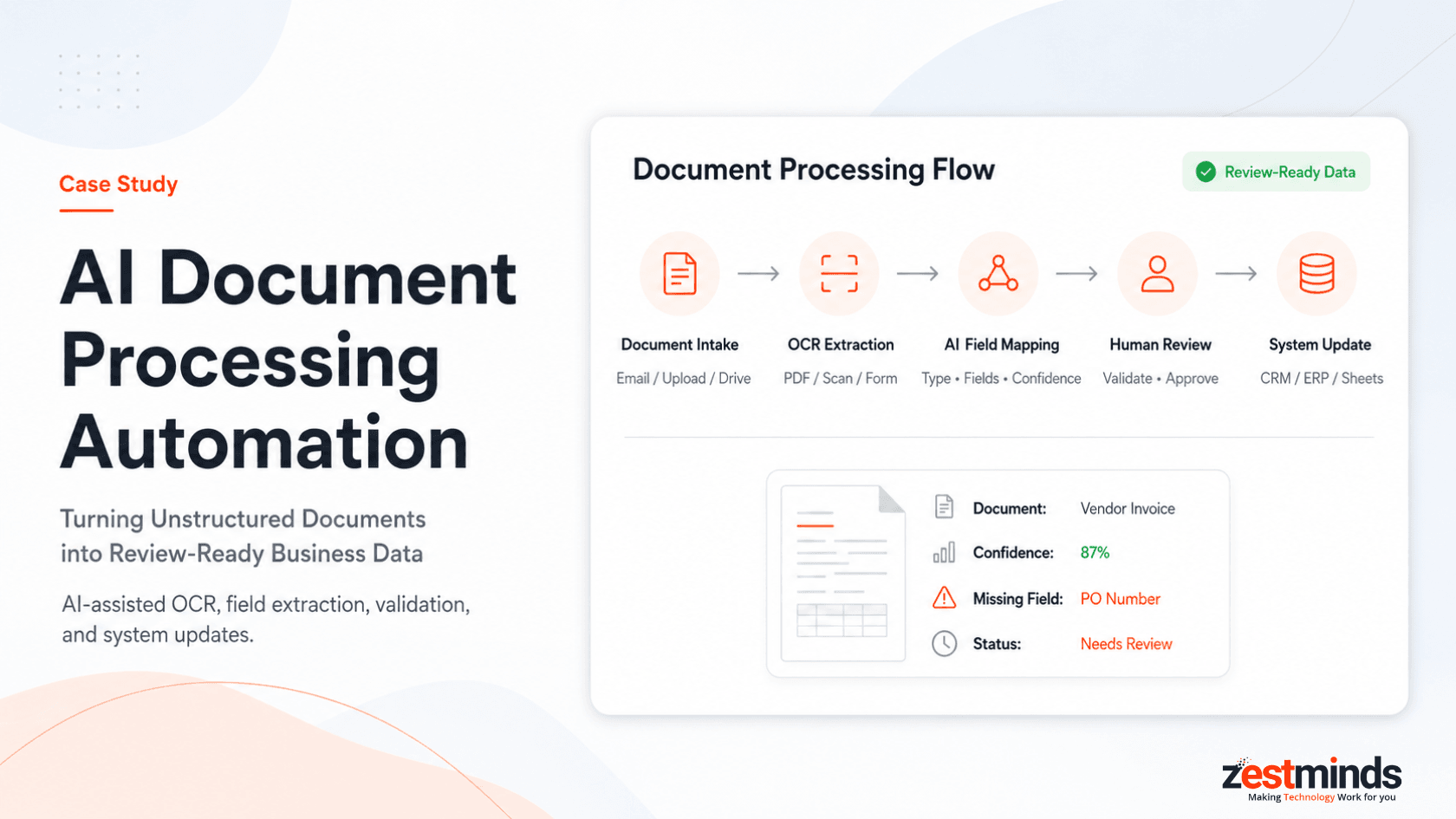
AI Document Processing Automation Case Study: Turning Unstructured Documents into Review-Ready Business Data
Executive Summary
A back-office operations team was spending a significant amount of time manually reviewing business documents, extracting key fields, checking missing information, updating internal systems, and notifying the right team members for review.
Zestminds built an AI document processing automation workflow using n8n, OCR/document parsing, OpenAI/GPT APIs, Google Drive/S3-style storage, a human review dashboard, Slack/email alerts, and workflow logs.
The result was a faster and more consistent document processing workflow where the team could review structured output instead of manually reading and entering every document from scratch.
Project Snapshot
| Area | Details |
|---|---|
| Client Type | Operations-heavy business handling recurring documents |
| Function | Back-office operations, data entry, document review, and approvals |
| Main Challenge | Manual document review, field extraction, validation, and system updates |
| Document Sources | Email attachments, upload forms, shared folders, internal requests |
| Document Types | PDFs, scanned documents, forms, invoices, reports, and semi-structured business documents |
| Solution | AI document processing automation with extraction, validation, human review, and logs |
| Workflow Orchestration | n8n |
| AI Layer | OpenAI/GPT API |
| OCR / Parsing Layer | OCR and document parser for text extraction |
| Storage Layer | Google Drive / S3-style document storage |
| Review Layer | Human review dashboard for uncertain or missing fields |
| Notifications | Slack and email alerts |
| Business Impact | Faster document review, reduced manual data entry, and cleaner processing visibility |
Client Context
The client's operations team handled a steady flow of business documents every week.
Some documents arrived through email. Others were uploaded through forms, stored in shared folders, or sent internally for processing.
The team needed to review each file and understand:
- what type of document it was,
- which fields were important,
- whether required information was missing,
- whether the document needed approval,
- where the extracted data should be saved,
- and whether another team member needed to review it.
The challenge was not that the team lacked process discipline.
The real issue was that too much time was being spent on repetitive document reading, copying, checking, and data entry.
As document volume increased, the workflow became harder to manage consistently. Some documents moved quickly, while others waited for review or were delayed because key information was incomplete.
The client wanted automation, but not blind extraction. They needed a workflow where AI could prepare structured data, while humans could still review uncertain fields before final submission.
Manual Document Processing Before Automation
Before automation, the document processing workflow was mostly manual.
The usual process looked like this:
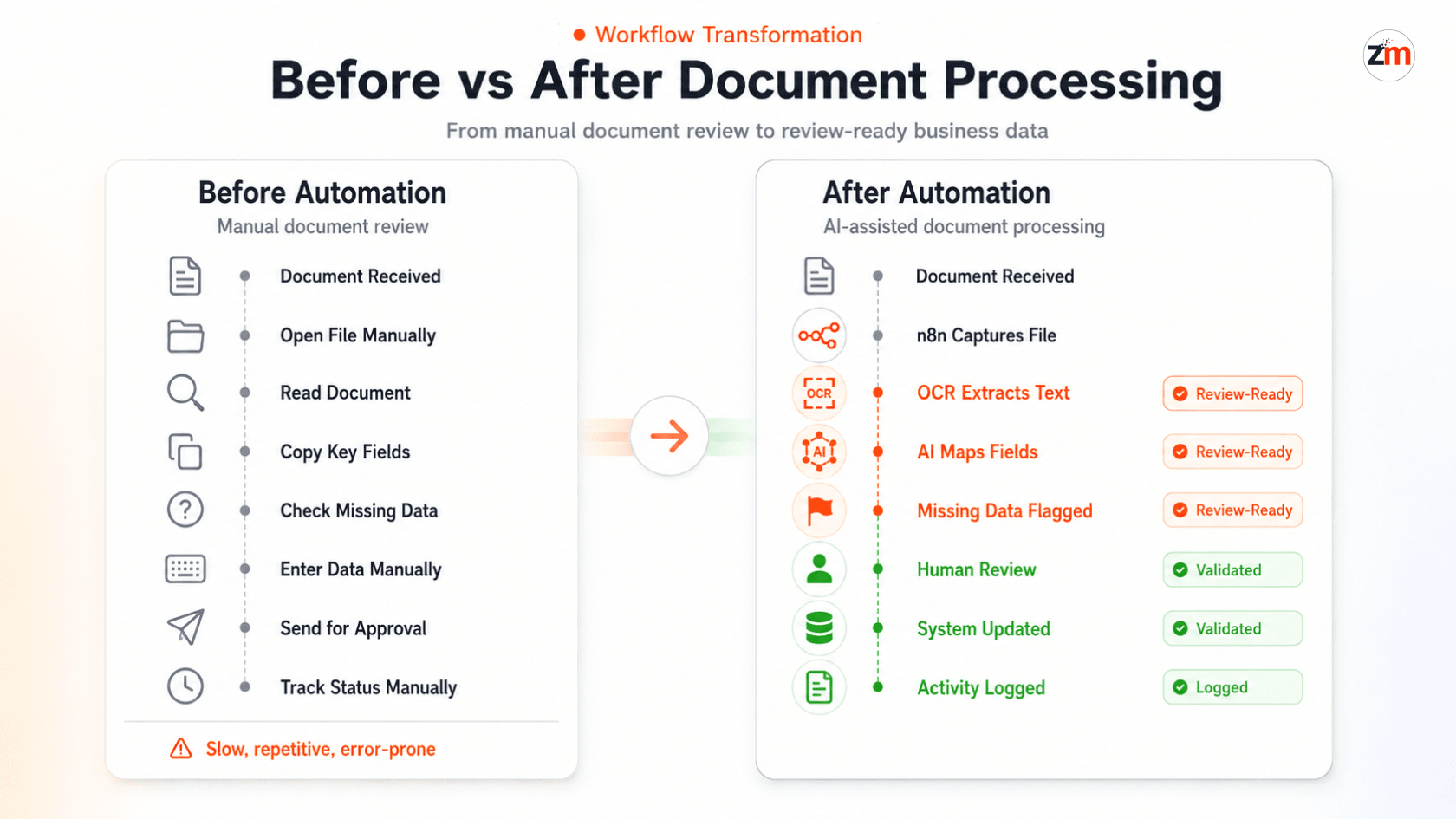
Document received → Team opens file manually → Document type is identified → Key fields are copied → Missing data is checked → Data is entered into system → Reviewer approves → Status is tracked manually
This created several operational issues:
- Team members had to open and read every document manually.
- Important fields were copied from PDFs, forms, or scanned documents by hand.
- Document type classification was inconsistent.
- Missing or unclear information was not always flagged early.
- Data entry into spreadsheets, CRM, ERP, or internal tools took time.
- Review status was difficult to track across documents.
- Errors could happen when information was copied from one system to another.
- There was limited visibility into processing status, failed extractions, or pending approvals.
The client needed a more structured document intake and review process.
They did not want AI to replace human accountability. They wanted AI to reduce repetitive extraction work and make documents easier to validate.
The Core Challenge
The real challenge was not simply "extracting text from documents."
Traditional OCR can capture text, but the business needed more than raw text.
For each document, the team needed to understand:
- what kind of document it was,
- which fields mattered,
- whether extracted values were complete,
- whether any values looked uncertain,
- whether the document needed human approval,
- where the data should be pushed,
- and what should happen if information was missing.
That required a workflow combining OCR, AI interpretation, validation rules, human review, and system updates.
Fully automated extraction was risky because documents often had inconsistent formats, unclear fields, scanned content, or missing information.
OCR and AI should prepare the document data, automation should route and update systems, and humans should review uncertain or business-critical fields before final submission.
What Zestminds Built
Zestminds built an AI document processing automation workflow as part of our AI workflow automation services, helping convert unstructured documents into review-ready business data.
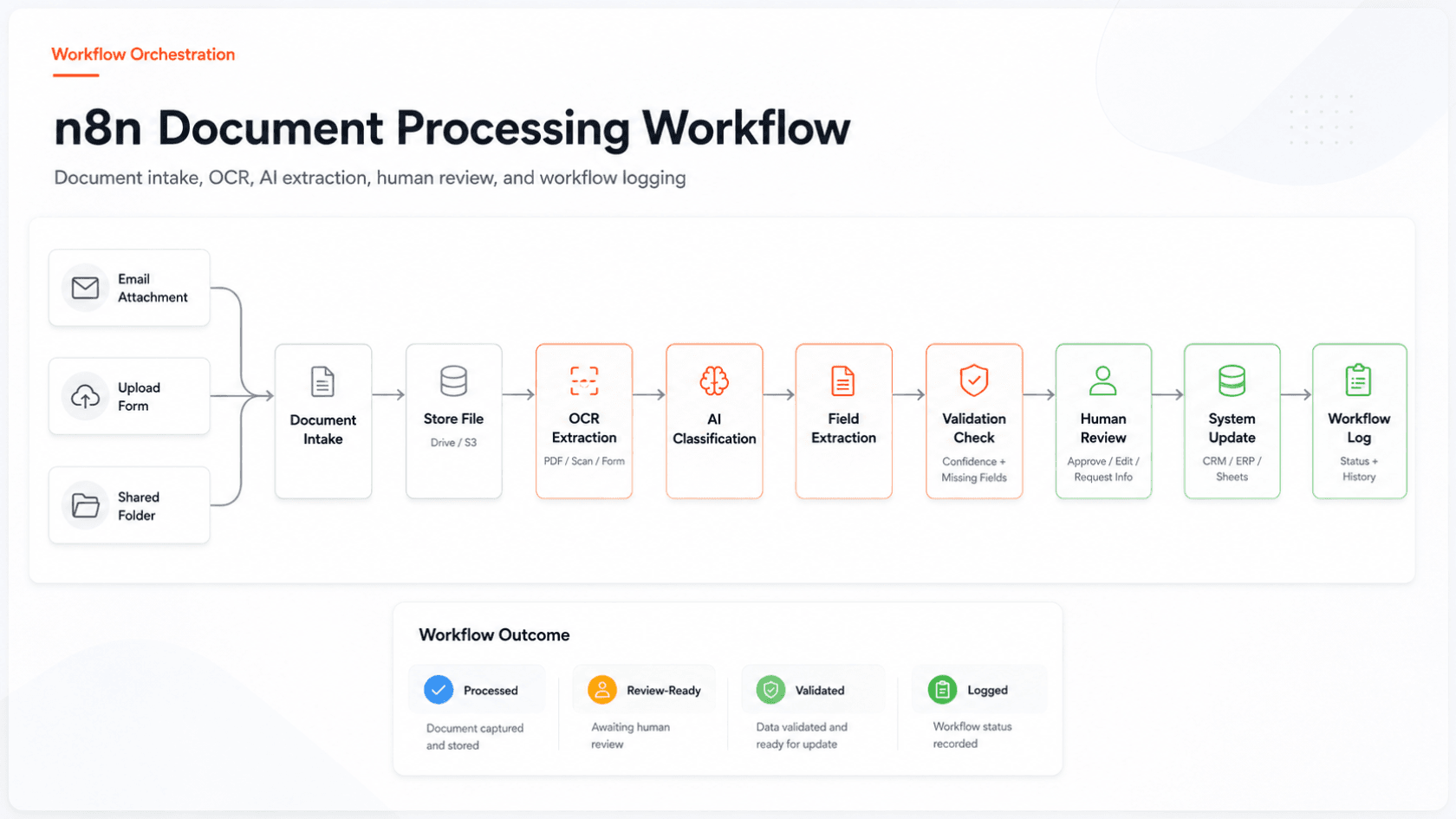
The workflow connected document intake sources, n8n automation, OCR/document parsing, OpenAI/GPT-based document understanding, storage, a review dashboard, Slack/email alerts, and workflow logs.
n8n acted as the orchestration layer. It captured incoming files, triggered processing steps, routed documents based on type and status, handled API calls, and pushed structured output into the review or business system layer.
The OCR/document parsing layer extracted text from PDFs, scanned files, and uploaded documents.
OpenAI/GPT APIs were used to interpret the extracted content, classify document type, identify important fields, detect missing information, and prepare structured output.
This type of implementation also connects closely with our AI development services, where AI is used inside real workflows instead of being treated as a standalone experiment.
The review dashboard allowed team members to validate uncertain fields, correct extracted values, approve records, or reject incomplete documents.
After approval, the workflow pushed structured data into the connected system, spreadsheet, CRM, ERP, or database.
AI should reduce manual document work, but human review should remain available where accuracy and business context matter.
Workflow After Automation
After automation, the document workflow became more structured and easier to manage.
The new process looked like this:
Document received → n8n captures file → OCR extracts text → AI classifies and extracts fields → Validation checks run → Human reviews uncertain fields → Approved data is pushed to system → Activity is logged
Automated Workflow Steps
- A document was received through email, upload form, shared folder, or internal request.
- n8n captured the document and started the processing workflow.
- The original file was stored in Google Drive, S3-style storage, or an internal document repository.
- OCR/document parsing extracted text and raw data from the file.
- OpenAI/GPT analyzed the extracted content and classified the document type.
- AI extracted important fields such as name, date, amount, reference number, document category, line items, or required business fields.
- Validation rules checked whether mandatory fields were present and whether any values were uncertain.
- Documents with low confidence, missing fields, or business-critical values were sent to human review.
- Approved data was pushed into the connected system, spreadsheet, CRM, ERP, or database.
- Workflow logs stored status, extracted fields, review decisions, errors, and processing history.
Tech Stack Used
| Layer | Tool / Technology | Role |
|---|---|---|
| Document Intake | Email attachments, upload forms, shared folders | Captured incoming business documents |
| Workflow Orchestration | n8n | File capture, routing, API calls, branching, and status handling |
| OCR / Parsing | OCR engine / document parser | Extracted text from PDFs, scans, and uploaded documents |
| AI Understanding | OpenAI/GPT API | Classified documents, extracted fields, detected missing data, and prepared structured output |
| Storage | Google Drive / S3-style storage | Stored original documents and processed files |
| Review Layer | Review dashboard / Airtable-style review interface | Allowed human validation of uncertain or missing fields |
| System Update | CRM, ERP, database, or Google Sheets | Stored approved structured data |
| Notifications | Slack and email alerts | Notified reviewers about pending, failed, or approved documents |
| Tracking | n8n logs and workflow activity logs | Tracked status, errors, review decisions, and processing history |
Because the workflow involved document intake, extraction logic, validation rules, approval controls, system updates, and logs, it required more than a simple automation setup.
This is where custom software development becomes important for reliability and long-term maintainability.
AI Document Processing Logic
The AI layer was configured to convert document content into structured business data.
For each document, AI helped identify:
- document type,
- document summary,
- key fields,
- required values,
- missing information,
- uncertain or low-confidence fields,
- approval requirement,
- suggested next action,
- and target system for the extracted data.
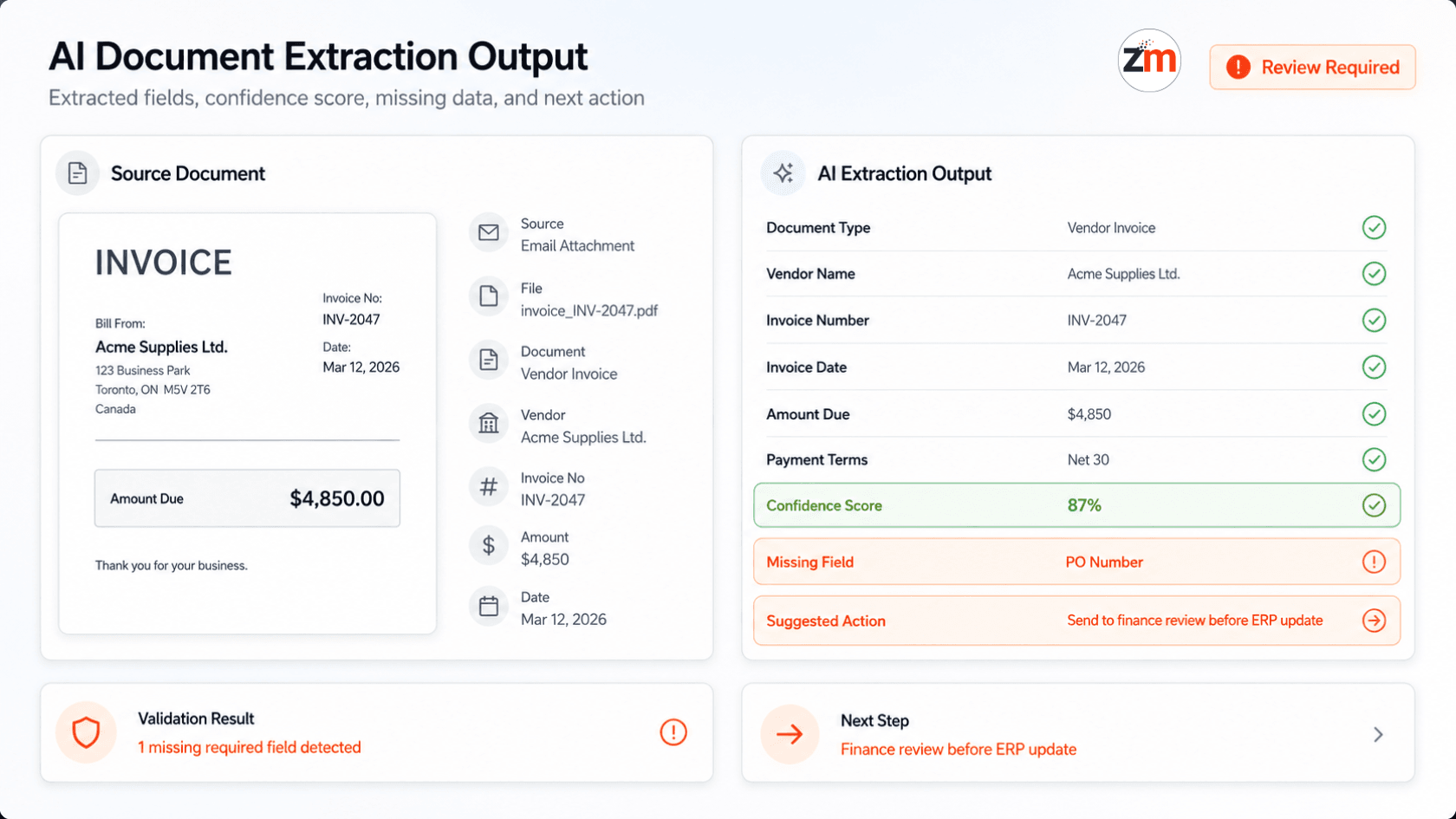
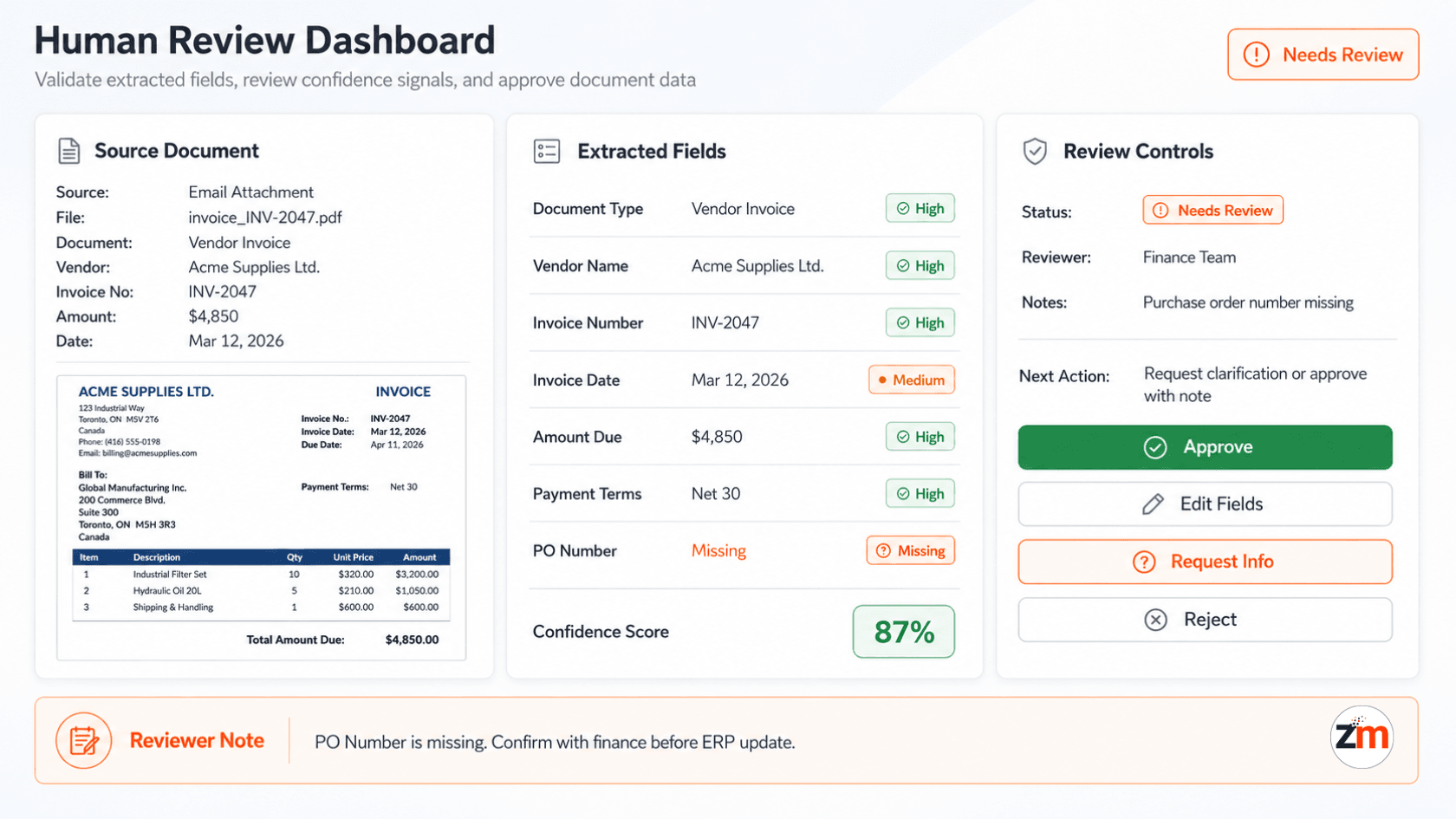
Example structured output:
Document Type: Vendor Invoice
Vendor Name: Acme Supplies Ltd.
Invoice Number: INV-2047
Invoice Date: March 12, 2026
Amount Due: $4,850
Payment Terms: Net 30
Missing Fields: Purchase order number
Confidence: Medium
Suggested Action: Send to finance review before ERP update
This gave the operations team a structured review view instead of forcing them to read every document manually.
The AI did not simply summarize the document. It prepared the information in a way the business could validate, approve, and use.
Human Review and Validation Layer
Human review was important because document workflows often involve financial, operational, legal, or customer-related data.
The automation was designed to route documents for review when:
- required fields were missing,
- extracted values had low confidence,
- the document type was unclear,
- the amount or date needed approval,
- the document triggered a business rule,
- or the system detected incomplete information.
The review layer allowed the team to:
- check extracted values,
- correct field data,
- approve or reject the document,
- request missing information,
- add internal notes,
- and decide whether the data should be pushed into the final system.
This helped reduce manual effort without removing accountability.
The goal was not to make AI the final authority. The goal was to make humans faster, better informed, and less dependent on repetitive data entry.
System Updates and Notifications
After review and validation, the approved data was pushed into the connected business system.
Depending on the client's workflow, this could include:
- updating a CRM record,
- creating an ERP entry,
- adding a row to Google Sheets,
- updating a database,
- attaching the original document to a record,
- or triggering an approval workflow.
The system also notified the right team members through Slack or email.
Notifications could be sent when:
- a new document was ready for review,
- required fields were missing,
- a document failed processing,
- a high-value document needed approval,
- or data was successfully pushed into the final system.
This helped the team avoid scattered follow-ups and manual status checks.
Workflow Logs and Visibility
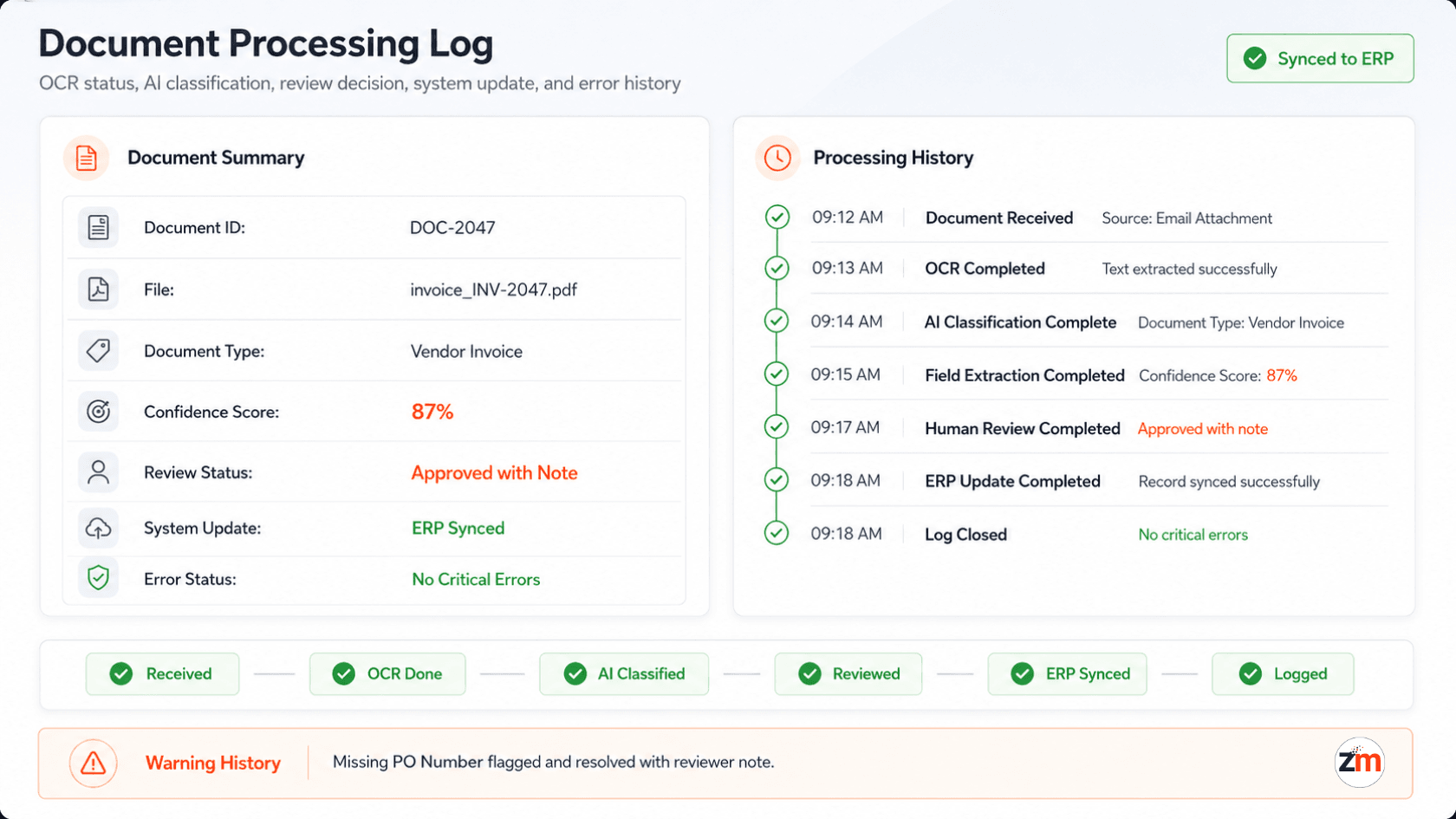
The automation also created a clear processing history for each document.
The team could track:
- when the document was received,
- where it came from,
- whether OCR completed successfully,
- how AI classified the document,
- which fields were extracted,
- which fields needed review,
- who approved or corrected the data,
- whether the final system update succeeded,
- and whether any errors occurred.
This visibility made the workflow more reliable.
Instead of asking "Was this document processed?" the team could see the status, review history, and next action in one place.
Results and Business Impact
The automation helped reduce repetitive document review and manual data entry across the workflow.
The impact included:
- manual document review time reduced from around 12–20 minutes per document to 3–5 minutes,
- manual data entry effort reduced by approximately 60–75%,
- documents became review-ready faster,
- missing or uncertain fields were flagged earlier,
- reviewers had clearer context before approval,
- approved data was pushed more consistently into connected systems,
- and the team gained better visibility into document status, errors, and review history.
The workflow did not remove human review.
It made review faster and more focused by turning unstructured documents into structured, review-ready business data.
What This Project Proves About Zestminds
This project shows Zestminds' ability to build AI document processing automation for real back-office workflows.
The work was not limited to OCR or simple PDF extraction.
It required understanding document intake, classification, field extraction, validation rules, human review, system updates, notifications, and workflow logs.
The workflow combined:
- n8n automation,
- OCR/document parsing,
- OpenAI/GPT-based document understanding,
- storage and file handling,
- human-in-the-loop validation,
- system updates,
- Slack/email alerts,
- and processing logs.
This is where Zestminds brings value as an AI workflow automation partner: by combining AI, automation tools, business process understanding, and practical review controls into systems that reduce repetitive work without losing accuracy or oversight.
You can also explore more Zestminds work across AI, automation, and product engineering on our case studies page.
Frequently Asked Questions
What is AI document processing automation?
AI document processing automation uses OCR, AI, workflow automation, and validation rules to extract, classify, review, and route data from business documents such as PDFs, forms, invoices, reports, and scanned files.
What types of documents can be processed?
The workflow can support PDFs, scanned documents, email attachments, upload forms, invoices, reports, contracts, applications, and other semi-structured or unstructured business documents.
Did AI automatically approve every document?
No. AI prepared structured output and flagged missing or uncertain fields. Documents that needed validation were routed to a human reviewer before final system updates.
Why is human review important in document automation?
Human review is important because documents often contain financial, operational, legal, or customer-related information. Review helps prevent incorrect data from being pushed into business systems.
What was the main business benefit?
The workflow reduced manual document review and data entry effort, helped flag missing information earlier, and made documents easier to approve, track, and push into connected systems.
Need Help Automating Document Processing?
Zestminds can help you build an AI-assisted document processing workflow that connects your document intake sources, OCR layer, AI extraction logic, human review, system updates, and workflow logs.
Whether your documents come from email attachments, upload forms, shared folders, or internal workflows, we can help turn unstructured files into review-ready business data.
Table of Contents
- Project Snapshot
- Client Context
- Manual Document Processing Before Automation
- The Core Challenge
- What Zestminds Built
- Workflow After Automation
- Tech Stack Used
- AI Document Processing Logic
- Human Review and Validation Layer
- System Updates and Notifications
- Workflow Logs and Visibility
- Results and Business Impact
- What This Project Proves About Zestminds
- Frequently Asked Questions
- Need Help Automating Document Processing?
Before You Scale Further, Review the Architecture.
Let’s evaluate where your system stands — and where it may break under growth.
Schedule an Architecture Review 30-minute technical discussion. No obligation.