
AI Workflow Automation Tools for Business: Best Options, Use Cases, and ROI
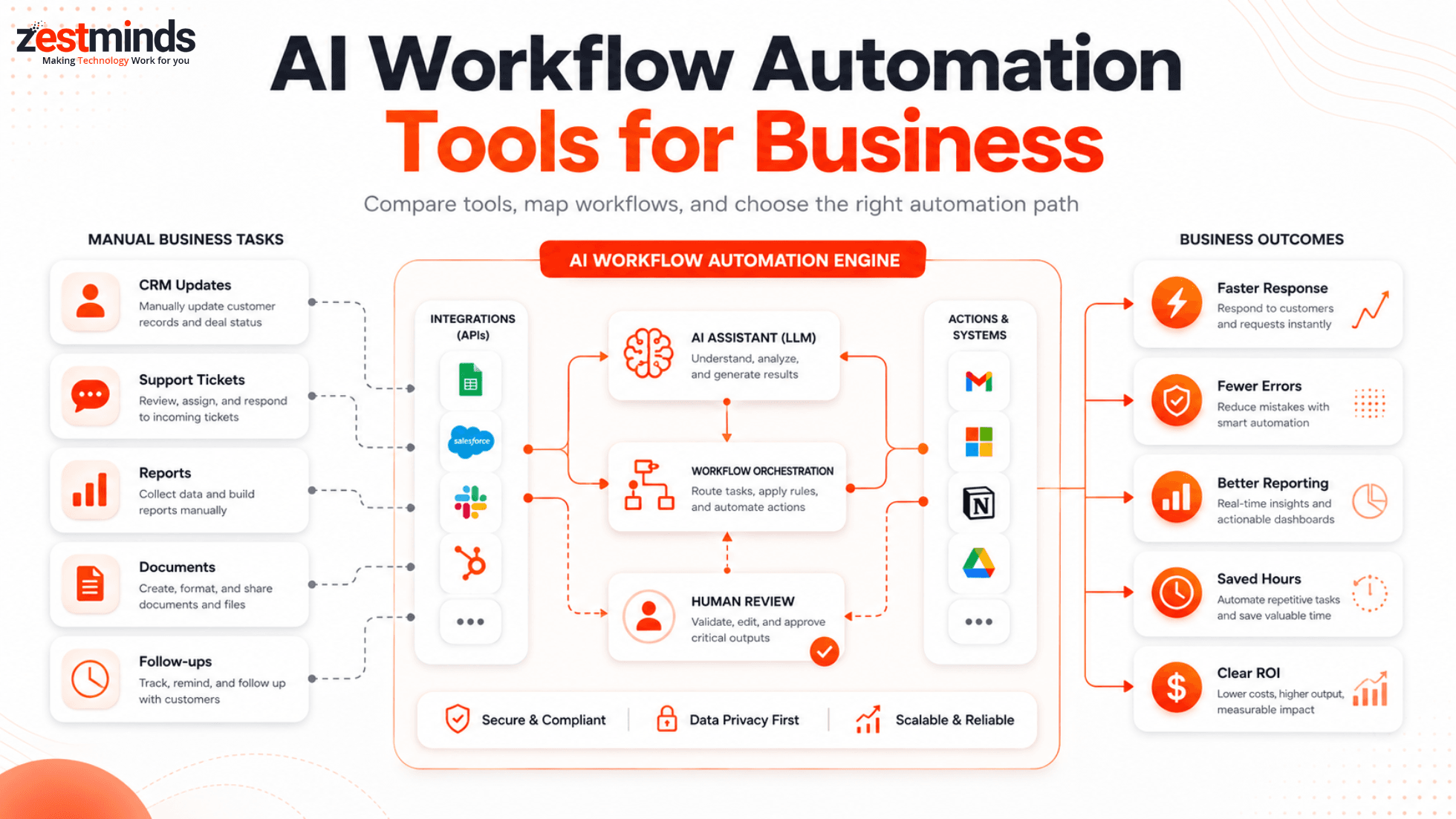
Looking to automate business workflows without drowning in tools your team may never use? This guide breaks down practical AI workflow automation tools, real business use cases, no-code options, and when custom automation makes more sense than another software subscription.

Introduction
Running a business with too many manual tasks is like trying to run a delivery company with one bicycle and a notebook. It may work for a few orders, but once things grow, delays, mistakes, and frustration start showing up everywhere.
That is where AI workflow automation helps. It can reduce repetitive work, organize data, summarize information, route tasks, support teams, and connect tools your business already uses.
This guide is written for founders, SMB owners, operations teams, marketers, and CTOs who want a practical answer to one simple question: which AI automation tools are worth using, and when do we need something more custom?
Why AI Workflow Automation Matters for Businesses
The Real Cost of Manual Business Processes
Manual work usually looks harmless in the beginning. Someone copies a lead from a form into a CRM. Someone exports a spreadsheet every Friday. Someone checks support emails and assigns them one by one. Someone creates the same report again and again.
But over time, these small tasks become expensive. They create delays, errors, and hidden dependency on people remembering every tiny step.
Common manual workflow problems include:
- Leads not reaching the sales team on time
- Customer support tickets sitting in the wrong queue
- Teams copying data between spreadsheets, CRMs, and project tools
- Invoices, documents, and reports being processed manually
- Managers spending hours chasing status updates
- Employees doing boring admin work instead of useful work
For growing companies, structured automation can help convert these repetitive steps into smoother workflows with better visibility, fewer mistakes, and less manual follow-up.
How AI Changes Workflow Automation
Traditional automation usually follows fixed rules. For example, if a form is submitted, send an email. If a deal is moved to a new stage, create a task. This is useful, but it is limited.
AI-powered workflow automation adds more context. AI can read text, summarize conversations, classify requests, extract details from documents, draft replies, score leads, and suggest the next action.
In practical terms, AI can help with tasks like:
- Summarizing a sales call and pushing notes into the CRM
- Classifying a support ticket as billing, technical, refund, or urgent
- Extracting invoice details from a PDF
- Creating a first draft of a customer reply
- Routing a lead based on company size, location, or urgency
- Generating weekly reports from multiple tools
Good AI automation does not mean removing humans from every decision. In many business workflows, the safest setup is AI plus rules plus human review. Think of AI as the smart assistant, not the final boss.
For a broader view of how organizations are trying to capture value from AI, McKinsey’s State of AI 2025 report is a useful external reference.
What Is AI Workflow Automation?
Quick Definition for Business Leaders
AI workflow automation is the use of artificial intelligence to improve, route, or complete business tasks with less manual effort. It can combine AI models, business rules, integrations, APIs, no-code tools, CRMs, ERPs, dashboards, and human approval steps.
A simple workflow might look like this:
- A website lead comes in
- AI summarizes the request
- The lead is scored based on budget, urgency, and service fit
- The data is added to the CRM
- The sales team receives a Slack or email alert
- A follow-up draft is prepared for human review
That is more useful than just sending a generic autoresponder. The workflow understands context and helps the team respond faster.
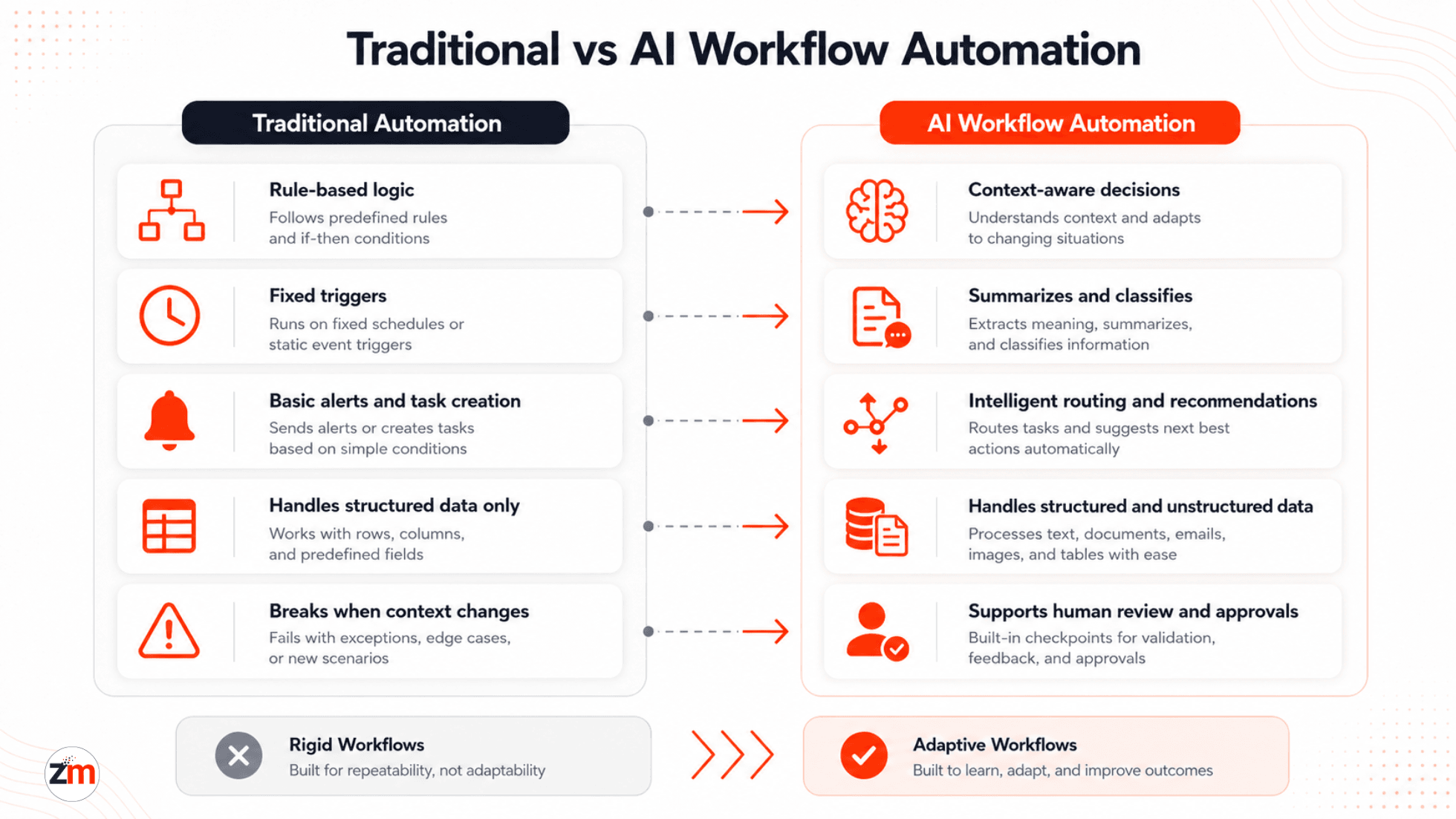
Traditional Automation vs AI Workflow Automation
| Feature | Traditional Automation | AI Workflow Automation |
|---|---|---|
| Logic | Rule-based | Rule-based plus context-aware AI |
| Best for | Simple repetitive tasks | Tasks involving text, decisions, routing, or summaries |
| Data handling | Structured data | Structured and unstructured data |
| Examples | Email alerts, task creation, reminders | Lead scoring, ticket classification, document extraction, report summaries |
| Human review | Optional | Recommended for sensitive or customer-facing workflows |
AI Workflow Automation Tools Compared
Before signing up for every shiny AI tool, compare them by workflow fit. A tool that is perfect for marketing content may be useless for invoice processing. A no-code tool that works for 10 tasks may become messy when your workflow touches CRM, ERP, APIs, and approval rules.
| Tool | Best For | Automation Type | Common Limitation |
|---|---|---|---|
| Zapier | Simple app-to-app workflows | No-code | Complex branching can become hard to manage |
| Make | Visual multi-step workflows | No-code / low-code | Needs careful planning for advanced scenarios |
| n8n | Flexible workflows with API control | Low-code | May need technical setup and maintenance |
| Microsoft Power Automate | Microsoft ecosystem workflows | No-code / low-code | Best suited when the business already uses Microsoft tools heavily |
| ChatGPT / Claude | Text generation, summaries, classification, reasoning support | AI assistant / API-based | Needs guardrails, prompts, review, and integration |
| Fireflies.ai | Meeting notes and action items | SaaS automation | Focused mainly on meeting intelligence |
| Notion AI | Docs, internal knowledge, summaries | Workspace AI | Not a full workflow automation platform |
Best AI Tools for Business Workflow Automation
Here are practical AI workflow automation tools business teams should understand. The best choice depends on your existing tools, workflow complexity, budget, and how much control you need.
1. Zapier
Zapier is useful for simple no-code automation between common apps. It works well for tasks like sending website leads to a CRM, creating tasks from form submissions, sending Slack alerts, updating spreadsheets, or triggering email follow-ups.
It is a good starting point for small teams because it is easy to understand. But when workflows need advanced logic, custom APIs, approval layers, or error handling, it may need expert planning. Teams that want cleaner setup, troubleshooting, or scalable workflow design can explore Zapier automation services.
2. Make
Make is useful for visual workflows with multiple steps. It is often a good fit for teams that need more control than basic app-to-app automation but still want a visual workflow builder.
For example, Make can collect a form submission, check conditions, call an AI model, update a CRM, send a notification, and create a task. It is strong for operations, sales, reporting, and content workflows. For more advanced scenarios, Make.com AI workflow automation services can help design workflows that do not break when the business grows.
3. n8n
n8n is a flexible automation platform for teams that want more technical control. It is useful for workflows involving APIs, custom logic, internal tools, and self-hosted or privacy-aware setups.
It can be a better fit when your workflow needs more than a simple no-code trigger. For example, n8n can connect internal databases, custom SaaS tools, CRM systems, AI models, and approval steps. If your team needs low-code automation with stronger control, n8n AI workflow automation services can be a practical next step.
4. Microsoft Power Automate
Microsoft Power Automate is useful for businesses already using Microsoft 365, Outlook, Teams, SharePoint, Excel, and Dynamics. It can help automate approvals, document handling, notifications, internal requests, and reporting workflows.
It is strongest when your company already lives inside Microsoft tools. If your team uses a mixed stack with custom apps, CRMs, ERPs, and external APIs, compare setup effort before committing fully.
5. ChatGPT and Claude
ChatGPT and Claude are not workflow platforms by themselves, but they are powerful AI engines inside workflows. They can summarize text, classify requests, draft replies, extract information, rewrite content, analyze customer conversations, and support internal knowledge tasks.
The real value comes when these AI tools are connected safely with your business systems. For example, AI can summarize a support ticket, but your helpdesk still needs routing rules, priority logic, and human review for sensitive replies.
6. Notion AI
Notion AI is useful for teams that manage product notes, internal documentation, meeting notes, content plans, and knowledge bases in Notion. It can summarize pages, create drafts, organize notes, and help teams find information faster.
It is not a replacement for a full workflow automation platform, but it works well as part of a documentation and knowledge workflow.
7. Fireflies.ai
Fireflies.ai helps record, transcribe, summarize, and extract action items from meetings. This is useful for sales calls, client meetings, internal planning, and project discussions.
The best workflow is not just recording the meeting. The real win comes when summaries and action items move into your CRM, project management tool, or follow-up process automatically.
8. Airtable AI
Airtable AI is useful when teams manage structured data in Airtable and want AI support for classification, summaries, content generation, or workflow triggers. It can work well for marketing operations, lightweight CRM workflows, content calendars, and internal tracking systems.
It is best for teams already using Airtable as an operational database. For complex enterprise workflows, it may need API-level integration with other systems.
9. Bardeen
Bardeen is useful for browser-based automation. It can help teams automate repetitive actions across web apps, such as collecting information, updating records, and moving data between browser tools.
It is helpful for sales, research, and admin workflows, but it should be used carefully when workflows involve sensitive data or systems where browser automation may be fragile.
10. Reclaim.ai
Reclaim.ai focuses on calendar and time-blocking automation. It helps schedule tasks, protect focus time, and organize meetings around priorities.
It is not a business process automation platform, but it can improve productivity for teams that struggle with packed calendars and scattered priorities.
Best AI Automation Tools by Business Function
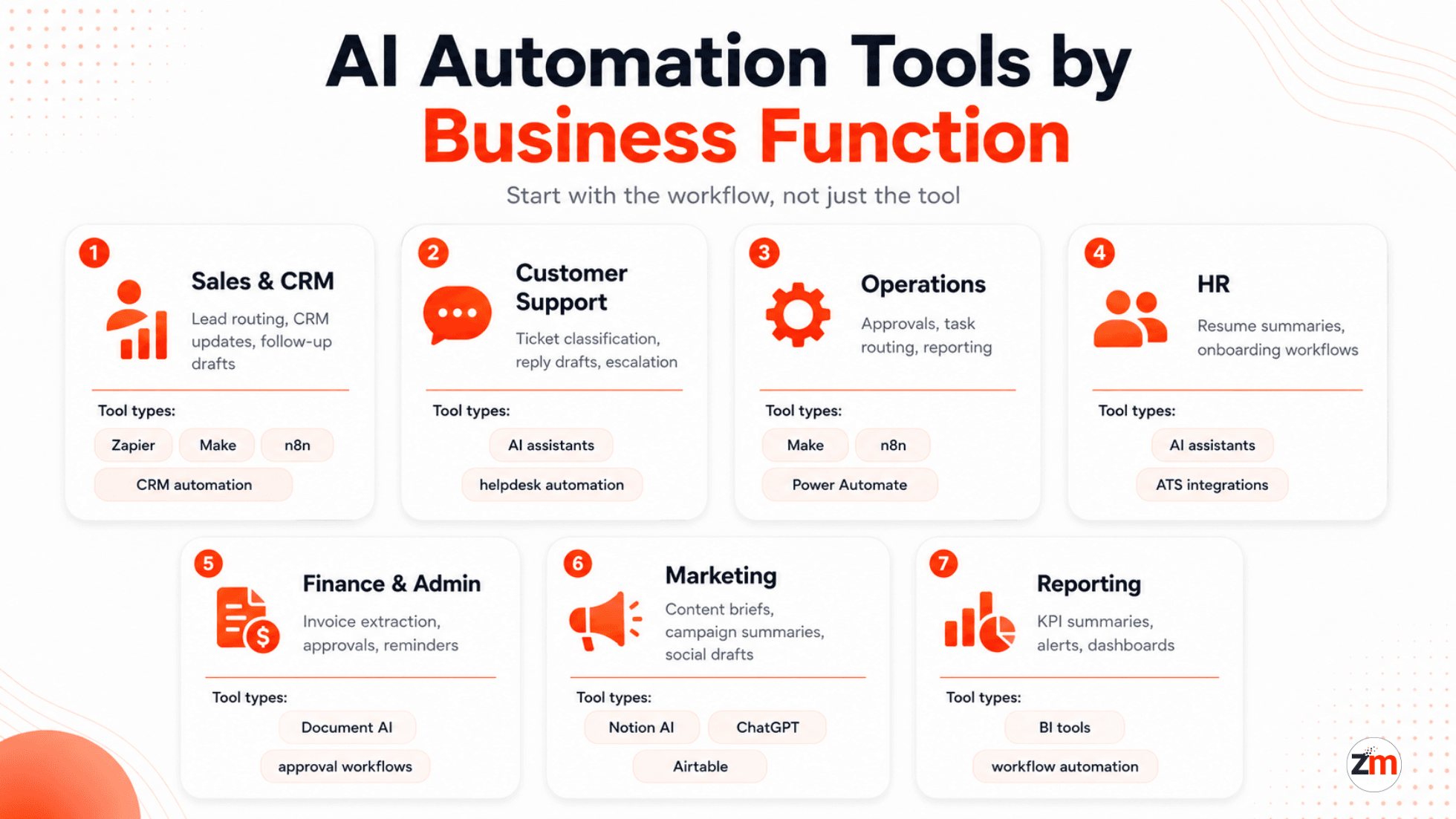
Instead of choosing a tool first, start with the business function. A hammer is useful, but not if the job needs a screwdriver. Same logic applies to AI automation tools.
| Business Function | Workflow to Automate | Useful Tool Types |
|---|---|---|
| Sales and CRM | Lead routing, CRM updates, follow-up drafts, lead scoring | Zapier, Make, n8n, ChatGPT, CRM automation |
| Customer Support | Ticket classification, reply drafts, escalation, summaries | AI assistants, helpdesk automation, workflow builders |
| Operations | Task routing, approvals, spreadsheet updates, reporting | Make, n8n, Power Automate, Airtable |
| HR | Resume screening, interview summaries, onboarding checklists | AI assistants, ATS integrations, workflow builders |
| Finance and Admin | Invoice routing, reminders, document extraction, approvals | Document AI, OCR tools, approval workflows |
| Marketing | Content briefs, campaign summaries, social drafts, reporting | Notion AI, ChatGPT, Claude, Airtable, automation tools |
| Reporting | Weekly summaries, KPI dashboards, alerts, data cleanup | BI tools, workflow automation, AI summaries |
Real Use Cases: How Businesses Use AI to Reduce Manual Work
Sales Outreach and CRM Automation
AI tools can help sales teams personalize outreach, summarize lead details, score prospects, and draft follow-up emails. Automation tools can then move that information into the CRM, notify the right salesperson, and schedule reminders.
For example, a website lead can be summarized by AI, tagged by service interest, added to the CRM, and assigned to a sales rep based on region or project type. If this is a key workflow for your team, AI CRM automation services can help connect AI logic with CRM processes more reliably.
Customer Support Ticket Routing
Support teams often waste time sorting tickets before solving them. AI can classify requests into billing, technical, refund, onboarding, or urgent categories. It can also summarize long customer messages and suggest a first response.
The workflow should still include human review for sensitive replies. AI can speed up the work, but your support team should stay in control of final customer communication.
Meeting Notes and Action Items
Tools like Fireflies.ai can turn meetings into summaries and action items. The next step is connecting those action items with your project management tool or CRM.
For example, after a client call, the workflow can create tasks, update the opportunity record, and prepare a follow-up email draft. This saves time and reduces the classic “who was supposed to do that?” confusion.
Document Processing and Data Extraction
AI can help extract useful information from invoices, forms, contracts, resumes, purchase orders, and support attachments. This is especially helpful when teams manually copy details from PDFs or emails into spreadsheets or software systems.
For sensitive workflows, AI extraction should include validation, review, and exception handling. Wrong invoice data or wrong customer details can create bigger problems than the manual work you were trying to avoid.
Operations and Reporting Automation
Operations teams often live inside recurring reports, spreadsheets, updates, and approvals. AI workflow automation can collect information from multiple tools, summarize changes, flag issues, and notify the right person.
A simple example is a weekly operations summary that pulls data from project tools, support tickets, and sales systems, then highlights delayed tasks, overdue follow-ups, and workload issues. Teams with these recurring process problems can also explore operations automation services for a more structured approach.
HR and Recruitment Workflows
AI can help screen resumes, summarize candidate profiles, draft interview questions, and create onboarding checklists. Automation tools can move candidates between stages and remind hiring managers when action is needed.
Human review is important here. AI can assist with sorting and summarizing, but hiring decisions should not be fully automated without careful oversight.
A good automation workflow does not simply remove manual steps. It makes the next best action clearer for the team.
Want to see how automation projects are planned across different business workflows? Explore our AI automation case studies.
Can You Automate Business Workflows Without Developers?
Yes, many business workflows can be automated without developers, especially if the workflow is simple and the tools already integrate with each other.
No-code tools are a good fit when:
- You want to move form submissions into a CRM
- You need Slack or email alerts for new tasks
- You want meeting notes saved automatically
- You need simple follow-up reminders
- You want to update spreadsheets from app activity
- The risk of a workflow failure is low
Developer or automation expert support becomes useful when:
- The workflow touches custom APIs or internal databases
- Multiple systems need to stay in sync
- You need role-based approvals or permission logic
- Customer or financial data is involved
- The automation needs audit logs or error handling
- Your no-code workflows keep breaking as volume grows
The practical approach is simple: start with no-code where it works, move to low-code when you need more control, and use custom automation only when the workflow is important enough to justify it.
No-Code vs Low-Code vs Custom AI Workflow Automation
Choosing the right automation approach is more important than choosing the trendiest tool. A small team may only need Zapier. A growing operations team may need Make or n8n. A SaaS company with custom workflows may need API-level automation.
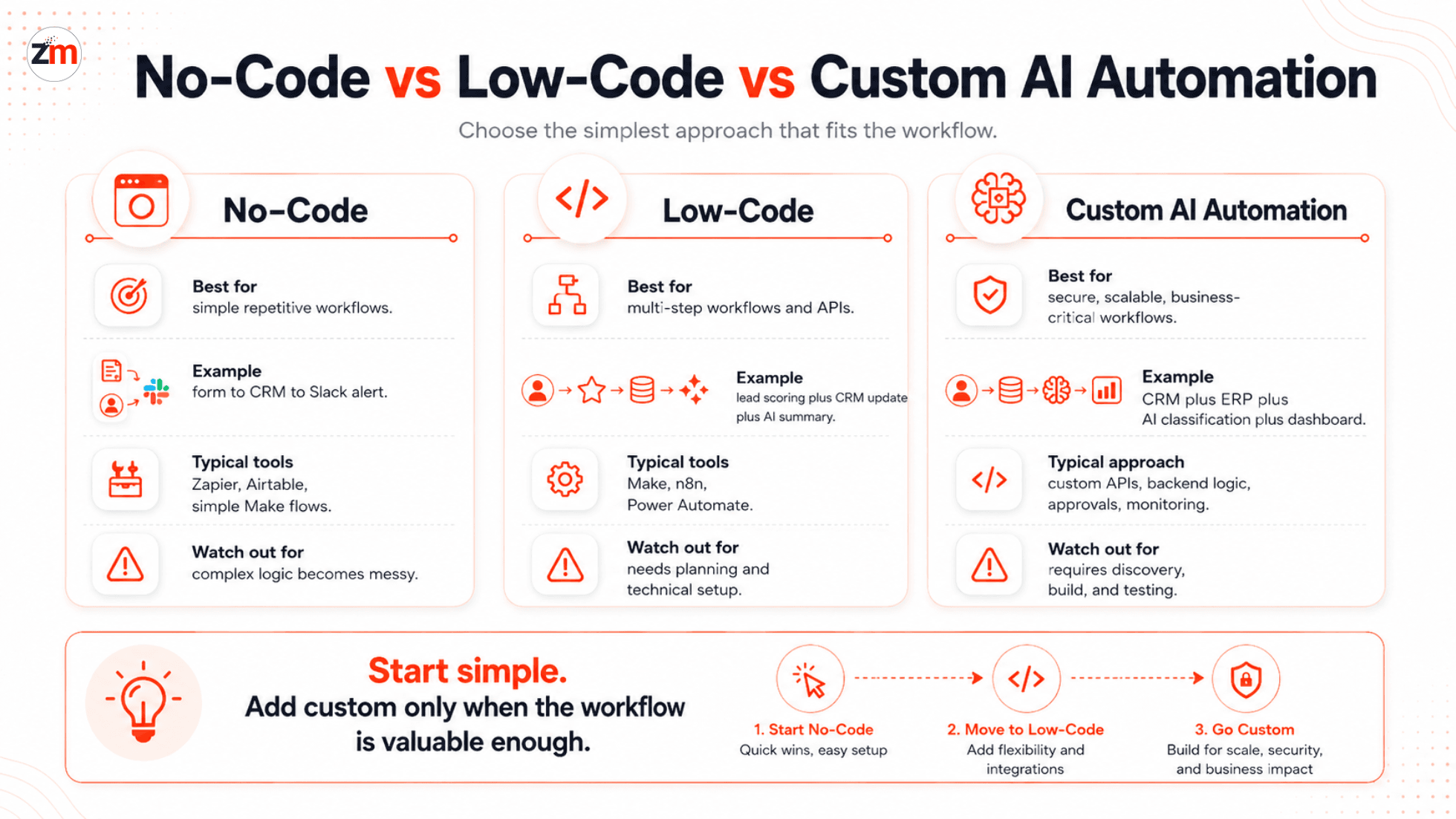
| Approach | Best For | Example | Limitation |
|---|---|---|---|
| No-code automation | Simple repetitive workflows | New form lead to CRM and Slack alert | Can become messy with complex logic |
| Low-code automation | Multi-step workflows with conditions and APIs | Lead scoring plus CRM update plus AI summary | Needs better planning and technical understanding |
| Custom AI automation | Secure, scalable, business-critical workflows | CRM plus ERP plus AI classification plus dashboard | Needs discovery, design, development, and testing |
Not sure which approach fits your workflow?
Start by mapping one repetitive process. Identify the trigger, tools involved, data movement, decision points, and failure risks. If the workflow touches multiple systems or needs reliable handoffs, workflow automation consulting can help you choose the right path before building anything.
How to Choose the Right AI Tool for Your Business
Before signing up for every AI app with a shiny homepage, check whether it actually fits your workflow.
A simple evaluation checklist:
- Workflow fit: What exact task should this tool automate?
- System fit: Does it connect with your CRM, email, helpdesk, ERP, project tool, or database?
- Data movement: What information moves between tools?
- Human review: Does the workflow need approval before action?
- Error handling: What happens if the automation fails?
- Security: Will the tool handle customer, financial, or private business data?
- Scalability: Will pricing or limits become painful as volume grows?
- Ownership: Who in your team will monitor and maintain the workflow?
For teams handling sensitive or high-impact AI workflows, the NIST AI Risk Management Framework is a useful external reference for thinking about AI trust, governance, and risk management.
The right tool should make your workflow simpler, not create a second workflow just to manage the tool. That is like buying a robot vacuum that needs three people to supervise it. Funny, but not useful.
How to Estimate ROI from AI Workflow Automation
AI automation ROI does not need to be complicated. Start with the work your team repeats every week.
A practical ROI check:
- How many hours does the task take each month?
- What is the average hourly cost of the people doing it?
- How many errors or delays happen because the task is manual?
- How much faster can the workflow become after automation?
- What is the monthly cost of the tool?
- What is the setup and maintenance effort?
For example, if a task takes 30 hours per month and the loaded team cost is $30 per hour, the manual cost is around $900 per month. If automation saves 60 percent of that time, the time-saving value is around $540 per month before counting fewer errors, faster replies, or better customer experience.
This does not mean every workflow deserves automation. If a task happens once a month and takes 10 minutes, leave it alone. Automating tiny tasks too early is how teams end up with a toolbox full of subscriptions and no real savings.
When Should You Hire an AI Automation Partner?
You do not need an automation partner for every small workflow. Many simple tasks can be handled with no-code tools. But support becomes useful when automation affects revenue, customers, operations, or important business data.
Consider expert help when:
- Your workflow involves CRM, ERP, SaaS, accounting, or internal databases
- You need custom API integrations
- Your team is manually moving data between multiple tools
- You need AI to classify, summarize, extract, or route business information
- You need approval steps, fallback logic, or audit logs
- You need dashboards, alerts, or reporting on top of the workflow
- Your current no-code automation keeps breaking
The goal is not to build custom software for every task. The goal is to choose the simplest reliable approach for the workflow. Sometimes that is Zapier. Sometimes it is Make or n8n. Sometimes it is a custom API integration with AI in the middle.
Final Thoughts
AI workflow automation is not about replacing your team with robots. It is about removing repetitive work so your team can spend more time on decisions, customers, strategy, and delivery.
The best way to start is not by buying ten tools. Pick one painful workflow. Map the steps. Check which systems are involved. Decide whether no-code is enough. Add AI only where it improves speed, accuracy, or decision-making.
Start small, measure the result, and then automate the next workflow. That is how automation becomes a business advantage instead of another confusing software experiment.
Need help choosing the right automation approach?
If your team has a workflow that is repeated every week, Zestminds can help you review whether no-code, low-code, or custom AI automation makes sense. Start with one workflow, not a giant transformation plan.
FAQs
What are the best AI workflow automation tools for business?
The best tools depend on your workflow. Zapier, Make, n8n, Microsoft Power Automate, ChatGPT, Claude, Fireflies, and Notion AI are useful for common tasks like CRM updates, meeting notes, support routing, content workflows, and reporting.
Can small businesses automate workflows without developers?
Yes, small businesses can automate simple workflows using no-code tools like Zapier, Make, Airtable, and n8n. Developer help becomes useful when workflows need custom APIs, complex logic, data security, or deep CRM/ERP integration.
What is the difference between no-code, low-code, and custom AI workflow automation?
No-code tools are best for simple app-to-app workflows. Low-code tools support more advanced logic and API connections. Custom AI automation is better for secure, scalable, or business-critical workflows that standard tools cannot handle well.
Which business workflows should be automated first with AI?
Start with repetitive, high-volume tasks such as lead routing, CRM updates, meeting summaries, support ticket classification, invoice processing, reporting, and follow-up emails. Avoid automating broken processes before fixing the workflow.
How do I choose the right AI automation tool for my business?
Check whether the tool integrates with your existing CRM, email, project management, support, and accounting systems. Also review pricing, workflow limits, data security, approval steps, failure handling, and ease of use for your team.
How can I measure ROI from AI workflow automation?
Measure hours saved, manual errors reduced, faster response times, lower admin effort, and revenue impact. Compare those savings with tool costs, setup time, maintenance, and any custom development required.
When should a company hire an AI automation partner instead of using tools alone?
Consider an AI automation partner when your workflow involves multiple systems, custom APIs, sensitive data, approval rules, dashboards, CRM/ERP integration, or AI decisions that need human review and reliable fallback logic.
Table of Contents
- Introduction
- Why AI Workflow Automation Matters for Businesses
- What Is AI Workflow Automation?
- AI Workflow Automation Tools Compared
- Best AI Tools for Business Workflow Automation
- Best AI Automation Tools by Business Function
- Real Use Cases: How Businesses Use AI to Reduce Manual Work
- Can You Automate Business Workflows Without Developers?
- No-Code vs Low-Code vs Custom AI Workflow Automation
- How to Choose the Right AI Tool for Your Business
- How to Estimate ROI from AI Workflow Automation
- When Should You Hire an AI Automation Partner?
- Final Thoughts
- FAQs
Shivam Sharma
Before You Scale Further, Review the Architecture.
Let’s evaluate where your system stands — and where it may break under growth.
Schedule an Architecture Review 30-minute technical discussion. No obligation.