
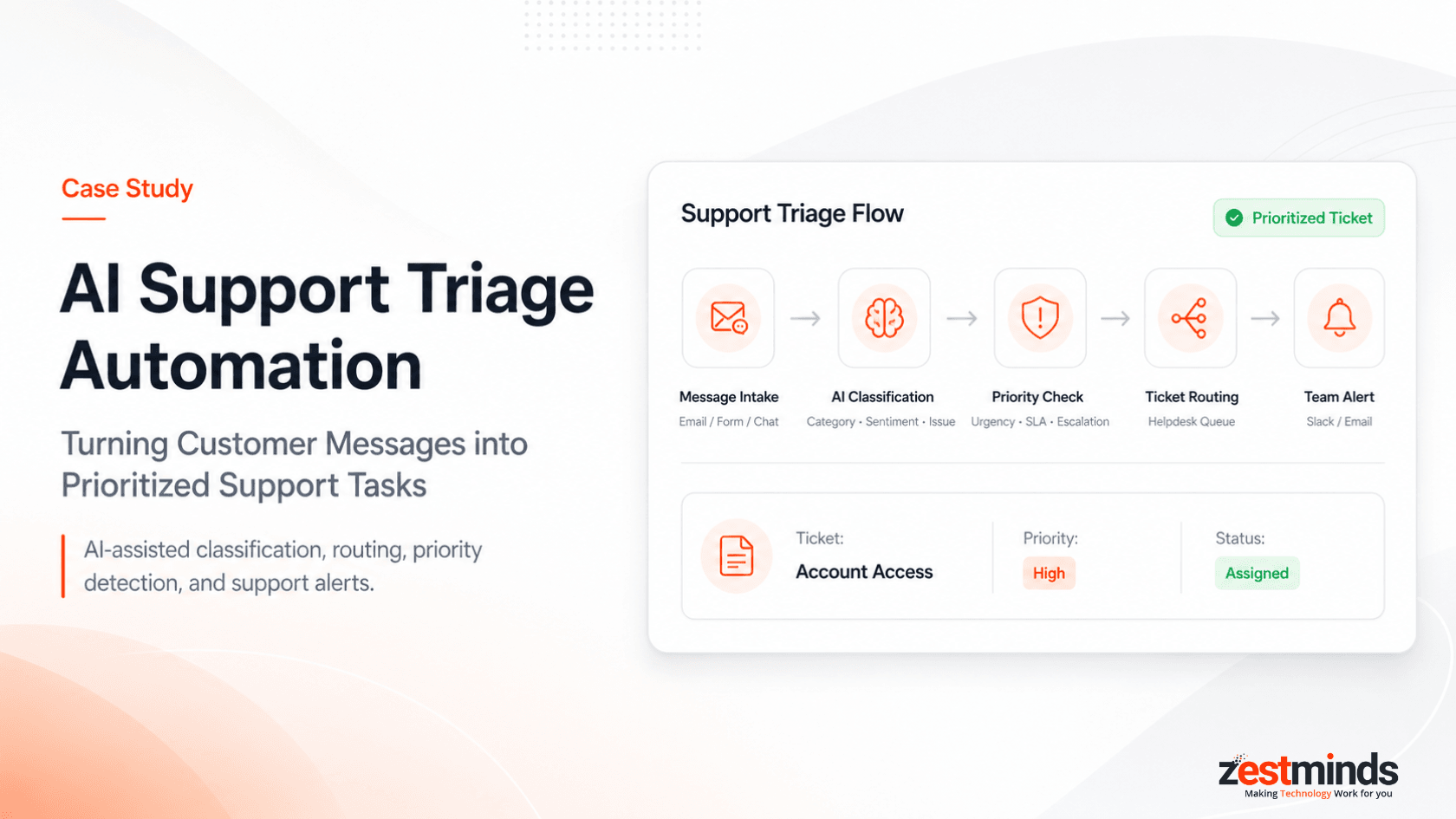
AI Support Triage Automation Case Study: Turning Customer Messages into Prioritized Support Tasks
Executive Summary
A support-heavy service business was receiving customer messages from multiple channels, including support email, website forms, chat inquiries, and internal escalation requests.
The support team had to read every message manually, understand the issue, identify the right category, check urgency, create or update a ticket, assign it to the right person, and notify the team when something needed immediate attention.
Zestminds built an AI-assisted support triage automation workflow using n8n, OpenAI/GPT APIs, a Freshdesk/Zendesk-style helpdesk system, Gmail/support inbox, Slack alerts, human review rules, and workflow logs.
The goal was not to replace the support team. The goal was to reduce repetitive first-level triage, improve routing consistency, identify urgent issues faster, and give support agents better context before they replied to customers.
Impact Highlights
| Area | Before Automation | After Automation |
|---|---|---|
| First-Level Triage | Around 8–12 minutes per message | Under 2 minutes per message for initial classification and routing |
| Manual Ticket Setup | Support agents manually created, categorized, and prioritized tickets | Manual ticket creation and categorization effort reduced by approximately 60–70% |
| Urgent Ticket Visibility | Urgent issues could get mixed with normal requests | High-priority and escalation cases were flagged within minutes |
| Support Context | Agents had to read every raw message from scratch | Agents started with AI-prepared summaries, category, priority, sentiment, and response direction |
| Human Control | Review depended on manual judgment after reading each message | Sensitive, high-priority, billing, account access, and escalation cases were marked for human review |
Impact figures are based on before-and-after workflow comparison for first-level support triage, ticket setup, categorization, and routing tasks during the automation rollout.
Project Snapshot
| Area | Details |
|---|---|
| Client Type | Support-heavy service business handling recurring customer requests |
| Function | Customer support, operations, internal issue routing, and escalation handling |
| Main Challenge | Manual ticket review, inconsistent categorization, delayed routing, slow first-level triage, and limited visibility into urgent requests |
| Support Sources | Gmail/support inbox, website forms, chat inquiries, and internal escalation requests |
| Solution | AI-assisted support triage and ticket routing workflow |
| Workflow Orchestration | n8n |
| AI Layer | OpenAI/GPT API |
| Ticketing Layer | Freshdesk / Zendesk-style helpdesk system |
| Notification Layer | Slack and email alerts |
| Human Role | Support team reviewed high-priority tickets, sensitive replies, billing issues, account access cases, and escalation scenarios |
| Business Impact | Faster triage, more consistent routing, better urgent-ticket visibility, reduced repetitive support work, and clearer workflow tracking |
Client Context
The client was a growing service business with a support team handling customer messages across different intake channels every day.
Some messages were simple questions. Some were technical issues. Some were billing-related. Others required escalation because the customer was frustrated, blocked, or waiting on a time-sensitive response.
The business did not need a generic chatbot. It needed a practical support operations workflow that could read incoming messages, understand the issue, prepare the ticket context, and route the request to the right person faster.
For every new message, the team needed to understand:
- what the customer was asking,
- which category the issue belonged to,
- whether the issue was urgent,
- whether the customer sounded frustrated,
- which team should handle it,
- whether a ticket already existed,
- what priority should be assigned,
- what information was missing,
- and what response should be prepared first.
The issue was not that the support team lacked capability.
The real issue was that too much time was going into repetitive first-level review, categorization, ticket setup, and routing before the actual support work could begin.
The client wanted AI to assist with support triage, but they did not want AI to blindly reply to every customer or make sensitive escalation decisions without human oversight.
Manual Support Triage Before Automation
Before automation, the support team manually reviewed every incoming message.
The usual workflow looked like this:
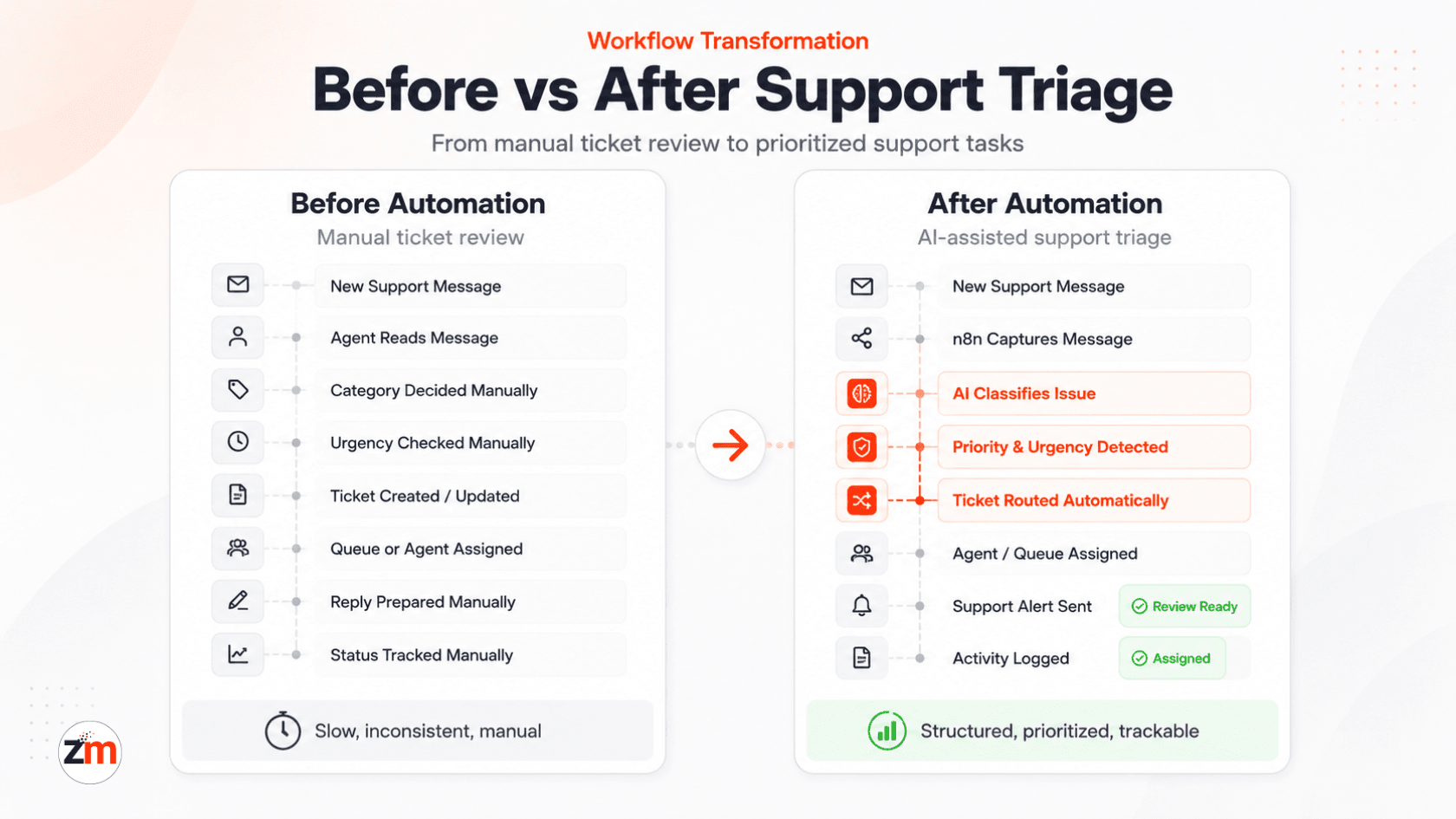
New support message received → Support agent reads manually → Issue category is identified → Urgency is checked → Ticket is created or updated → Agent/team is assigned → Reply is drafted → Status is tracked manually
This created several operational issues:
- Support messages from different channels were not always handled consistently.
- Agents spent time reading and categorizing repetitive issues.
- Urgent tickets were sometimes mixed with normal requests.
- Ticket categories and priorities varied by agent.
- Some tickets were assigned late or to the wrong queue.
- First response preparation took longer than needed.
- Support managers had limited visibility into pending, urgent, or misrouted requests.
- The team had to manually check whether a ticket needed escalation.
- Draft responses depended heavily on the individual agent's speed, tone, and context.
The client needed a more structured support intake process.
They did not want AI to replace support agents. They wanted AI to prepare the ticket context, reduce manual triage work, and help the team respond faster with better information.
The Core Challenge
The real challenge was not simply “support automation.”
The real challenge was turning unstructured customer messages into clear, prioritized, and actionable support tasks.
For every new message, the workflow had to answer practical support questions:
- Is this a technical issue, billing question, account problem, refund request, or general inquiry?
- Is the customer blocked or just asking for information?
- Is this urgent?
- Is the customer frustrated?
- Which team should handle it?
- Should this be escalated?
- What information is missing?
- What should the first response say?
- Does this need human review before replying?
Doing this manually for every support message slowed down the team and created inconsistency.
At the same time, fully automated customer replies were risky. Some tickets involved billing concerns, account access problems, frustrated customers, technical incidents, or sensitive operational issues.
AI should prepare and prioritize the support ticket, automation should route it to the right place, and humans should stay involved where judgment, empathy, or escalation is required.
What Zestminds Built
Zestminds built an AI-assisted support triage automation workflow as part of our AI workflow automation services, focused on reducing repetitive support triage while keeping human review in the right places.
The workflow connected incoming support sources, n8n automation, OpenAI/GPT-based ticket analysis, a helpdesk ticketing system, Slack alerts, human review rules, and workflow logs.
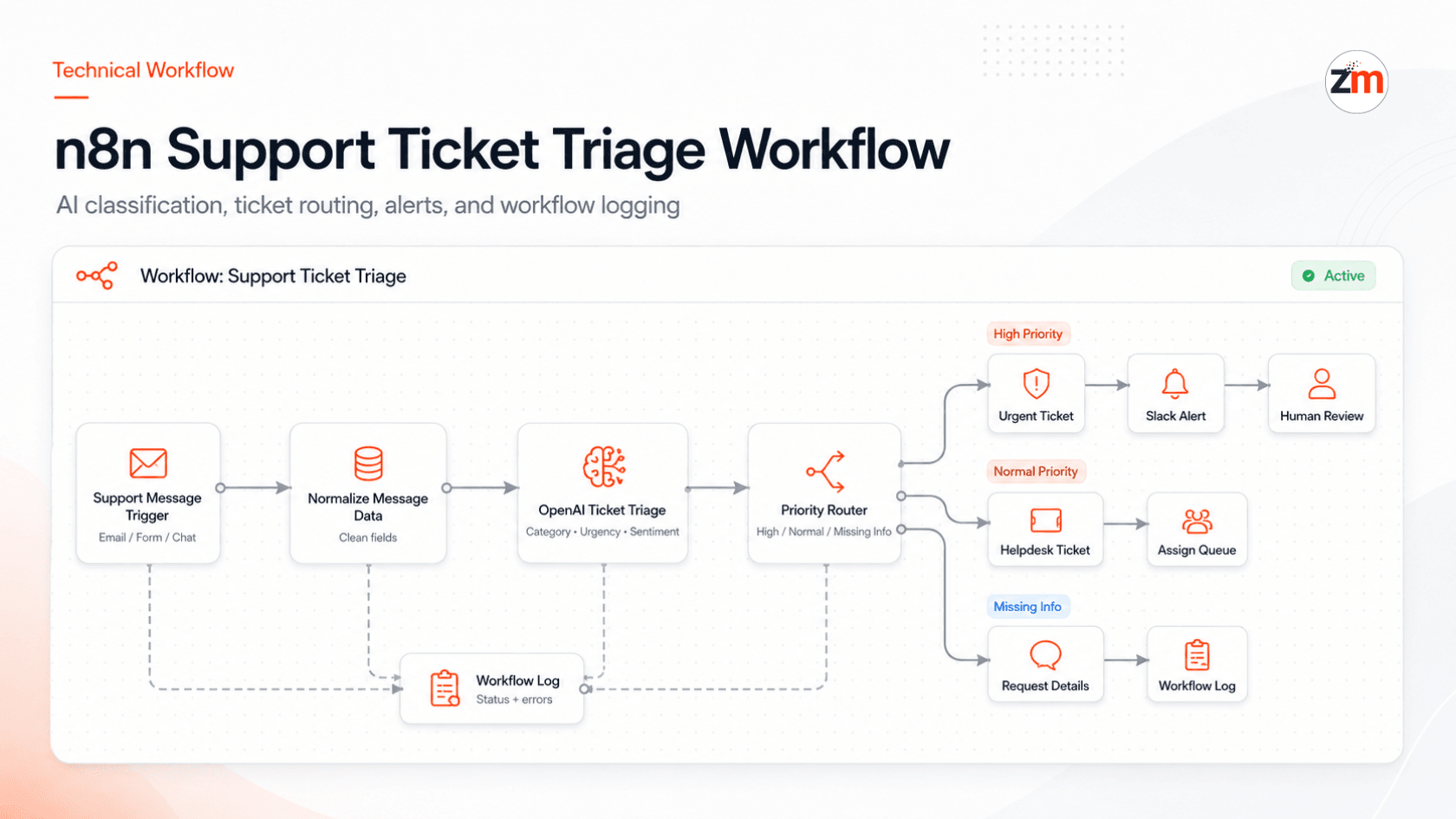
n8n acted as the orchestration layer. It captured incoming support messages, normalized the data, sent the message to the AI layer, handled routing conditions, and passed the structured output into the ticketing system and notification channels.
OpenAI/GPT APIs analyzed each message and prepared structured ticket intelligence, including issue summary, category, urgency level, customer sentiment, suggested priority, missing information, recommended queue, escalation flag, and draft response direction.
This type of implementation also connects closely with our AI development services, where the goal is not just to add AI, but to make it useful inside real business workflows.
The ticketing system was used to create or update support tickets, assign the right team or agent, set priority, and track status.
Slack and email alerts were triggered when a ticket required immediate attention, escalation, or human review.
AI prepares the support context. The support team still owns the customer experience.
Workflow After Automation
After automation, the support intake process became more structured, faster, and easier to manage.
The new workflow looked like this:
New support message received → n8n captures the message → AI summarizes and classifies the issue → Priority and urgency are detected → Ticket is created or updated → Agent/team is assigned → Slack/email alert is sent → Draft response is prepared → Human review rules are applied → Activity is logged
Automated Workflow Steps
- A new support message was received through email, website form, chat, or internal request.
- n8n captured the message and normalized the data.
- The message was sent to OpenAI/GPT for support triage analysis.
- AI generated a summary, category, urgency level, sentiment signal, suggested priority, and recommended next action.
- The workflow checked whether the case required human review.
- The helpdesk system created or updated the ticket.
- The ticket was assigned to the right queue, team, or support agent.
- High-priority or escalation cases triggered Slack or email alerts.
- AI prepared a draft response where appropriate.
- Human review was applied for sensitive, high-priority, or customer-facing replies.
- Workflow logs stored ticket status, routing decisions, alerts, review status, and errors.
Tech Stack Used
| Layer | Tool / Technology | Role |
|---|---|---|
| Support Intake | Gmail/support inbox, website forms, chat, internal requests | Captured incoming support messages from multiple channels |
| Workflow Orchestration | n8n | Message capture, data normalization, AI API calls, branching, routing, and workflow control |
| AI Triage | OpenAI/GPT API | Summarized tickets, classified issues, detected urgency, identified sentiment, and suggested response direction |
| Ticketing System | Freshdesk / Zendesk-style helpdesk | Ticket creation, priority assignment, queue routing, agent assignment, and status tracking |
| Notifications | Slack and email alerts | Alerted team members about urgent, escalated, or review-needed tickets |
| Human Review | Support manager / support agent | Reviewed sensitive tickets, edited draft responses, and approved customer-facing communication |
| Tracking | n8n logs and helpdesk activity logs | Tracked triage status, routing, alerts, review history, failures, and exceptions |
Because the workflow involved routing rules, ticketing logic, AI output handling, alerts, review controls, and error tracking, it required more than a simple tool-to-tool connection.
This is where custom software development becomes important for reliability, maintainability, and long-term workflow ownership.
AI Support Triage Logic
The AI layer was configured to turn customer messages into structured support ticket data.
For each support message, AI extracted:
- issue summary,
- ticket category,
- urgency level,
- customer sentiment,
- affected product or service,
- missing information,
- suggested priority,
- suggested team or queue,
- escalation flag,
- human review requirement,
- and draft response direction.
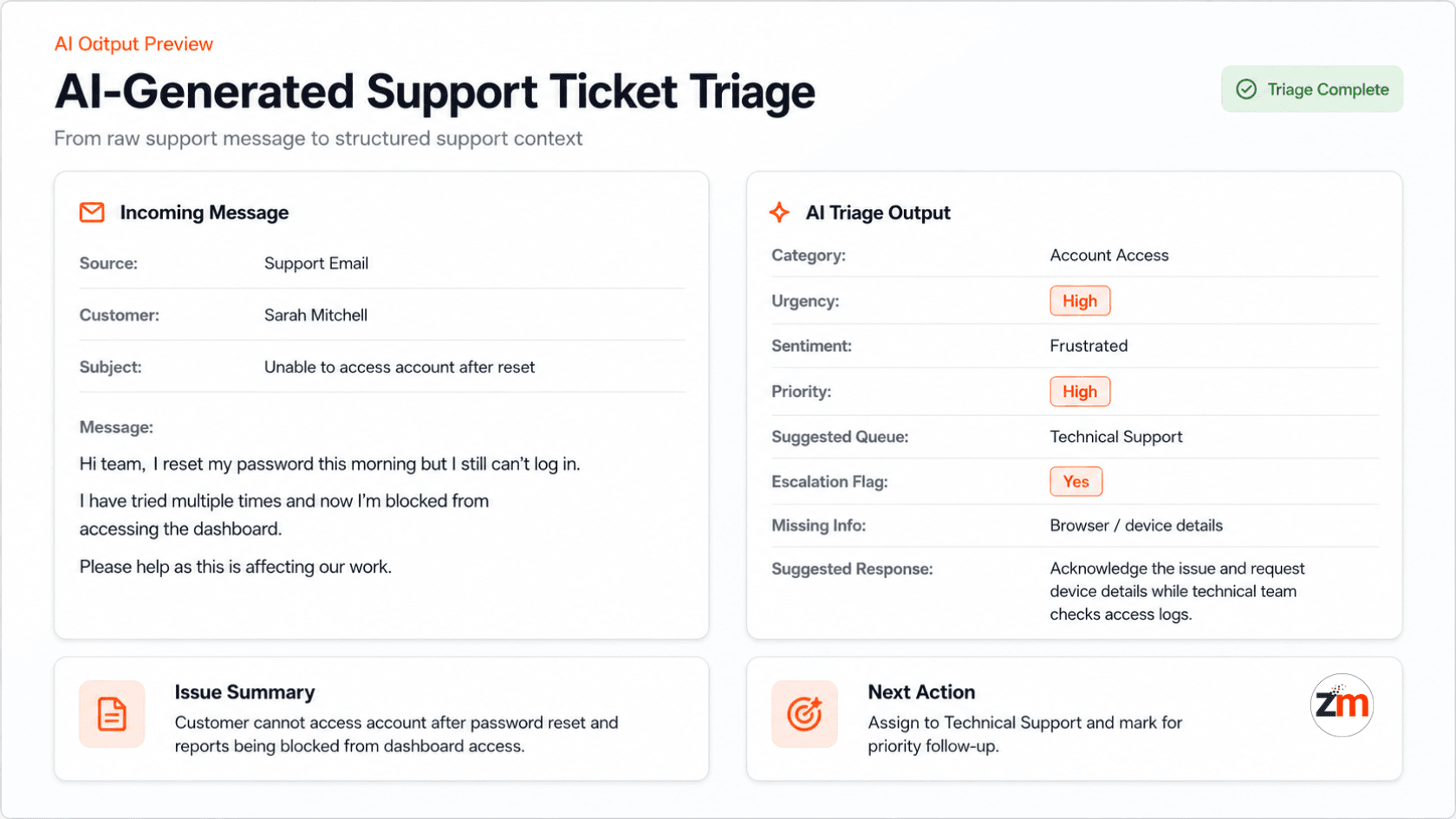
Example structured output:
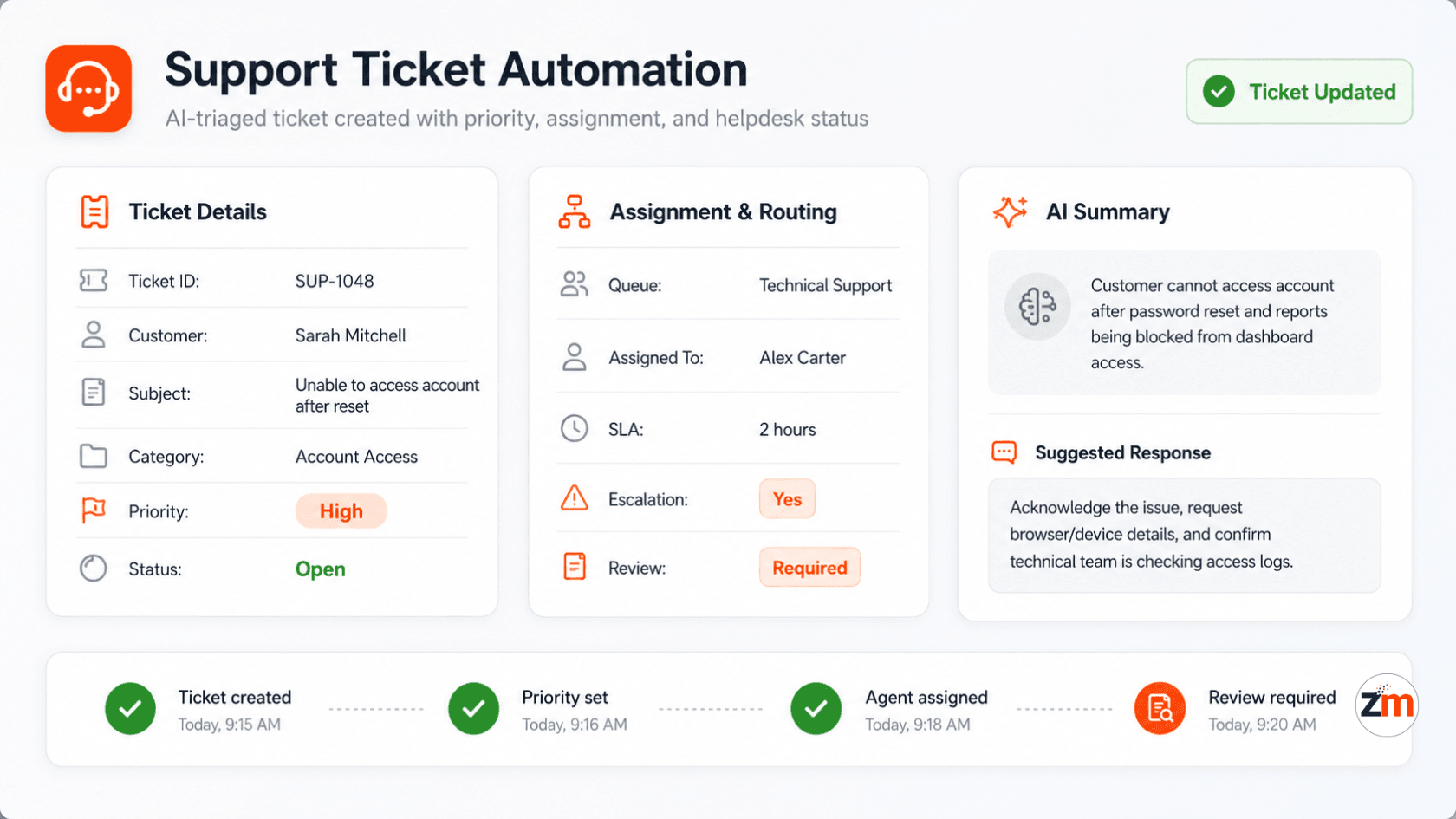
Issue Summary: Customer is unable to access their account after password reset.
Category: Account Access
Urgency: High
Sentiment: Frustrated
Suggested Priority: High
Suggested Queue: Technical Support
Missing Info: Browser/device details
Escalation Flag: Yes
Human Review Required: Yes
Suggested Action: Assign to technical support and send troubleshooting request
Draft Response: Acknowledge the issue and ask for device/browser details while confirming the team is checking access logs.
This gave the support team a clear starting point instead of a raw customer message.
Agents no longer had to read every message from scratch before understanding what needed to happen next.
Ticketing System Automation
After AI triage, the workflow pushed structured ticket data into the helpdesk system.
The ticketing system was used to:
- create new tickets,
- update existing tickets,
- assign categories,
- set urgency and priority,
- route tickets to the right queue,
- assign agents,
- attach AI-generated summaries,
- add internal notes,
- mark review-needed tickets,
- and track ticket status.
For example, a frustrated customer reporting an account access issue could be automatically categorized as “Account Access,” marked as high priority, routed to technical support, and flagged for human review before response.
A low-priority general question could be routed to a normal support queue with a suggested draft reply.
This helped the support team focus on the right tickets faster, without losing control over customer communication.
Safety, Review, and Control Rules
A key part of the workflow was deciding where AI could assist and where humans needed to stay in control.
The system was designed as a support triage assistant, not a blind auto-reply engine.
Human review was required for tickets involving:
- billing, refund, or payment-related issues,
- account access and security-sensitive requests,
- angry, frustrated, or high-risk customer sentiment,
- SLA-sensitive or time-sensitive issues,
- technical incidents or service interruptions,
- low-confidence AI classification,
- unclear customer intent,
- and responses that could affect customer trust or business risk.
The workflow also supported practical control rules:
- AI could summarize and classify the message.
- AI could suggest priority, queue, and next action.
- AI could prepare a draft response direction.
- Human agents could review, edit, approve, rewrite, or ignore the AI suggestion.
- Review-needed tickets were clearly marked inside the ticketing system.
- Escalation alerts were sent to the right team members.
- Workflow logs captured routing decisions, review status, and failed steps.
This made the automation safer for real support operations, where speed matters but customer tone, context, and judgment still matter too.
The strongest support automation does not remove humans from the loop. It removes repetitive sorting work so humans can focus on the cases that need attention.
Alerts, Escalations, and Human Review
The workflow notified the team when a ticket required immediate attention.
Depending on the AI triage output, the system could trigger:
- Slack alerts for urgent tickets,
- email alerts for support managers,
- escalation flags for frustrated customers,
- internal notes for support agents,
- review-needed status for sensitive cases,
- and draft responses for agent review.
Human review was especially important for:
- angry or frustrated customers,
- billing or refund requests,
- account access problems,
- SLA-sensitive issues,
- technical incidents,
- and customer-facing responses that needed careful wording.
The system did not blindly send every AI-generated response.
Instead, AI prepared the support context and suggested a response direction. The support team could review, edit, approve, or rewrite the final message.
This helped the client move faster without making the support experience feel careless, robotic, or risky.
Workflow Logs and Visibility
The automation also created better visibility into the support process.
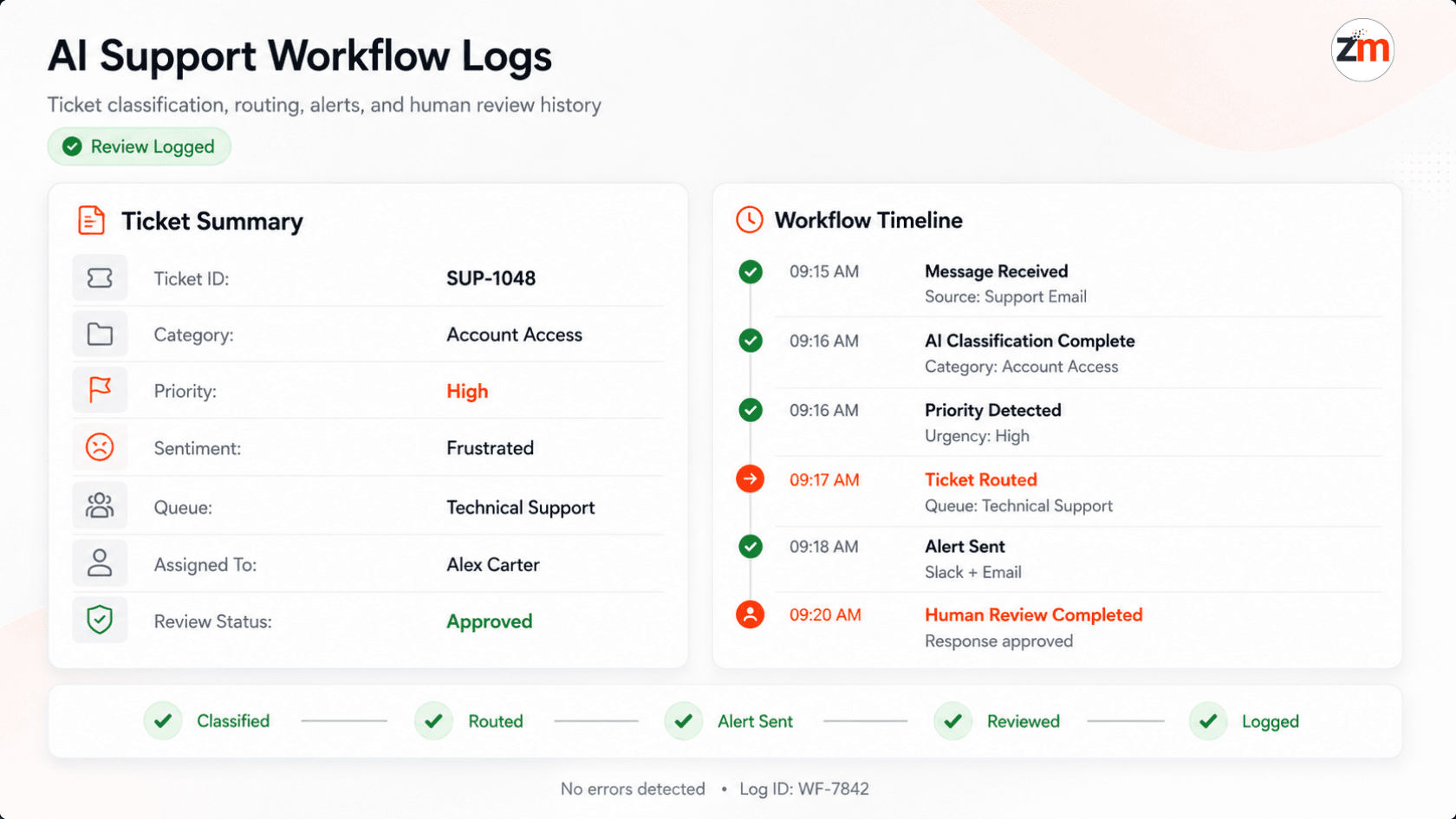
The team could track:
- when a support message was received,
- how AI classified the ticket,
- which category was assigned,
- which priority was assigned,
- which queue or agent received it,
- whether a Slack or email alert was sent,
- whether human review was required,
- whether the ticket was updated successfully,
- and whether the workflow completed or failed.
This helped the support team identify bottlenecks, missed routing, urgent cases, failed automation steps, and review-heavy categories.
For support operations, visibility matters because a workflow is only useful if the team can trust what happened inside it.
Results and Business Impact
The automation helped the client make support intake faster, more consistent, and easier to manage.
The impact included:
- first-level support triage reduced from around 8–12 minutes per message to under 2 minutes,
- manual ticket creation and categorization effort reduced by approximately 60–70%,
- urgent tickets became easier to identify within minutes,
- support tickets were routed more consistently,
- support agents started with AI-prepared summaries and suggested response direction,
- escalation cases became more visible to managers,
- sensitive tickets were marked for human review instead of being treated like normal requests,
- and the team had clearer logs of ticket routing, alerts, errors, and review activity.
| Business Area | Improvement |
|---|---|
| Speed | Support messages were classified, prioritized, and routed faster. |
| Consistency | Ticket categories, urgency levels, and routing decisions became more standardized. |
| Visibility | Managers could identify urgent, escalated, failed, and review-needed tickets more clearly. |
| Agent Productivity | Agents spent less time sorting messages and more time resolving customer issues. |
| Customer Experience | Urgent and sensitive cases could be handled faster with better context. |
| Operational Control | AI assisted the workflow, but humans remained responsible for final customer communication. |
The workflow did not replace support agents.
It gave them a better starting point, so they could spend less time sorting tickets and more time helping customers.
This is the kind of business process improvement Zestminds focuses on through business process automation services: practical workflow automation that reduces repetitive work while keeping teams in control.
What This Project Proves About Zestminds
This project shows Zestminds' ability to build AI-assisted support automation workflows for real customer operations.
The work was not just about connecting an inbox to a ticketing tool.
It required understanding how support teams triage messages, how ticket categories and urgency should be assigned, when customer sentiment matters, when escalation is needed, and where human review should remain part of the process.
The workflow combined:
- n8n automation,
- OpenAI/GPT-based ticket triage,
- helpdesk ticketing automation,
- Slack and email alerts,
- draft response preparation,
- human review rules,
- workflow logs,
- and support operations thinking.
This is where Zestminds brings value as an AI workflow automation partner: by combining automation tools, AI APIs, ticketing workflows, and business process understanding into practical systems that help real teams work faster and more consistently.
For businesses already using CRMs, helpdesks, support inboxes, or internal operation tools, similar workflows can also connect with AI CRM automation, sales operations, onboarding, reporting, and internal task routing.
You can also explore more Zestminds work across AI, automation, and product engineering on our case studies page.
Frequently Asked Questions
Which tools were used in this AI support triage workflow?
The workflow used n8n for orchestration, OpenAI/GPT APIs for AI ticket triage, a Freshdesk/Zendesk-style helpdesk system for ticket creation and routing, and Slack/email alerts for team notifications.
What did AI do in the workflow?
AI analyzed incoming support messages and generated a summary, category, urgency level, sentiment signal, suggested priority, escalation flag, human review requirement, and draft response direction.
Did AI automatically reply to every customer?
No. AI could prepare draft responses, but sensitive, urgent, billing-related, account-related, or customer-facing replies could still be reviewed and edited by the support team before sending.
Why was human review included?
Human review was included because support conversations often require judgment, empathy, business context, and careful wording. AI helped prepare the ticket, but the support team controlled final customer communication.
Can this type of workflow work with Zendesk or Freshdesk?
Yes. Similar AI support triage workflows can be connected with Zendesk, Freshdesk, HubSpot Service Hub, Gmail, shared inboxes, internal forms, Slack, and other helpdesk or support tools depending on the business process.
Is n8n required for this type of support automation?
No. n8n was used in this case because it fit the workflow requirements. Similar systems can also be built using Make.com, Zapier, custom APIs, backend services, or a mix of automation tools and custom software depending on reliability, scale, and integration needs.
What was the main business benefit?
The workflow reduced manual triage time, improved ticket categorization, helped identify urgent issues faster, gave support agents better context before responding, and kept humans involved for sensitive communication.
Need Help Automating Support Triage?
Zestminds can help you build an AI-assisted support triage workflow that connects your support inbox, helpdesk, team alerts, and human review process.
Whether your support requests come from email, forms, chat, CRM, or internal escalations, we can help turn raw messages into prioritized support tasks with AI-assisted classification, routing, draft response preparation, and human review controls.
If your team is spending too much time reading, sorting, assigning, and escalating support messages manually, this is a strong use case for practical AI workflow automation.
Table of Contents
- Impact Highlights
- Project Snapshot
- Client Context
- Manual Support Triage Before Automation
- The Core Challenge
- What Zestminds Built
- Workflow After Automation
- Tech Stack Used
- AI Support Triage Logic
- Ticketing System Automation
- Safety, Review, and Control Rules
- Alerts, Escalations, and Human Review
- Workflow Logs and Visibility
- Results and Business Impact
- What This Project Proves About Zestminds
- Frequently Asked Questions
- Need Help Automating Support Triage?
Before You Scale Further, Review the Architecture.
Let’s evaluate where your system stands — and where it may break under growth.
Schedule an Architecture Review 30-minute technical discussion. No obligation.