
AI Workflow Automation Case Study: Reducing Manual Review and Follow-Up Work
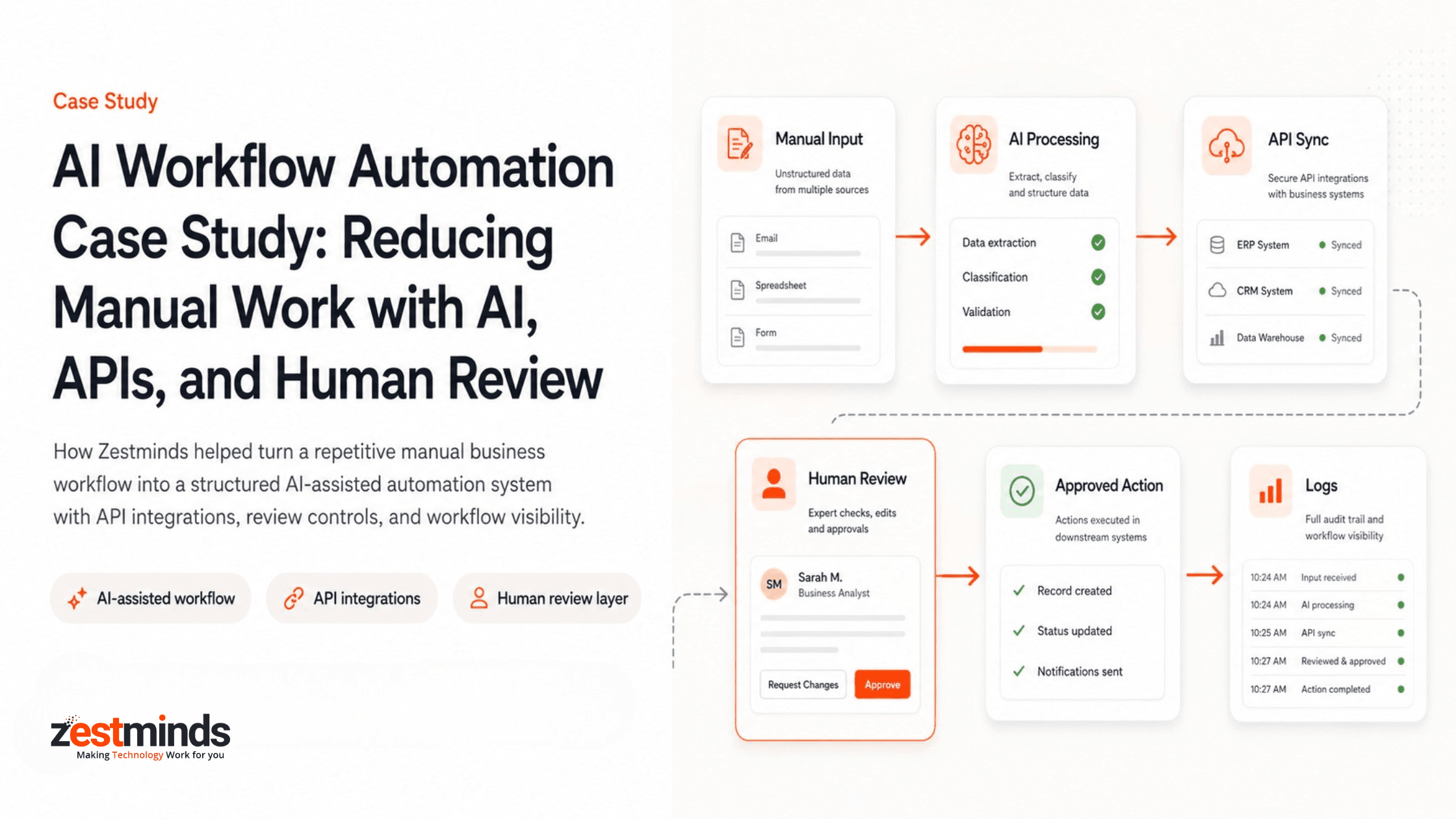
Executive Summary
A service-based business was spending significant operational time manually reviewing incoming requests, preparing summaries, updating Monday.com CRM records, assigning follow-up tasks, and notifying team members through Slack and Gmail.
Zestminds built an AI-assisted workflow automation system using Make.com, FastAPI, OpenAI/GPT APIs, Monday.com CRM, Slack, Gmail, a human review layer, and workflow logs. The system helped turn a repetitive manual process into a structured, trackable workflow where AI prepared the output and humans stayed in control before final actions were completed.
Project Snapshot
- Client Type: Service-based business with repetitive operational workflows
- Main Challenge: Manual review, copy-paste work, inconsistent CRM updates, delayed task assignment, and scattered follow-ups
- Solution: AI-assisted workflow automation using Make.com, FastAPI, OpenAI/GPT APIs, Monday.com CRM, Slack, Gmail, human review, and workflow logs
- Automation Layer: Make.com for workflow triggers, routing, and simple automation handoffs
- Custom API Layer: FastAPI for business rules, validation, AI processing endpoints, approval handling, and system communication
- AI Layer: OpenAI/GPT APIs for summarization, classification, extraction, missing information detection, and suggested next actions
- CRM Layer: Monday.com CRM for record updates, task creation, workflow status, and assignment tracking
- Notification Layer: Slack for internal alerts and Gmail for email notifications or follow-up messages
- Human Role: Review, edit, approve, or reject AI-prepared output before final action
- Business Impact: Reduced repetitive preparation work, improved consistency, faster review, and better workflow visibility
Client Context
The client’s team managed recurring business requests that needed to be reviewed, summarized, categorized, updated in Monday.com CRM, assigned to the right person, and followed up through internal and email communication.
Most of the work was not technically difficult, but it was repetitive. A team member had to open the request, read the details, extract the important points, prepare a short summary, update the CRM record, assign a task, notify the team, and track whether the next action was completed.
As request volume increased, the workflow became slower and more dependent on individual team members. The client wanted to reduce repetitive work without giving AI full control over business decisions.
The requirement was clear: automate the preparation and routing work, but keep a human approval step before CRM updates, task creation, or follow-up actions were completed.
Manual Workflow Before Automation
Before automation, the workflow depended heavily on manual effort.
The typical process looked like this:
New request received → Manual review → Details copied → Summary prepared → Monday.com CRM updated → Task assigned → Slack/Gmail follow-up sent → Status tracked manually
This created several operational problems:
- Team members repeated the same review and update steps for each request.
- Important details were copied manually between emails, forms, notes, and Monday.com CRM.
- Summaries and internal notes were not always consistent.
- Task assignment depended on manual follow-up.
- Slack alerts and Gmail notifications were sometimes delayed.
- CRM status updates were not always completed at the right time.
- There was limited visibility into what had been reviewed, approved, updated, or missed.
- Fully autonomous AI was not suitable because final actions still needed human judgment.
The client needed a workflow where AI could reduce repetitive preparation work, but the team could still review and approve the output before final actions happened.
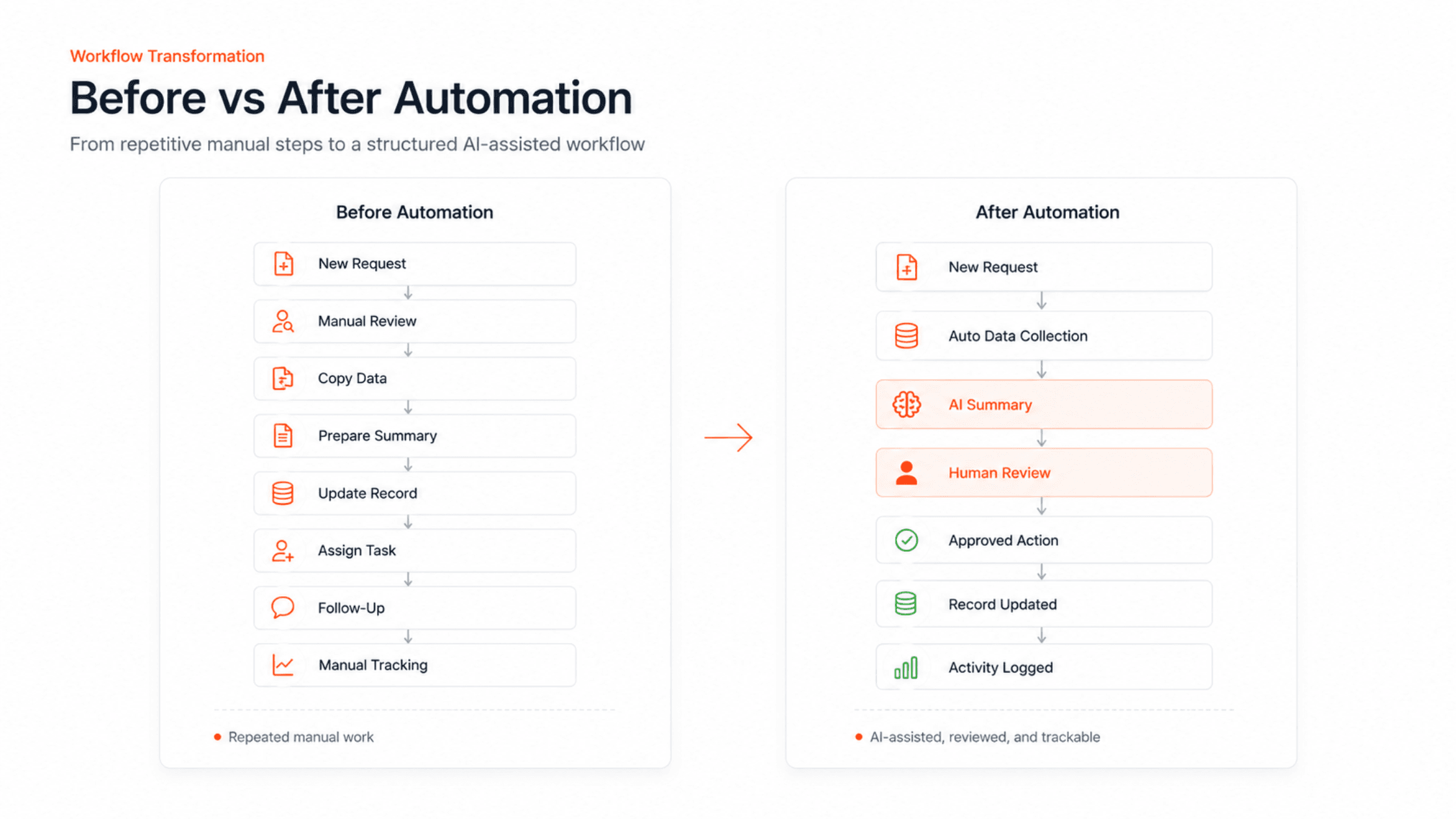
The Core Challenge
The core challenge was not just that the team was doing manual work.
The real issue was that the workflow had no structured automation layer between intake, AI processing, CRM updates, task assignment, team notifications, and activity tracking.
For each request, the team had to manually decide:
- what information was important,
- how the request should be summarized,
- which category it belonged to,
- what action should happen next,
- who should handle the follow-up,
- what should be updated in Monday.com CRM,
- whether a Slack alert or Gmail notification was needed,
- and when the workflow could be marked as complete.
This created delays, inconsistent execution, and limited visibility.
At the same time, the workflow could not be fully handed over to AI. If AI generated the wrong summary, selected the wrong category, or triggered the wrong action automatically, the team could lose control over the process.
The goal was to use AI as a workflow assistant, not as an uncontrolled decision-maker.
What Zestminds Built
Zestminds built an AI-assisted workflow automation system that connected Make.com, FastAPI, OpenAI/GPT APIs, Monday.com CRM, Slack, Gmail, a human review layer, and workflow logs into one practical operating flow.
The workflow started when a new request entered the system. Make.com captured the trigger and routed the request into the automation flow. FastAPI handled the custom backend logic, data validation, AI processing requests, approval status, and API communication between systems.
The OpenAI/GPT API generated a structured summary, category, priority, missing information, and suggested next action. Before anything was pushed forward, the team reviewed the AI-prepared output through a human approval layer.
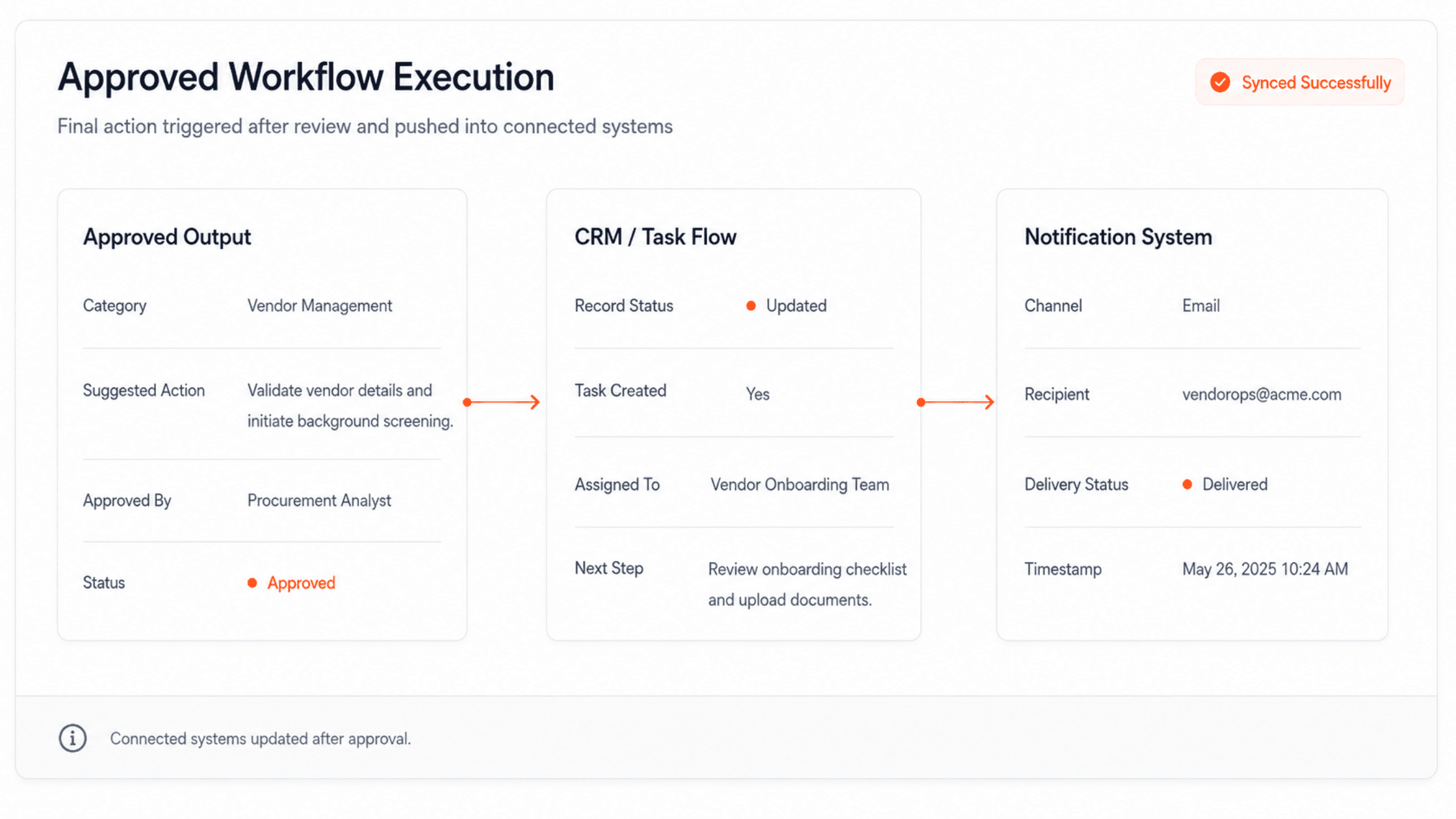
After approval, the workflow updated the relevant Monday.com CRM record, created or updated follow-up tasks, sent internal alerts through Slack, and triggered Gmail-based email notifications where needed.
The system was designed so automation could move the workflow forward, AI could prepare structured output, and humans could approve important actions before they were completed.
For businesses planning similar systems, Zestminds provides AI workflow automation services focused on practical tool integrations, human review, API reliability, and production-ready implementation.
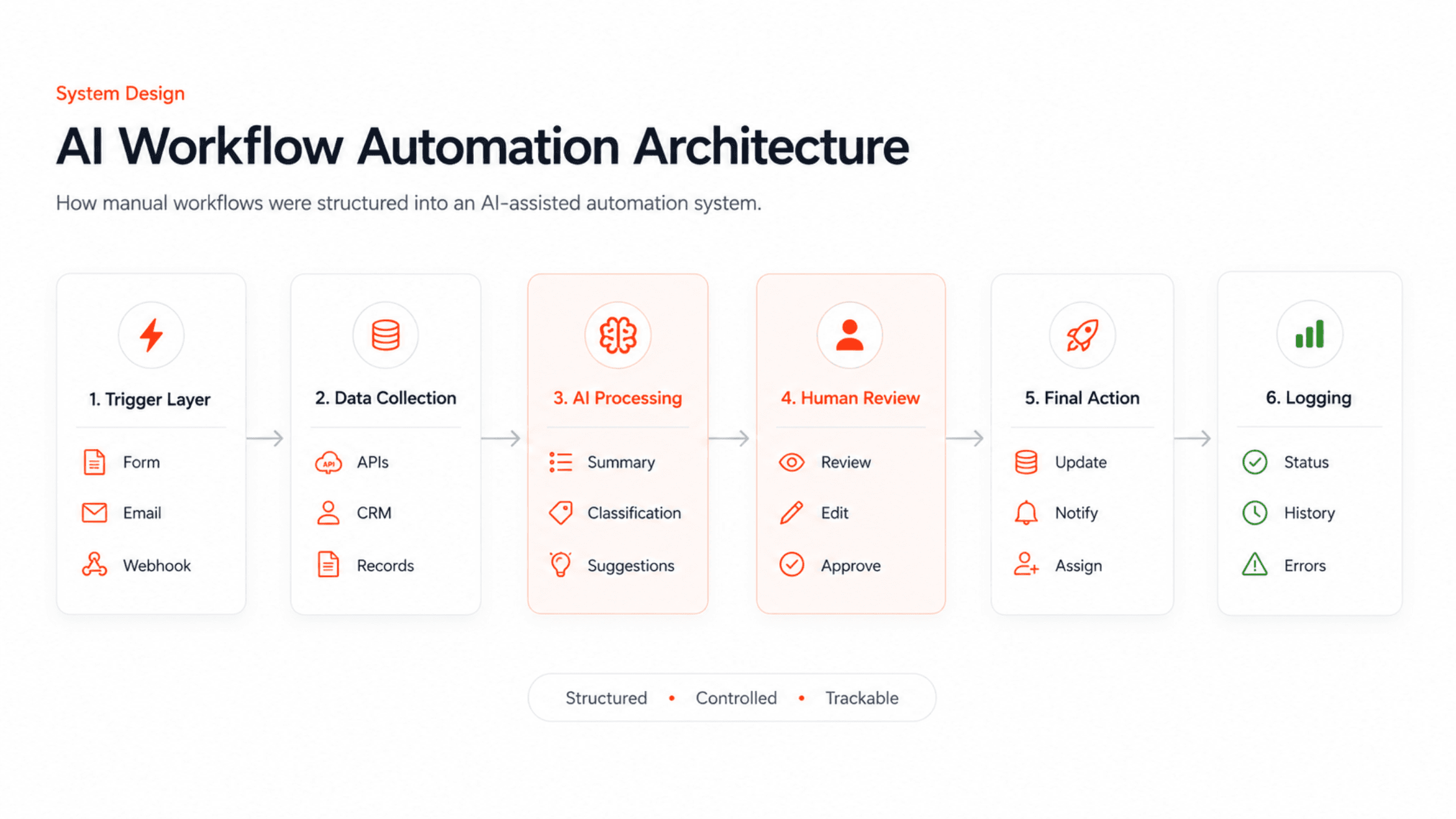
Workflow After Automation
After automation, the workflow became more structured and easier to manage.
The new process looked like this:
New request received → Make.com trigger → FastAPI validation and AI processing → Human review → Monday.com CRM update → Slack alert → Gmail notification → Workflow log updated
The system reduced repetitive manual work while keeping the team involved in important decisions.
Automated Workflow Steps
- A new request, lead, email, form submission, or internal record entered the workflow.
- Make.com captured the trigger and routed the request to the next automation step.
- FastAPI received the request data, validated the payload, and prepared it for AI processing.
- OpenAI/GPT API generated a structured summary, category, priority, missing information, and suggested next action.
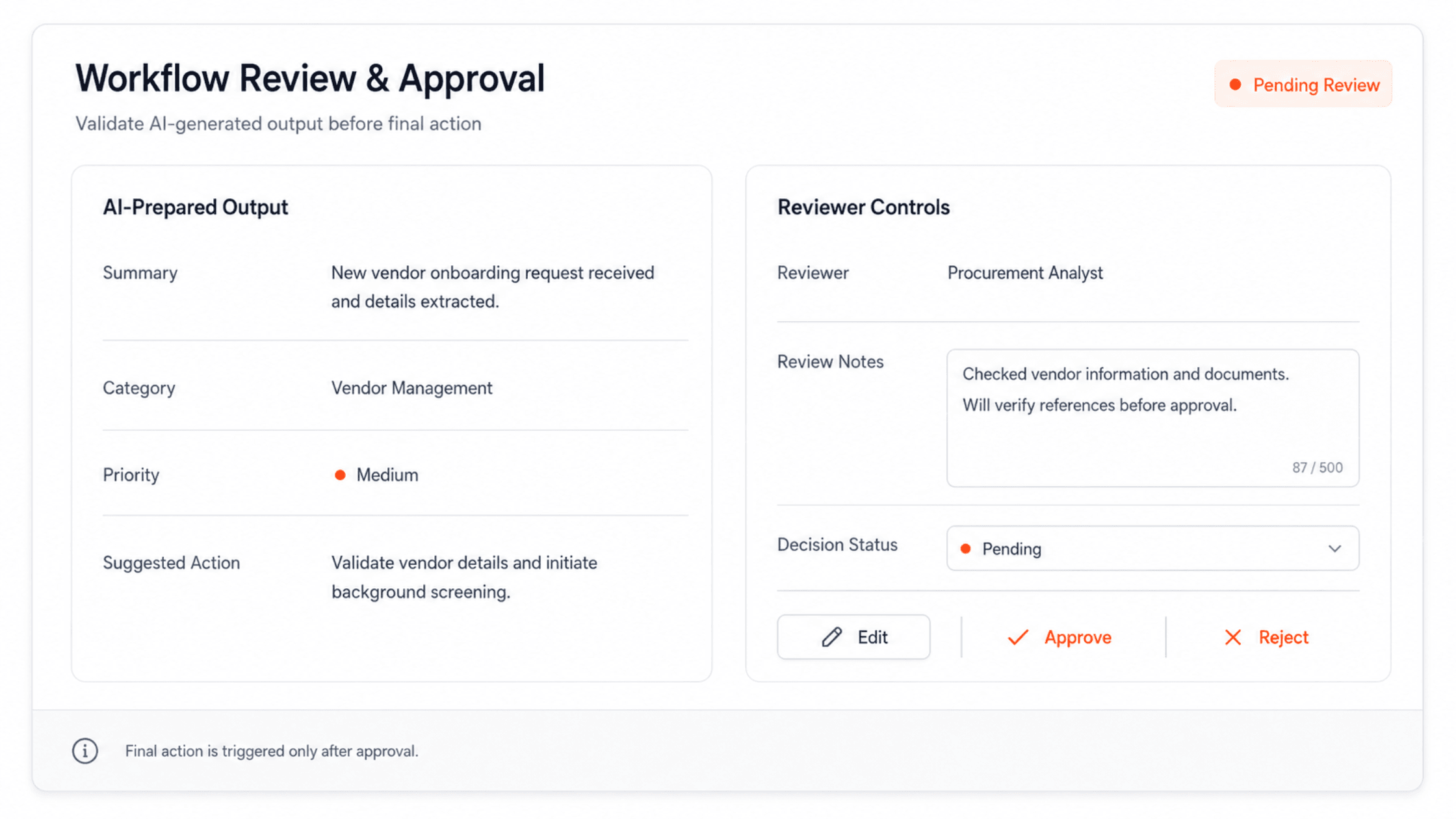
- The human review screen allowed the team to edit, approve, or reject the AI-prepared output.
- After approval, FastAPI pushed the approved data to Monday.com CRM.
- Monday.com CRM was updated with the latest status, task details, assignment, or next action.
- Slack alerts were sent to notify the internal team.
- Gmail notifications or follow-up messages were triggered where required.
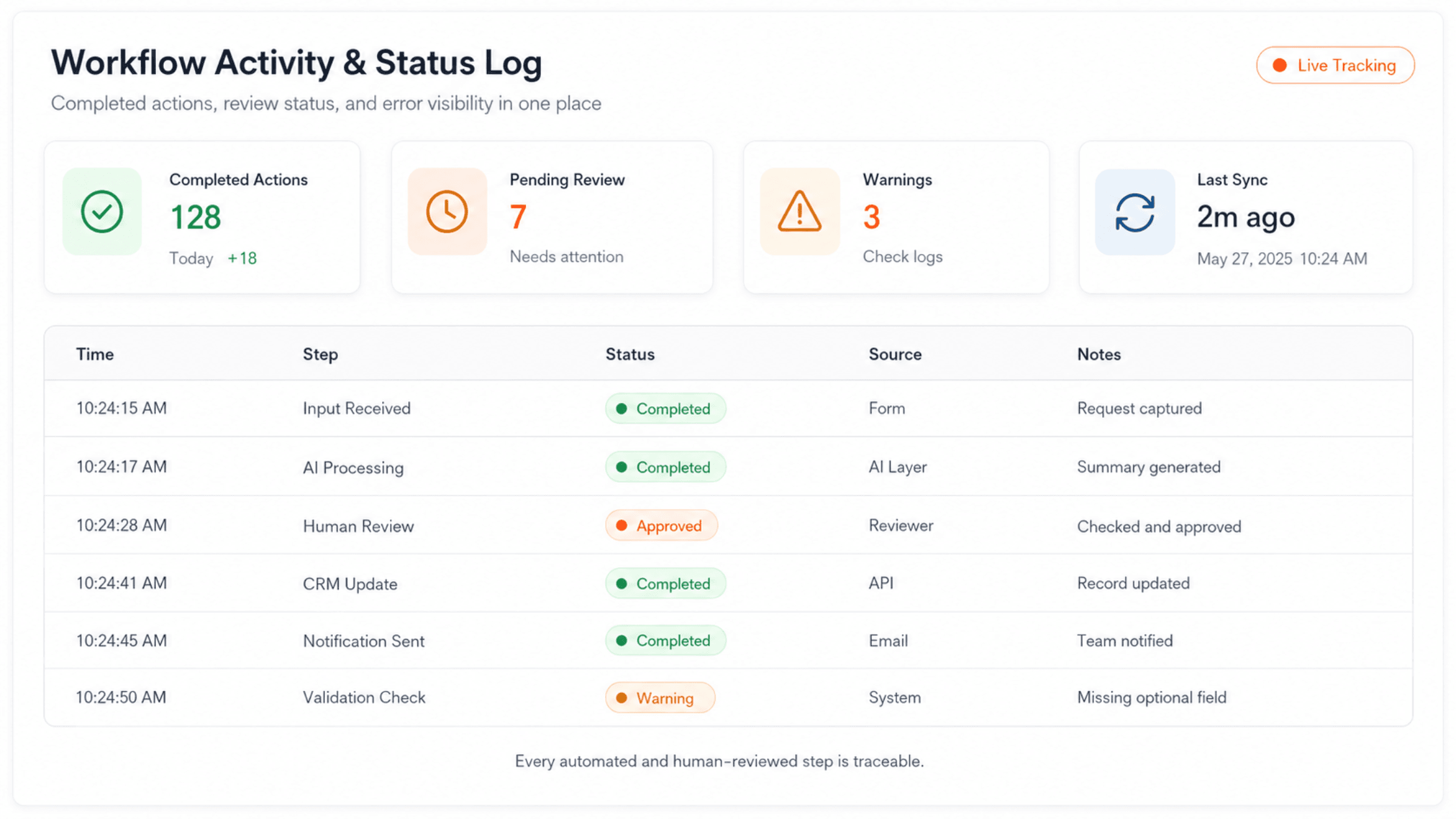
- The workflow log stored completed actions, review decisions, status changes, warnings, and errors.
Tech Stack Used
The stack was selected around the actual workflow requirement: capture the intake, process the data, prepare AI output, allow human approval, update CRM records, send notifications, and track the workflow.
| Layer | Tool / Technology | Role in the Workflow |
| Automation Routing | Make.com | Captured workflow triggers, routed incoming requests, and connected simple automation handoffs. |
| Custom API Layer | FastAPI | Handled business rules, validation, AI processing endpoints, approval status, and API communication. |
| AI Processing | OpenAI / GPT API | Generated summaries, categories, priorities, missing information, and suggested next actions. |
| CRM and Task Tracking | Monday.com CRM | Stored workflow records, task assignments, status updates, and follow-up actions. |
| Internal Notifications | Slack | Sent alerts to the internal team when review, approval, or follow-up was needed. |
| Email Notifications | Gmail | Triggered email notifications or follow-up messages based on approved workflow output. |
| Human Review | Custom Review Interface | Allowed the team to review, edit, approve, or reject AI-prepared output before final action. |
| Tracking | Workflow Logs | Stored status changes, completed actions, review decisions, warnings, and errors. |
Solution Architecture
The workflow was built in clear layers so every part of the system had a defined responsibility.
- Trigger Layer: New requests entered the workflow through form submissions, emails, or internal intake sources.
- Automation Routing Layer: Make.com captured the trigger and routed the request into the automation flow.
- Custom API Layer: FastAPI handled validation, workflow rules, approval status, and communication between AI, CRM, notifications, and logs.
- AI Processing Layer: OpenAI/GPT APIs extracted key details, summarized the input, classified the request, identified missing information, and suggested the next action.
- Human Review Layer: The review screen allowed the team to edit, approve, or reject AI-prepared output.
- CRM and Action Layer: Monday.com CRM received approved updates, task assignments, status changes, or next-step actions.
- Notification Layer: Slack and Gmail sent internal alerts and follow-up notifications.
- Logging Layer: Workflow logs stored completed steps, review decisions, warnings, and error states.
This structure made the workflow easier to maintain, extend, and troubleshoot. It also helped avoid over-automation by keeping important business actions under human review.
When workflows require deeper business rules, approval controls, secure integrations, dashboards, or custom backend logic, this type of implementation often overlaps with custom software development rather than simple tool-to-tool automation.
Role of AI in the Workflow
AI was used to reduce repetitive cognitive work, not to replace human decision-making.
The AI layer helped the team by:
- extracting important details from incoming requests,
- summarizing long or unstructured inputs,
- classifying requests into relevant categories,
- identifying priority and missing information,
- preparing draft internal notes or responses,
- suggesting next actions,
- and converting messy input into structured workflow data.
The AI acted as an assistant inside the workflow. It prepared the first version of the output, but the final decision stayed with the team.
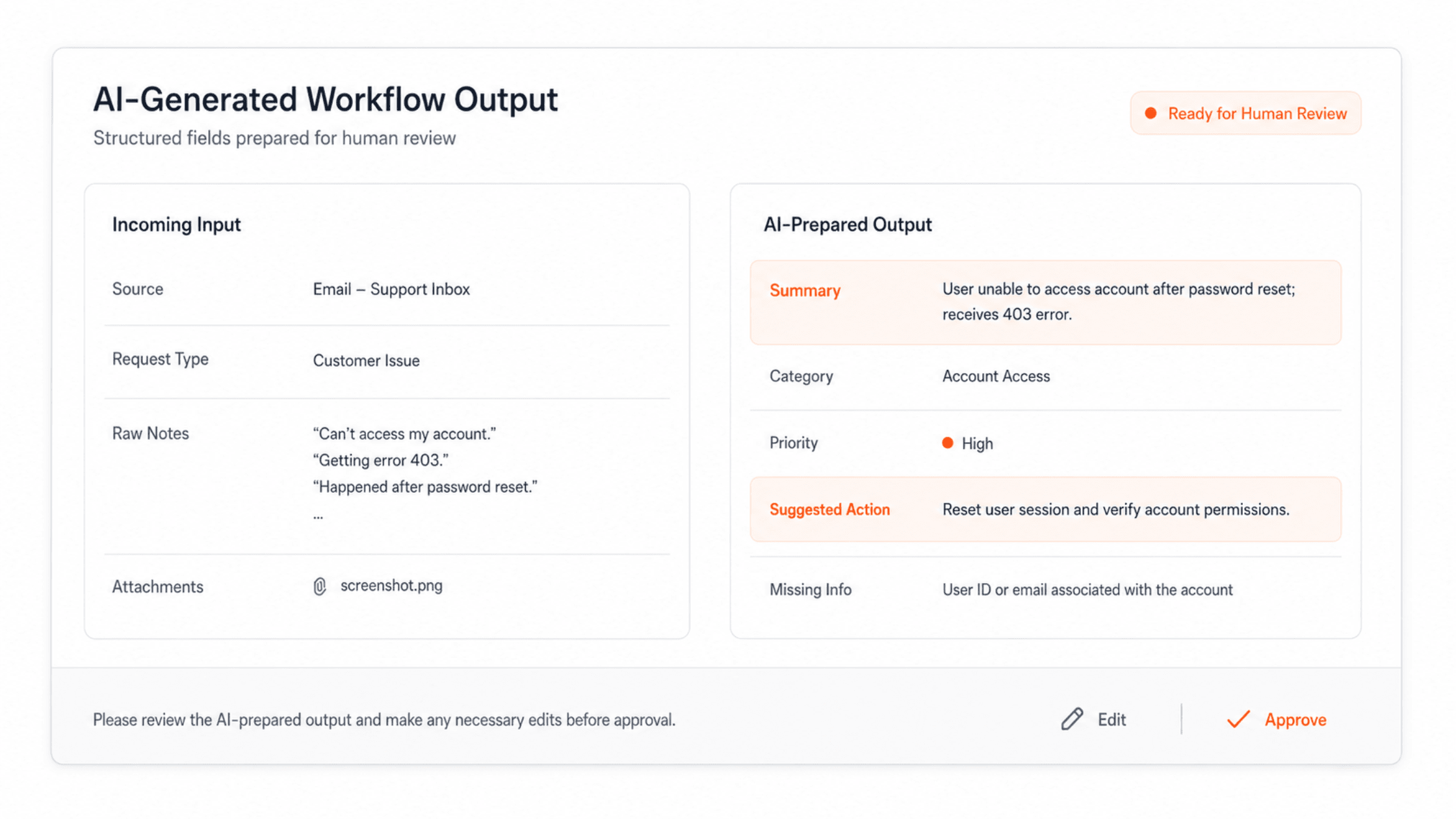
Human Review Layer
A fully autonomous workflow was not the right approach for this use case.
Some actions still required business context, judgment, or quality control. For that reason, Zestminds added a human review step before Monday.com CRM updates, task changes, Slack alerts, or Gmail follow-ups were completed.
The review layer allowed the team to:
- check AI-generated summaries,
- edit draft notes or responses,
- approve or reject suggested actions,
- correct categories if needed,
- review sensitive cases,
- and prevent incorrect CRM updates, task assignments, or follow-up messages.
This made the workflow safer and more practical for real business use.
The goal was not to remove humans from the process. The goal was to remove repetitive preparation work so humans could focus on decisions.
CRM Updates, Notifications, and Logging
Once the AI-prepared output was approved, the workflow completed the next operational actions automatically.
- Monday.com CRM: Updated the relevant record, changed workflow status, added task details, or assigned the next step to the right person.
- Slack: Sent internal alerts when a request was ready, approved, assigned, or required attention.
- Gmail: Triggered email notifications or follow-up messages where required.
- Workflow Logs: Stored approval status, completed actions, failed steps, warnings, timestamps, and review decisions.
This helped the team see what happened after approval instead of relying on manual memory or scattered updates.
Implementation Approach
Zestminds followed a workflow-first implementation approach.
1. Workflow Mapping
The first step was to understand the existing manual process.
We mapped:
- where the workflow started,
- which data was needed for review,
- which steps were repetitive,
- what had to be updated in Monday.com CRM,
- where Slack alerts were useful,
- where Gmail notifications were needed,
- where AI could help,
- where human approval was necessary,
- and what should be logged for tracking and debugging.
2. Automation Design
After mapping the workflow, we separated the system into practical layers:
- Make.com trigger and routing,
- FastAPI validation and workflow logic,
- AI processing,
- human review,
- Monday.com CRM update,
- Slack and Gmail notifications,
- and workflow logging.
This helped keep the workflow understandable and avoided unnecessary complexity.
3. AI Processing Setup
The AI layer was configured to produce structured outputs instead of vague responses.
For example, the AI could prepare:
- summary,
- request category,
- priority indicator,
- suggested next action,
- missing information,
- and draft response or internal note.
This made the output easier for the team to review and use.
4. Human Review Interface
A review step was added so the team could validate AI-generated output before completion.
This improved trust in the workflow and reduced the risk of incorrect automated actions.
5. Final Action and Logging
Once the output was approved, the workflow completed the final action automatically.
This could include updating a Monday.com CRM record, assigning a task, sending a Slack alert, triggering a Gmail notification, moving the item to the next stage, or storing the action in the workflow history.
Before and After
| Before Automation | After Automation |
| Team manually checked incoming requests. | Make.com captured the trigger and started the workflow. |
| Important details were copied manually. | FastAPI collected, validated, and prepared data for processing. |
| Summaries were prepared manually. | OpenAI/GPT generated first-draft summaries, categories, priorities, and suggested actions. |
| Follow-ups depended on manual action. | Approved actions triggered Monday.com CRM updates, Slack alerts, and Gmail notifications. |
| Status was tracked manually. | Workflow logs stored completed actions, warnings, approval status, and errors. |
| Review quality varied by person. | Review became more structured through a human approval layer. |
| Scaling required more manual effort. | More requests could be processed with fewer manual touchpoints. |
Results and Business Impact
The automation helped reduce repetitive manual effort across the workflow.
Instead of preparing every step from scratch, the team could review AI-prepared output and focus on exceptions, decisions, and final approvals.
The impact included:
- reduced manual copy-paste work,
- faster first-level review,
- more consistent summaries and internal notes,
- more consistent Monday.com CRM updates,
- faster Slack alerts for internal visibility,
- more structured Gmail follow-up notifications,
- clearer workflow visibility,
- better task routing and follow-up,
- reduced dependency on individual team members,
- and a more scalable operational process.
The system did not replace the team. It gave the team a better operating layer where Make.com handled trigger routing, FastAPI handled custom workflow logic, AI handled repetitive preparation, and humans handled judgment.
What This Project Proves About Zestminds
This project shows Zestminds’ ability to build practical AI workflow automation systems using real automation tools, custom APIs, AI processing, CRM integrations, notifications, and human review.
The work was not limited to a simple AI prompt or a basic tool-to-tool automation. The workflow connected Make.com, FastAPI, OpenAI/GPT APIs, Monday.com CRM, Slack, Gmail, approval controls, and workflow logs into one structured process.
The goal was not to build an AI demo.
The goal was to improve a real operational workflow where incoming requests had to be captured, processed, reviewed, approved, updated, assigned, notified, and tracked.
This is where Zestminds brings value as an AI workflow automation partner, by combining automation tools, AI APIs, CRM workflows, custom backend logic, notifications, and production-grade thinking around real business needs.
Frequently Asked Questions
Which tools were used in this AI workflow automation project?
The workflow used Make.com, FastAPI, OpenAI/GPT APIs, Monday.com CRM, Slack, Gmail, a custom human review layer, and workflow logs.
What was Make.com used for?
Make.com was used to capture workflow triggers, route incoming requests, and connect simple automation steps before the request moved into custom processing.
What was FastAPI used for?
FastAPI was used for custom API logic, validation, AI processing endpoints, approval status handling, and communication between the automation flow, AI layer, Monday.com CRM, Slack, Gmail, and logs.
Why was human review included?
Human review was included because the client did not want AI to complete important workflow actions without approval. The team could review, edit, approve, or reject AI-prepared output before CRM updates, task changes, Slack alerts, or Gmail notifications were completed.
Did AI replace the team?
No. AI reduced repetitive preparation work such as summarization, classification, extraction, and suggested actions. The team remained responsible for review, approval, and final decisions.
Need Help Automating a Repetitive Business Workflow?
Zestminds can help you map the process, identify where AI can safely add value, and build an automation system using the right mix of automation tools, APIs, CRM integrations, notifications, and human review.
Whether your workflow needs Make.com, FastAPI, OpenAI/GPT APIs, Monday.com CRM, Slack, Gmail, internal dashboards, or custom backend development, we can help you design an automation system that is practical, reliable, and human-controlled.
Table of Contents
- Project Snapshot
- Client Context
- Manual Workflow Before Automation
- The Core Challenge
- What Zestminds Built
- Workflow After Automation
- Tech Stack Used
- Solution Architecture
- Role of AI in the Workflow
- Human Review Layer
- CRM Updates, Notifications, and Logging
- Implementation Approach
- Before and After
- Results and Business Impact
- What This Project Proves About Zestminds
- Frequently Asked Questions
- Need Help Automating a Repetitive Business Workflow?
Before You Scale Further, Review the Architecture.
Let’s evaluate where your system stands — and where it may break under growth.
Schedule an Architecture Review 30-minute technical discussion. No obligation.