
Backend State Model for Scalable AI Workflows in Production
Most AI workflow failures in production are not only model failures. They are often backend state failures. The system does not clearly know which step is running, what failed, what was retried, what needs human review, which model version was used, or how much cost has already been spent.
A scalable AI workflow needs more than a working prompt, notebook, or API demo. It needs a backend architecture that can track state, resume failed steps, control retries, monitor cost, and keep every decision traceable as real users, messy data, and business systems enter the picture.
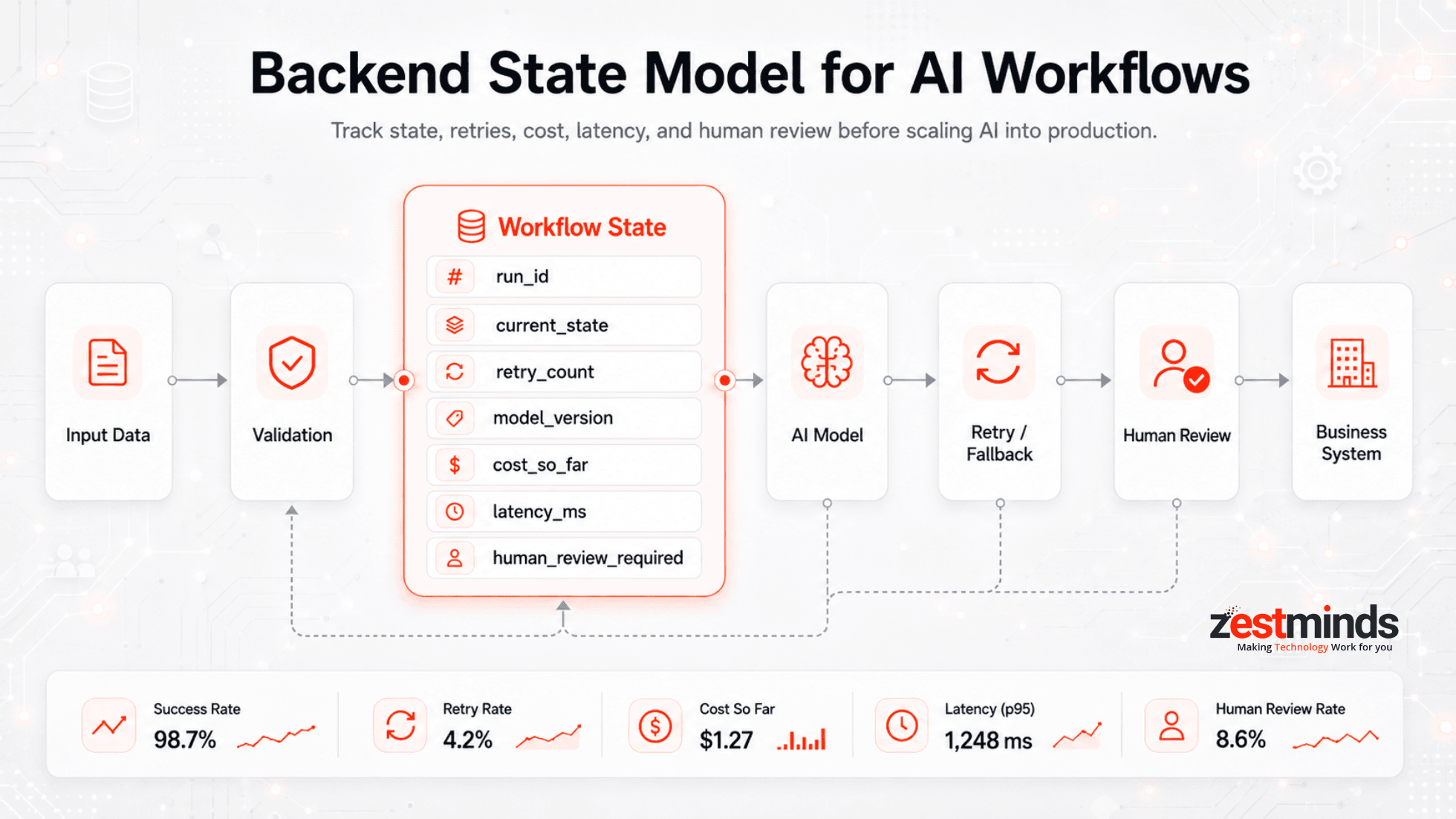
In practical terms, a backend state model for AI workflows is the structure that tracks each workflow run from start to finish: queued, validating, processing, waiting for tools, retrying, waiting for human review, completed, or failed. This guide explains how CTOs, founders, and engineering teams can design scalable AI workflows that survive real production conditions.

What Is a Backend State Model for AI Workflows?
A backend state model for AI workflows is the system of records that tracks what is happening inside an AI-powered process at every step. It gives the workflow a memory that is separate from the model response itself.
For example, an AI lead qualification workflow may need to know:
- Has the lead data been validated?
- Has the company profile been enriched?
- Did the CRM check succeed or fail?
- Which model and prompt version scored the lead?
- Was the confidence score high enough to continue?
- Does the result need human approval before outreach?
Without explicit backend state, the workflow becomes a chain of hopeful API calls. It may work in a demo, but it becomes difficult to debug, retry, pause, resume, or audit once real users and business systems are involved.
A production-ready state model usually tracks:
- Workflow identity
- Current execution state
- Step-level status
- Retry count and failure reason
- Input and output references
- Model and prompt versions
- Cost and latency data
- Human review status
- Final business outcome
This is why experienced teams treat AI workflows like backend systems, not just model integrations. The model may generate the intelligence, but the backend state model keeps the system reliable.
Need to take an AI workflow from prototype to production?
A structured architecture review can help identify where state, retries, monitoring, or business-system integrations need to be improved before scaling.
Why AI Demos Don't Survive Production
A demo answers one question: "Can this idea work?" Production answers a very different one: "Can this system keep working when things go wrong?"
AI demos are easy to get excited about. A notebook runs. An API responds. A stakeholder says yes. Then the workflow goes live, usage grows, and suddenly the system feels slow, expensive, unpredictable, or difficult to fix.
The problem is rarely just the model. Most production issues happen because everything around the model was not designed to scale.
The demo mindset
In demos:
- Inputs are clean
- Load is predictable
- Failures are ignored or handled manually
- Costs are not measured closely
- A developer is nearby to fix issues
This is fine for exploration. It is risky for production.
The hidden production realities
Once an AI workflow goes live:
- Input data becomes messy and inconsistent
- Users send unexpected formats, long documents, or incomplete information
- Third-party APIs slow down, timeout, or rate-limit requests
- Latency stacks up across multiple workflow steps
- Retry storms increase cost
- Models quietly degrade as data changes
- Business users need approvals, audit trails, and clear ownership
A demo is like testing a bridge with one car. Production is when thousands of vehicles cross it every day, in bad weather, with no engineer standing underneath. That is why scalable AI workflows need explicit state, monitoring, fallback paths, and human review where needed.
These principles also align with broader production reliability thinking, where systems are designed for failure, recovery, observability, and graceful degradation. Google Cloud's reliability guidance is a useful reference for teams thinking beyond the demo stage: Google Cloud reliability principles.
Core Components of a Production-Grade AI Workflow
A scalable AI workflow is not a single model call. It is a coordinated backend system where each component has a clear responsibility.
It helps to think less in terms of a "smart API" and more like a distributed application with intelligence embedded inside.
1. Ingestion and validation
Every production workflow starts with input control. Before data reaches a model, the backend should validate formats, normalize fields, reject invalid payloads, and detect edge cases.
Good ingestion logic protects the workflow from:
- Malformed data
- Missing required fields
- Unsupported file types
- Very large inputs
- Unexpected languages or formats
Production systems do not assume "reasonable" inputs. They assume reality will be messy.
2. Deterministic pre-processing
One common scaling mistake is pushing everything into the model. Not everything needs AI.
Rule-based steps are often better for:
- Metadata checks
- Simple routing decisions
- Keyword filters
- Input trimming and normalization
- Threshold-based decisions before LLM calls
The more work you can do deterministically, the calmer your system behaves at scale. This is especially useful when building AI workflows with FastAPI and LangGraph as part of a broader backend architecture.
3. Model execution layer
The model execution layer should be treated like any other dependency: powerful, useful, and unreliable by default.
Production considerations include:
- Timeouts
- Controlled retries
- Versioned prompts
- Versioned models
- Structured input and output contracts
- Fallback behavior if model output is incomplete or invalid
If the backend does not track which model and prompt version generated a result, debugging becomes guesswork later.
4. Post-processing and decisioning
Raw model output is rarely production-ready. Most workflows need another layer that validates, normalizes, and decides what happens next.
Post-processing may include:
- JSON schema validation
- Confidence scoring
- Business rule checks
- Duplicate detection
- Human review routing
- CRM, ERP, or support system updates
For example, if an LLM extracts contract data but misses a required field, should the workflow retry, use a fallback parser, or send the record to manual review? These decisions should be part of the workflow design, not last-minute patches.
5. Persistence and state management
Production workflows need memory. This does not mean storing everything forever. It means storing the right state at the right level so the system can continue, recover, and explain what happened.
A reliable persistence layer should track:
- Inputs and outputs
- Current workflow state
- Step-level execution history
- Retries and failures
- Human approvals
- Business system updates
Stateless demos do not scale. Stateful systems do, but only when state is explicit and well controlled.
Workflow State vs Session State
Many AI applications mix workflow state and session state. That creates confusion later, especially in chat-based tools, AI agents, CRM automations, support workflows, and document-processing systems.
Session state helps the application remember a user interaction. Workflow state helps the backend remember the execution progress of a business process. They are related, but they should not be treated as the same thing.
| State Type | What It Tracks | Example |
|---|---|---|
| Session State | User conversation, UI context, temporary preferences | A chatbot remembers the user's last question |
| Workflow State | Backend execution progress across steps | A lead qualification workflow is waiting for CRM verification |
| Audit State | What happened, when, why, and through which model/tool | Prompt version, model version, output, and approval history |
| Business State | Status inside CRM, ERP, ticketing, or internal systems | A lead is marked qualified in CRM after human approval |
This separation matters because business workflows often touch multiple systems. An AI support triage workflow, for example, may start in a helpdesk, call an LLM, classify urgency, check customer history, route to a team, and update the ticket. If session state and workflow state are mixed, the system becomes hard to monitor and harder to trust.
Building AI workflows around business systems?
AI workflows connected to CRM, ERP, support, sales, or operations data need clear state, approval paths, and reliable integrations.
Example Backend State Model for AI Workflows
A good backend state model does not need to be complicated at the start. It needs to be explicit enough for the workflow to be observable, recoverable, and safe to operate.
Here is a practical example of fields a production AI workflow may track.
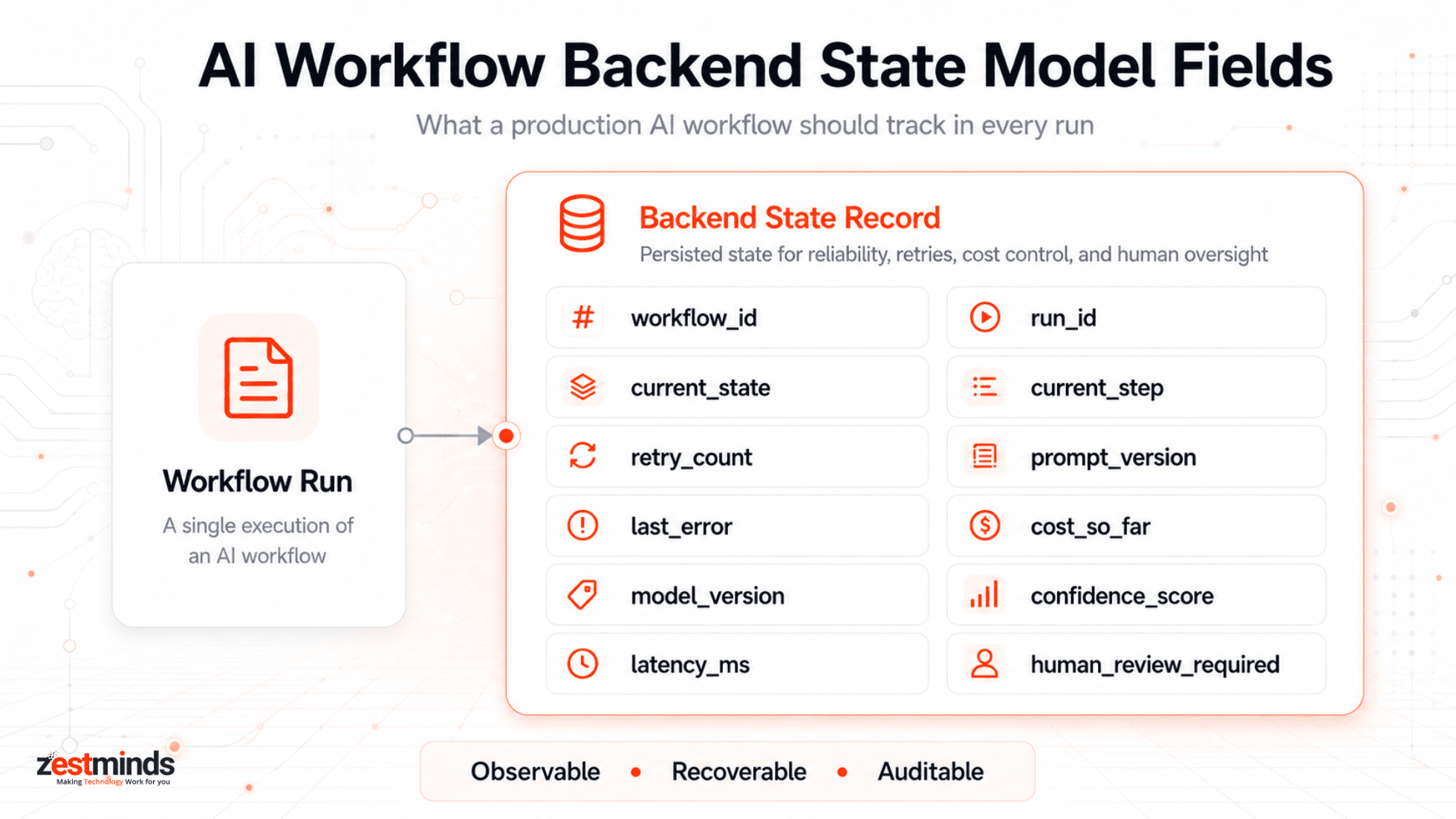
| State Field | Purpose | Example |
|---|---|---|
| workflow_id | Identifies the workflow type | lead_qualification |
| run_id | Tracks one workflow execution | run_84721 |
| current_state | Shows the current workflow status | waiting_for_human_review |
| current_step | Shows the active workflow step | crm_history_check |
| retry_count | Prevents uncontrolled retries | 2 |
| last_error | Stores the latest failure reason | CRM API timeout |
| model_version | Tracks which model generated the output | gpt-4.1-mini |
| prompt_version | Tracks which prompt version was used | lead_score_v3 |
| cost_so_far | Helps control workflow-level spend | $0.42 |
| latency_ms | Tracks performance per run or step | 4200 |
| confidence_score | Supports automated or manual decisioning | 0.71 |
| human_review_required | Flags records that need manual approval | true |
This kind of structure makes the workflow easier to debug. If a user complains that an AI-generated recommendation was wrong, the team can inspect the run, check the input, see the model version, review the confidence score, and understand whether the decision was automated or manually approved.
Example: AI lead qualification workflow
For a B2B sales workflow, the backend state may move through these steps:
- Queued: A new lead enters the system.
- Validating: Required fields like company, website, email, and region are checked.
- Enriching: The system gathers company context from approved sources.
- Scoring: The AI model evaluates fit, urgency, and relevance.
- Checking CRM: The workflow checks whether the lead already exists.
- Generating draft: A personalized message is prepared.
- Waiting for human review: A sales or marketing person approves the final action.
- Completed: The workflow records the final decision and updates the CRM.
This is how AI automation becomes safer for real business use. The workflow does not blindly act. It moves through clear states, keeps records, and gives humans control where judgment matters.
State Transitions, Retries, and Fallbacks
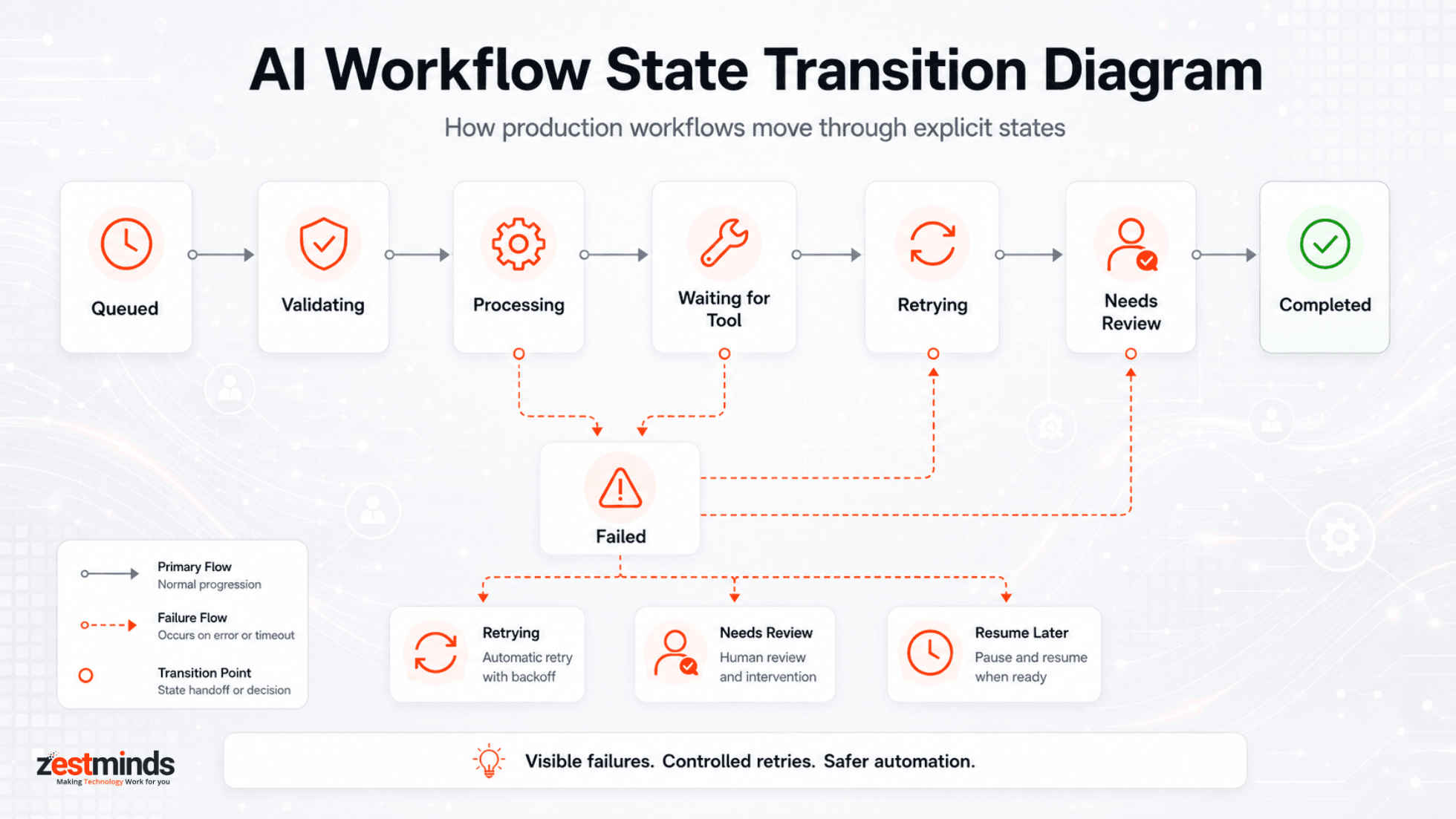
State transitions define how an AI workflow moves from one step to another. Without them, every failure becomes a custom debugging session.
A simple production workflow may follow this pattern:
- queued → request received
- validating → input is checked and normalized
- processing → deterministic logic and AI steps run
- waiting_for_tool → external API or business system response is pending
- retrying → a failed step is retried within limits
- needs_review → human approval is required
- completed → workflow finished successfully
- failed → workflow stopped after controlled failure handling
Retries should be bounded
Retries are useful, but blind retries can make a production issue worse. If a third-party API is down or an LLM provider is timing out, retrying every request aggressively can increase latency, cost, and failure volume.
A safer retry strategy includes:
- Retry limits
- Backoff policies
- Error-specific retry rules
- Dead-letter queues for failed jobs
- Human review for repeated failures
Fallbacks should be designed before launch
A fallback is what the system does when the ideal path fails. For example:
- If the model returns invalid JSON, retry with a stricter prompt once.
- If the confidence score is low, send the record to human review.
- If the CRM API fails, pause the workflow and resume later.
- If cost exceeds a limit, stop the workflow before another expensive call.
Good fallback design makes AI workflows feel reliable, even when individual components fail.
Scaling Challenges You Only See After Launch
Some AI workflow problems do not appear until real users arrive. By the time teams notice them, they are often already expensive.
| Scaling Area | What Breaks First | What Teams Miss |
|---|---|---|
| Latency | Chained model calls | Latency budgets per step |
| Cost | Retry storms and long inputs | Cost per workflow run |
| Reliability | API timeouts and rate limits | Graceful degradation |
| Data Drift | Quiet quality decay | Input/output monitoring |
| Operations | Silent failures | Alerting and visibility |
Latency compounds quickly
Each AI step adds latency: data fetch, preprocessing, model inference, post-processing, and external system updates. A one-second delay may feel acceptable in isolation. Chain several together, and the workflow starts feeling slow.
Production teams should track:
- Latency per step
- Total workflow duration
- Timeout frequency
- Slow external dependencies
Cost curves surprise teams
AI costs rarely scale exactly the way early spreadsheets suggest. Token usage can grow faster than request volume, retries can multiply inference costs, and long-tail inputs can trigger expensive paths.
Production-grade workflows should include:
- Cost tracking per workflow run
- Usage caps
- Input limits
- Early exits for low-value requests
- Cost alerts for abnormal usage
For teams moving from experiments into production systems, MLOps practices around monitoring, governance, automation, and lifecycle management can also help keep AI systems more reliable over time. AWS provides a useful overview here: What is MLOps?
Data drift erodes performance
Models do not always fail loudly when reality changes. They often fail quietly. User behavior shifts, input formats change, business rules evolve, and edge cases become normal cases.
The fix is visibility:
- Track input characteristics
- Monitor output confidence
- Sample real-world cases regularly
- Compare model output against human decisions
Orchestration, Monitoring, and Failure Handling
Orchestration is where AI workflows become operable systems. It controls sequencing, branching, retries, fallbacks, and visibility across the full workflow.
Why orchestration matters
As workflows grow, implicit control flow becomes impossible to reason about. A simple script may be enough for a prototype, but production workflows need visible and controlled execution.
Orchestration provides:
- Explicit step sequencing
- Defined retry policies
- Conditional branching
- Human approval paths
- Clear visibility into workflow execution
Observability is non-negotiable
You cannot scale what you cannot see. Production AI workflows need observability across both AI behavior and backend execution.
At minimum, track:
- Step-level logs
- Input and output samples
- Latency metrics
- Cost attribution
- Model and prompt versions
- Failure rates by step
- Human review rate
Observability turns AI from a black box into an operable system. It also gives business teams confidence because decisions can be reviewed, explained, and improved over time.
Human-in-the-loop is a feature
Automation does not always mean full autonomy. In many US, UK, EU, and regulated business environments, human review is not a weakness. It is a safety layer.
Human review should be triggered when:
- Confidence is low
- Output conflicts with business rules
- Data quality is poor
- The action affects customers, revenue, or compliance
- The workflow is new and still being monitored
Human-in-the-loop design is especially important for AI workflows connected to sales, support, hiring, healthcare, finance, legal operations, CRM updates, or customer communication.
Database State, Queue, or Workflow Engine?
Not every AI workflow needs a heavy workflow engine on day one. The right choice depends on complexity, duration, failure risk, audit needs, and business impact.
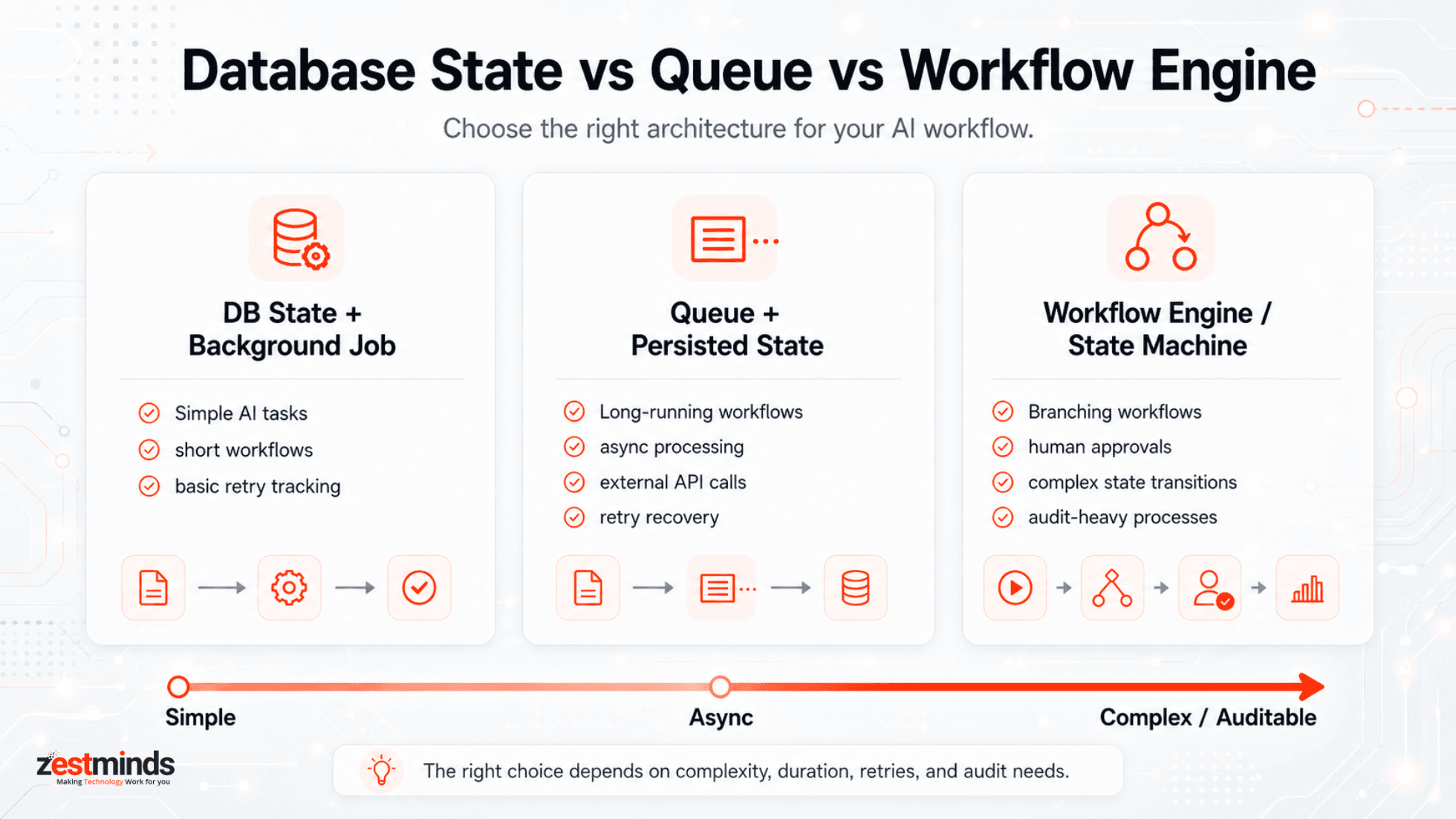
| Use Case | Better Choice | Why |
|---|---|---|
| Short, simple AI task | Database state + background job | Enough for basic tracking and retry handling |
| Long-running workflow | Queue + persisted state | Allows async processing, retries, and recovery |
| Multi-step branching workflow | State machine or workflow engine | Makes complex transitions easier to control |
| Human approval workflow | State model + review queue | Keeps humans in control before final action |
| Audit-heavy business process | Database audit trail + logs + approvals | Supports review, debugging, and accountability |
The mistake is not choosing a lightweight setup. The mistake is building without any explicit state model and hoping the workflow will remain understandable later.
When to Refactor vs When to Rebuild
At some point, every growing AI system hits a wall. The hard question is whether to improve the existing workflow or rebuild the backend around a cleaner state model.
Refactor when the core assumptions still hold
Refactoring makes sense when:
- The workflow steps are mostly correct
- Failures are localized
- State is messy but recoverable
- Costs can be optimized
- Observability can be added without major restructuring
In these cases, better orchestration, caching, retry policies, or decision logic can unlock meaningful gains.
Rebuild when demo shortcuts are everywhere
A rebuild may be necessary when:
- Business logic is tangled with model prompts
- State is implicit and scattered
- Failures cascade unpredictably
- No one can explain why a workflow produced a result
- Adding new features makes the system more fragile
The biggest risk is often not rebuilding. It is waiting too long, while operational debt, debugging fatigue, and feature paralysis keep growing.
Is your AI workflow ready for real production usage?
If your AI demo works but the production system feels fragile, a technical review can help decide whether the right next step is refactoring, rebuilding, or adding stronger backend state, retries, observability, and integrations.
Production AI Workflow Readiness Checklist
Before scaling an AI workflow, use this checklist to find weak points early.
- Is every workflow run traceable with a unique run ID?
- Are workflow states explicit and stored?
- Can failed workflows resume safely?
- Are retries bounded and error-specific?
- Are prompt and model versions logged?
- Is cost tracked per workflow run or step?
- Is latency tracked across each workflow stage?
- Are external API failures handled gracefully?
- Is low-confidence output routed to human review?
- Are CRM, ERP, or support updates idempotent?
- Are alerts configured for silent failures?
- Can the team explain why a workflow made a decision?
If the answer is "no" to several of these, the workflow may still be closer to a demo than a production system.
Closing Thoughts: Treat AI Like Infrastructure, Not a Feature
Most AI failures in production are not caused by bad models alone. They are caused by under-designed systems.
There is one mindset shift experienced founders and CTOs should take seriously:
AI is not a feature you add. It is infrastructure you operate.
Demos optimize for impression. Production systems optimize for behavior over time.
When AI workflows are designed with explicit backend state, orchestration, failure handling, observability, and cost controls, teams stop firefighting and start building systems that can compound value. The model becomes one component of the system, not the single point of failure.
For CTOs, founders, and engineering teams, the goal is simple: build AI workflows that are not just impressive in a demo, but reliable when real users, real data, and real business processes depend on them.
Turn your AI workflow into a production-ready system
For teams building AI automation around CRM, support, operations, SaaS workflows, or internal business systems, the backend architecture often decides whether the system scales cleanly or becomes expensive to maintain.
Frequently Asked Questions
What is a backend state model for AI workflows?
A backend state model for AI workflows is the structure used to track workflow execution across steps, retries, failures, model calls, human reviews, and final outcomes. It helps the system know what is happening, what has already happened, and what should happen next.
Why do AI workflows need persistent state?
AI workflows need persistent state because production systems must recover from failures, resume interrupted jobs, track decisions, control retries, and explain results later. Without persistent state, debugging and scaling become difficult.
What is the difference between workflow state and session state?
Session state tracks user interaction context, such as a chat conversation or temporary UI data. Workflow state tracks backend execution progress, such as current step, retry count, failure reason, approval status, and final business outcome.
How should production AI workflows handle retries?
Production AI workflows should use bounded retries with backoff policies, retry limits, error-specific rules, and fallback paths. Blind retries can increase cost, latency, and failure volume during outages or rate limits.
When should an AI workflow use a queue or workflow engine?
A queue is useful when AI workflows are asynchronous, long-running, or need retry handling. A workflow engine or state machine is better when the workflow has multiple branches, approvals, dependencies, or complex state transitions.
How do you monitor AI workflow cost and latency?
AI workflow cost and latency should be tracked per workflow run and per step. Teams should log model usage, token consumption, retries, timeout frequency, slow dependencies, and total execution time to identify expensive or slow paths.
When should an AI workflow be refactored instead of rebuilt?
An AI workflow should be refactored when the core architecture still works and failures are localized. A rebuild is usually better when state is scattered, business logic is tangled with prompts, failures cascade, and adding features makes the system more fragile.
Table of Contents
- What Is a Backend State Model?
- Why AI Demos Don't Survive Production
- Core Components of a Production AI Workflow
- Workflow State vs Session State
- Example Backend State Model
- Retries, Fallbacks, and State Transitions
- Scaling Challenges After Launch
- Orchestration, Monitoring, and Failure Handling
- DB State, Queue, or Workflow Engine?
- When to Refactor vs Rebuild
- Production Readiness Checklist
- Frequently Asked Questions
Shivam Sharma
Before You Scale Further, Review the Architecture.
Let’s evaluate where your system stands — and where it may break under growth.
Schedule an Architecture Review 30-minute technical discussion. No obligation.