
Production-Ready Laravel Docker Setup for Windows, Mac & Linux
A production-ready Laravel Docker setup helps your team run the same stack across Windows, macOS, Linux, and WSL2. By containerizing PHP-FPM, Nginx, MySQL/Postgres, Redis, queue workers, schedulers, and build tools, you reduce “it works on my machine” issues and make development, testing, and deployment more predictable.
This guide is written for developers, tech leads, and CTO-level evaluators who want a practical Laravel Docker environment that is useful beyond a basic local setup. We'll cover Dockerfile structure, Docker Compose services, queue workers, Supervisor, Horizon, CI/CD, production hardening, and common troubleshooting points.

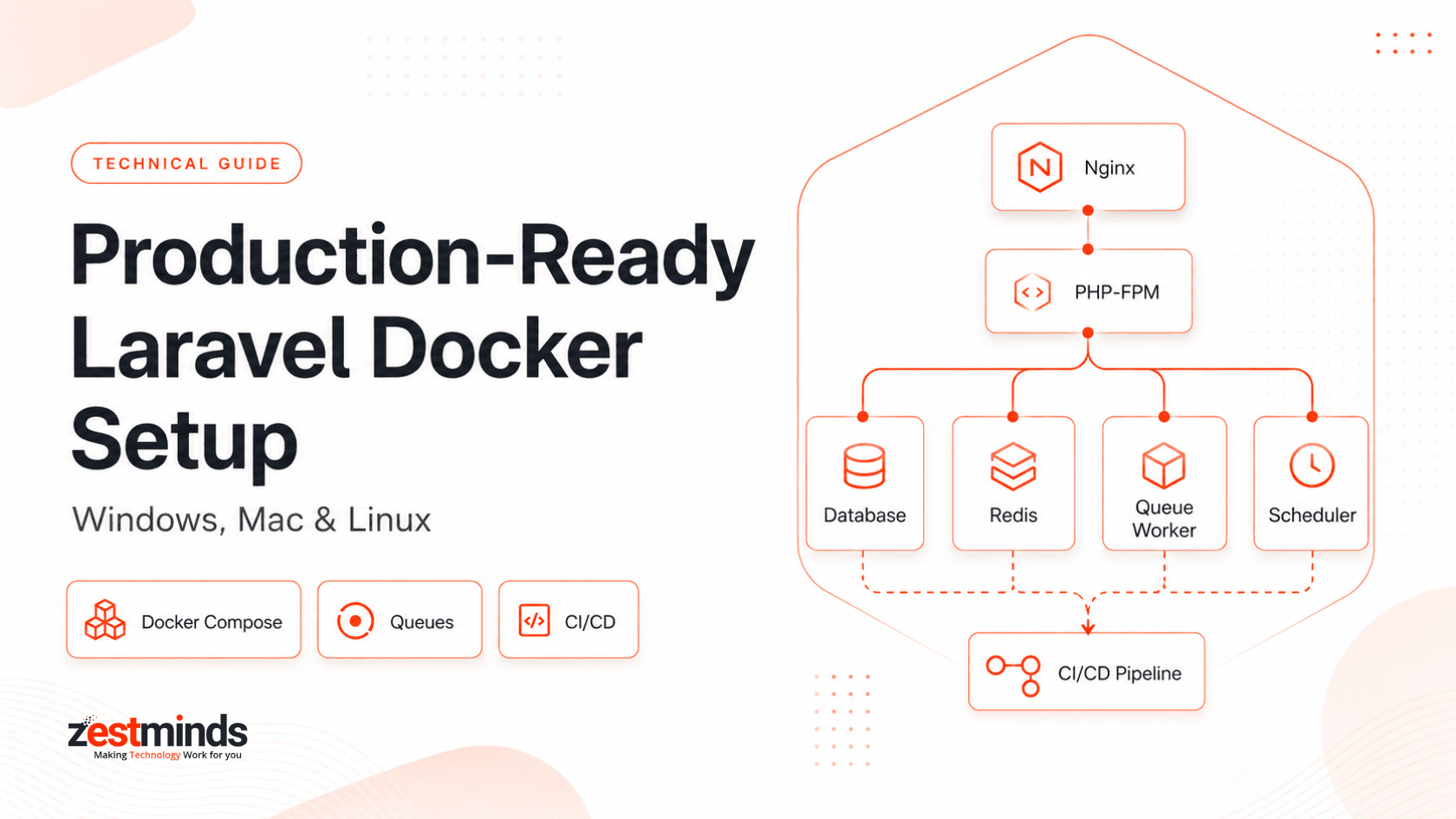
Creating a reliable Laravel development environment has always been harder than it sounds. Different PHP versions, inconsistent Nginx setups, mismatched database drivers, and OS-specific quirks can make every developer's machine behave slightly differently.
"But… it works on my machine."
Docker does not magically fix poor architecture, but it does give your Laravel team a shared runtime. That means the app, PHP extensions, web server, database, Redis, workers, and schedulers can be defined once and reused across machines and environments.
Still, not every Laravel Docker tutorial prepares you for real production work. Many examples stop at a basic Dockerfile or rely only on Laravel Sail. Sail is useful, but larger teams and production systems usually need more control over Dockerfiles, Compose services, queue workers, scheduler containers, CI/CD, logs, secrets, and deployment behavior.
A production-ready Laravel Docker setup is a containerized environment where Laravel, PHP-FPM, Nginx, database, Redis, queues, and schedulers run as separate, predictable services.
The goal is not just to “run Laravel in Docker.” The real goal is to make development consistent, deployment safer, and production behavior easier to reason about.
Why Laravel + Docker Still Matters for Production Teams
Docker is now a common part of modern Laravel engineering because teams need repeatable environments, reliable builds, and cleaner handoffs between local development, staging, and production.
Consistency across every machine, OS, and developer
When your application stack is defined through containers, every developer works with the same PHP version, extensions, Nginx config, Redis version, database service, queue worker command, scheduler behavior, and environment structure.
This matters even more for teams working across Windows, macOS, Linux, or WSL2. Without Docker, every machine becomes a tiny snowflake. Cute in winter, painful during a production bug.
The real villain: environment drift
Most Laravel teams have seen these problems:
- One developer uses PHP 8.3 while another still has PHP 8.1.
- Nginx behaves differently across machines.
- Redis is installed locally for one developer but missing for another.
- Queue workers run locally for some people but not for others.
- Windows and WSL2 file permissions create unexpected bugs.
- Node, Composer, and PHP extensions drift over time.
Docker reduces those differences by defining the environment in files your team can review, version, and reuse.
When Docker is not needed
Docker is powerful, but it is not mandatory for every Laravel project.
You may skip Docker for:
- Small hobby apps
- Quick experiments
- Training exercises
- Very low-resource machines
- Short proof-of-concept scripts
But if more than one developer is involved, or if the project will move to staging, CI/CD, workers, queues, or cloud deployment, Docker becomes much more useful.
Visual explainer: how Docker standardizes Laravel
+----------------------------------+
| docker-compose.yml               |
|                                  |
| - php-fpm                        |
| - nginx                          |
| - mysql or postgres              |
| - redis                          |
| - queue worker                   |
| - scheduler                      |
| - optional: mailpit, search, s3  |
+----------------------------------+
              |
              v
 Same stack across Windows, Mac,
 Linux, WSL2, staging, and CI/CD
No custom PHP installations. Fewer OS-specific surprises. Less onboarding friction. More predictable deployments.
Architecture Overview: Laravel Docker on Windows, macOS, Linux & WSL2
A serious Laravel Docker setup goes beyond “app + database.” It separates responsibilities so each service can be managed, restarted, scaled, and monitored independently.
A modern Laravel Docker setup usually includes:
- PHP-FPM container - Runs the Laravel application.
- Nginx container - Handles HTTP traffic and forwards PHP requests to PHP-FPM.
- MySQL or Postgres - Primary database service.
- Redis - Cache, queue backend, rate limiting, and Horizon support.
- Queue worker - Processes background jobs such as emails, reports, webhooks, billing events, and AI tasks.
- Scheduler - Runs Laravel scheduled commands without relying on a manually configured host cron.
- Mailpit or MailHog - Captures outgoing emails safely during development and staging.
- Node build container - Builds frontend assets using Vite or Webpack when needed.
For teams building SaaS platforms, CRMs, marketplaces, dashboards, or internal portals, this separation makes the system easier to understand and safer to scale. If your product is moving from prototype to a multi-user platform, this same thinking also applies to SaaS product development.
High-level container architecture
        +----------------------+
        |        NGINX         |
        |   HTTP / HTTPS       |
        +----------+-----------+
                   |
                   v
        +----------------------+
        |       PHP-FPM        |
        |   Laravel runtime    |
        +----------+-----------+
                   |
       +-----------+------------+
       |                        |
       v                        v
+-------------+          +-------------+
|  DATABASE   |          |    REDIS    |
+-------------+          +-------------+
                              |
                              v
                      +---------------+
                      | Queue Worker  |
                      +---------------+
                              |
                              v
                      +---------------+
                      | Scheduler     |
                      +---------------+
This architecture is close to how production Laravel systems are usually prepared before moving to cloud platforms, container registries, ECS, Kubernetes, Cloud Run, or managed VPS deployments.
Laravel Sail vs custom Docker Compose
Laravel Sail is excellent for local development. It helps teams start quickly without writing every Dockerfile and Compose service from scratch.
Laravel Sail is useful for:
- Quick onboarding
- Small teams
- Prototypes
- Local Laravel development
- Developers who want a standard Laravel-supported setup
But production-level engineering usually needs more than Sail. A custom Docker setup gives you better control over:
- Multi-stage builds
- Production-grade Nginx configuration
- Separate worker and scheduler containers
- Image size and build speed
- Environment-specific Dockerfiles
- Logging and observability
- CI/CD pipeline behavior
- Secrets and deployment workflows
If your Laravel app is moving beyond local development, it may be worth reviewing the architecture with a team that understands Laravel development services at production scale.
Trusted external references
- Docker Laravel development setup: https://docs.docker.com/guides/frameworks/laravel/development-setup/
- Laravel Sail documentation: https://laravel.com/docs/sail
- AWS containers overview: https://aws.amazon.com/containers/
Production Dockerfile vs Docker Compose: What Each One Does
Before writing code, it helps to separate two ideas that many Laravel teams mix up: Dockerfile and Docker Compose.
Dockerfile
A Dockerfile defines how your Laravel application image is built. It controls PHP version, system packages, PHP extensions, Composer dependencies, working directory, application files, and runtime command.
In simple words: the Dockerfile builds the Laravel application image.
Docker Compose
Docker Compose defines how services run together. It connects your Laravel app with Nginx, database, Redis, queue workers, schedulers, Mailpit, and other supporting services.
In simple words: Docker Compose runs the Laravel ecosystem.
How they work together
- Dockerfile builds the PHP-FPM Laravel image.
- Nginx config routes browser traffic to PHP-FPM.
- docker-compose.yml starts app, web, database, Redis, worker, and scheduler services.
- Worker service runs background jobs independently.
- Scheduler service runs scheduled Laravel commands independently.
This separation makes the setup easier to debug and easier to move into CI/CD later.
Step-by-Step: Building a Production-Ready Laravel Docker Setup
The structure below works well for teams that want a clean Laravel Docker setup across Windows, macOS, Linux, and WSL2.
Step 1 - Create a clean folder structure
/docker
  /php
    Dockerfile
  /nginx
    default.conf
docker-compose.yml
.dockerignore
You may also add separate Dockerfiles or entrypoint scripts later for workers, schedulers, or production builds. Keep the structure boring and predictable. Future you will thank present you.
Step 2 - Add a .dockerignore file
A good .dockerignore prevents unnecessary files from being copied into the image. This keeps builds smaller and faster.
.git
node_modules
vendor
storage/logs
.env
.env.*
Dockerfile
docker-compose.yml
npm-debug.log
yarn-error.log
Never copy secrets or local-only files into your production image.
Step 3 - Build a production-ready PHP-FPM image
FROM php:8.3-fpm-alpine

RUN apk add --no-cache \
    bash \
    git \
    unzip \
    libzip-dev \
    icu-dev \
    oniguruma-dev \
    mysql-client \
    && docker-php-ext-install \
    pdo \
    pdo_mysql \
    intl \
    zip \
    opcache

COPY --from=composer:2 /usr/bin/composer /usr/bin/composer

WORKDIR /var/www/html

COPY composer.json composer.lock ./

RUN composer install \
    --no-dev \
    --prefer-dist \
    --no-interaction \
    --no-scripts \
    --optimize-autoloader

COPY . .

RUN composer dump-autoload --optimize

CMD ["php-fpm"]
This is a practical base. For Postgres, replace or extend database extensions as needed. For larger applications, use multi-stage builds, a non-root user, and separate build steps for frontend assets.
Step 4 - Configure Nginx for Laravel
server {
    listen 80;
    server_name localhost;

    root /var/www/html/public;
    index index.php index.html;

    location / {
        try_files $uri $uri/ /index.php?$query_string;
    }

    location ~ \.php$ {
        fastcgi_pass app:9000;
        fastcgi_index index.php;
        include fastcgi_params;
        fastcgi_param SCRIPT_FILENAME $realpath_root$fastcgi_script_name;
        fastcgi_param DOCUMENT_ROOT $realpath_root;
    }

    location ~ /\.ht {
        deny all;
    }
}
This is the basic Nginx pattern for Laravel: serve files from the public directory and pass PHP requests to the PHP-FPM service.
Step 5 - Create docker-compose.yml
version: "3.8"

services:
  app:
    build:
      context: .
      dockerfile: docker/php/Dockerfile
    env_file:
      - .env
    restart: unless-stopped
    networks:
      - laravel

  web:
    image: nginx:alpine
    ports:
      - "8000:80"
    volumes:
      - ./public:/var/www/html/public:ro
      - ./docker/nginx/default.conf:/etc/nginx/conf.d/default.conf:ro
    depends_on:
      - app
    restart: unless-stopped
    networks:
      - laravel

  mysql:
    image: mysql:8
    environment:
      MYSQL_DATABASE: laravel
      MYSQL_ROOT_PASSWORD: secret
      MYSQL_USER: laravel
      MYSQL_PASSWORD: secret
    ports:
      - "3307:3306"
    volumes:
      - mysql_data:/var/lib/mysql
    restart: unless-stopped
    networks:
      - laravel

  redis:
    image: redis:alpine
    restart: unless-stopped
    networks:
      - laravel

  worker:
    build:
      context: .
      dockerfile: docker/php/Dockerfile
    command: php artisan queue:work redis --sleep=3 --tries=3 --timeout=90 --memory=256
    env_file:
      - .env
    depends_on:
      - app
      - redis
    restart: unless-stopped
    networks:
      - laravel

  scheduler:
    build:
      context: .
      dockerfile: docker/php/Dockerfile
    command: php artisan schedule:work
    env_file:
      - .env
    depends_on:
      - app
      - redis
    restart: unless-stopped
    networks:
      - laravel

networks:
  laravel:

volumes:
  mysql_data:
This Compose file gives you separate services for web traffic, PHP runtime, database, Redis, queues, and scheduled commands.
Production note: For local development and staging, bind mounts are common. For production, prefer immutable images built through CI/CD and avoid mounting application code directly from the host.
Step 6 - Start and validate the environment
docker compose up -d
Open the app:
http://localhost:8000
Then validate Laravel inside the app container:
docker compose exec app php -v
docker compose exec app php artisan --version
docker compose exec app php artisan migrate
If PHP, Artisan, database migration, Redis, worker, and scheduler all behave correctly, your Laravel Docker environment is in good shape.
Step 7 - Fix common permission issues on macOS and Linux
sudo chown -R $USER:$USER .
chmod -R ug+rw storage bootstrap/cache
Many teams also keep a small helper script for permissions during onboarding.
#!/bin/sh
chmod -R ug+rw storage bootstrap/cache
Best Way to Run Laravel Queue Workers in Docker
Queue workers are one of the most important parts of a production Laravel Docker setup. They process background jobs for emails, notifications, report generation, webhooks, billing events, imports, exports, and AI-related tasks.
The safest pattern is simple: run queue workers in a separate container.
Do not run queue workers inside the same container that serves web requests. If the worker crashes, grows in memory, or needs scaling, it should not affect PHP-FPM or Nginx.
Recommended worker service
worker:
  build:
    context: .
    dockerfile: docker/php/Dockerfile
  command: php artisan queue:work redis --sleep=3 --tries=3 --timeout=90 --memory=256
  env_file:
    - .env
  depends_on:
    - app
    - redis
  restart: unless-stopped
  networks:
    - laravel
Recommended queue:work flags
- --sleep=3 - Waits before checking for new jobs when the queue is empty.
- --tries=3 - Attempts a failed job three times before marking it as failed.
- --timeout=90 - Stops jobs that run longer than expected.
- --memory=256 - Restarts the worker when memory usage crosses the limit.
During deployment, remember that Laravel queue workers are long-running processes. They may continue running old code unless restarted.
docker compose exec app php artisan queue:restart
If your Laravel app relies heavily on queues, background jobs, or worker scaling, that is no longer just a development detail. It becomes a platform reliability concern. For teams facing these scaling issues, platform engineering support can help review worker design, deployment flow, monitoring, and recovery strategy.
Supervisor vs Docker Restart Policy for Laravel Workers
Laravel queue worker articles often recommend Supervisor. That advice is useful in traditional VPS setups, but Docker changes the conversation slightly.
Use Docker restart policy when each container runs one worker process
If your worker container runs a single queue process, Docker's restart policy is usually enough.
restart: unless-stopped
This keeps the container running if the worker exits unexpectedly. It also keeps the architecture simple because Docker is responsible for restarting the container.
Use Supervisor when one container needs to manage multiple worker processes
Supervisor is useful when you intentionally run multiple worker processes inside one container or when you are managing queue workers on a traditional server without container orchestration.
Use Supervisor when:
- You need multiple worker processes inside one container.
- You are not using ECS, Kubernetes, Docker Compose scaling, or another orchestration layer.
- You need process-level control on a traditional VPS.
Avoid adding Supervisor just because “production needs Supervisor.” In containerized setups, one process per container is usually cleaner and easier to scale.
When orchestration is better than Supervisor
If the app runs on ECS, Kubernetes, Docker Swarm, or another orchestrator, let the platform restart failed containers, scale workers, and manage health checks. In those cases, Supervisor may add unnecessary complexity.
Using Laravel Horizon in Docker
Laravel Horizon is useful when your application uses Redis queues and you need better visibility into jobs, retries, wait time, throughput, and failed jobs.
Run Horizon as its own service, not inside the web container.
horizon:
  build:
    context: .
    dockerfile: docker/php/Dockerfile
  command: php artisan horizon
  env_file:
    - .env
  depends_on:
    - app
    - redis
  restart: unless-stopped
  networks:
    - laravel
Use Horizon when:
- You need a queue dashboard.
- You are using Redis queues.
- You need visibility into job throughput and failures.
- You want better control over worker balancing.
For simpler apps, plain queue:work may be enough. For larger SaaS apps, CRMs, marketplaces, and reporting systems, Horizon can make queue behavior much easier to monitor.
Developer Workflow: Debugging, Testing & Team Onboarding
A good Laravel Docker setup should not only work in production. It should also make daily development easier.
Run Artisan commands inside containers
docker compose exec app php artisan migrate
docker compose exec app php artisan cache:clear
docker compose exec app php artisan queue:restart
Many teams add a shell alias to save time:
alias art="docker compose exec app php artisan"
Then daily commands become:
art migrate
art test
art queue:restart
Run tests inside the app container
docker compose exec app php artisan test
Or, if your project uses Pest:
docker compose exec app ./vendor/bin/pest
Running tests inside containers keeps dependency versions consistent across local machines and CI pipelines.
Run the scheduler in its own container
scheduler:
  build:
    context: .
    dockerfile: docker/php/Dockerfile
  command: php artisan schedule:work
  restart: unless-stopped
This keeps scheduled tasks visible and containerized. For production, some teams prefer cron calling schedule:run every minute. Both approaches can work, but avoid hiding scheduler behavior on one manually configured server.
Scale queue workers when needed
docker compose up --scale worker=5 -d
This is useful for email-heavy apps, import jobs, webhooks, report generation, and background processing. Just make sure your queue backend, database, and job design can handle the added concurrency.
Set up Xdebug for local debugging
pecl install xdebug
docker-php-ext-enable xdebug
xdebug.mode=debug
xdebug.client_host=host.docker.internal
Xdebug configuration may differ slightly between macOS, Windows, Linux, and WSL2, but Docker keeps most of the PHP environment predictable.
Developer workflow takeaways
- Run Artisan commands inside the app container.
- Run tests inside Docker for consistent results.
- Keep queue workers separate from the web container.
- Run scheduler logic in a visible, repeatable way.
- Restart workers during deployment.
Hardening Laravel Docker for Production
Production-readiness is not only about making containers start. It is about making builds predictable, deployments safe, and failures easier to diagnose.
Use multi-stage or optimized builds
Your final production image should avoid unnecessary build tools, caches, and local files. Keep the image focused on what the app needs to run.
A lean image gives you:
- Faster CI/CD builds
- Smaller deploy artifacts
- Reduced attack surface
- Cleaner production behavior
Never ship .env files in the image
Do not copy .env files into Docker images. Use runtime environment variables or managed secrets.
Common options include:
- AWS Secrets Manager
- GCP Secret Manager
- Kubernetes Secrets
- Docker secrets
- CI/CD environment variables
Log to stdout and stderr
In containerized deployments, logs should be easy for Docker, ECS, Kubernetes, or your logging system to collect. Avoid hiding important application logs only inside container files.
Use health checks where possible
Health checks help orchestration platforms understand whether a service is alive and ready to receive traffic.
healthcheck:
  test: ["CMD", "php", "artisan", "--version"]
  interval: 30s
  timeout: 10s
  retries: 3
This example is simple. In production, use a health endpoint or command that reflects real application readiness.
Align Docker with CI/CD
Developer pushes code
        |
        v
CI builds Docker image
        |
        v
Image pushed to registry
        |
        v
Deployment pulls image
        |
        v
Workers restarted safely
        |
        v
App runs with updated code
If your team is moving from manual deployments to containerized releases, DevOps and cloud engineering services can help structure image builds, registry workflows, secrets, rollback plans, and deployment automation.
Review Laravel API behavior too
For API-heavy Laravel applications, Docker is only one part of production readiness. Routing, versioning, validation, queues, rate limits, error handling, and deployment structure also matter. You can use our Laravel API development best practices guide as a deeper companion resource.
Common Pitfalls & Troubleshooting
Database is not connecting
Inside Docker Compose, Laravel should use the database service name, not localhost.
DB_HOST=mysql
DB_PORT=3306
If you use Postgres, use the Postgres service name instead.
Redis is not connecting
Use the Redis service name from docker-compose.yml.
REDIS_HOST=redis
REDIS_PORT=6379
QUEUE_CONNECTION=redis
CACHE_STORE=redis
Queue jobs are not processing
Check that the worker container is running and connected to Redis.
docker compose ps
docker compose logs worker
Also confirm that QUEUE_CONNECTION is set to redis or the queue driver your app actually uses.
Queue worker container keeps stopping
Common causes include failed Redis connection, missing environment variables, incorrect command syntax, memory limits, or a failed Laravel boot process.
docker compose logs worker
docker compose exec app php artisan queue:failed
Old code still runs after deployment
Laravel queue workers are long-running processes. Restart them after deployment.
php artisan queue:restart
In Docker, this can be handled during the deployment process or by restarting the worker service.
Storage permissions are failing
chmod -R ug+rw storage bootstrap/cache
Permissions are especially common when switching between Windows, WSL2, macOS, Linux, and mounted volumes.
Containers are not rebuilding correctly
docker compose build --no-cache
docker compose up -d
Use this when dependencies, PHP extensions, or Dockerfile layers are not updating as expected.
WSL2 networking feels stuck
wsl --shutdown
docker compose up -d
This simple reset fixes many local networking surprises on Windows.
Laravel Docker Production Readiness Checklist
Before calling a Laravel Docker setup production-ready, check these items:
- Dockerfile uses the required PHP version and extensions.
- .dockerignore excludes local, secret, and unnecessary files.
- Nginx serves Laravel from the public directory.
- Database service is configured using service names, not localhost.
- Redis is configured for cache, queues, and Horizon if needed.
- Queue workers run in a separate container.
- Scheduler runs separately from the web container.
- Workers restart during deployments.
- Secrets are injected at runtime and not baked into images.
- Logs are visible through container logs or a logging platform.
- CI/CD builds images instead of copying files manually.
- Health checks or readiness checks exist for important services.
- Permissions are tested across Windows, macOS, Linux, and WSL2.
- Production images do not rely on local bind mounts for application code.
Quick rule: If your Laravel app has queues, scheduled jobs, Redis, CI/CD, and more than one developer, Docker should be treated as part of your engineering workflow, not just a local setup shortcut.
Real-World Proof: Docker at Scale
In one multi-tenant Laravel CRM project, we used a Dockerized architecture to support multiple developers, staging environments, Redis-backed queues, CI/CD deployments, and separate worker and scheduler processes.
You can explore the related Laravel CRM case study to see how a structured backend approach supports larger Laravel platforms.
In similar production systems, this kind of setup helped reduce environment-related confusion, improve onboarding, and make deployments easier to repeat. The biggest win was not “Docker for the sake of Docker.” The win was a cleaner engineering workflow.
We have also used similar backend and container patterns for education platforms, SaaS dashboards, internal portals, reporting systems, and queue-heavy applications where predictable environments mattered.
Need a Second Set of Eyes on Your Laravel Docker Setup?
If your Laravel app is growing and you are unsure whether the Dockerfile, Compose setup, queue workers, scheduler, Redis, Horizon, or CI/CD flow is production-ready, a focused architecture review can save a lot of debugging later.
During a Laravel Docker architecture review, the Zestminds team can look at:
- Dockerfile structure
- Docker Compose services
- Nginx and PHP-FPM setup
- Queue worker and scheduler design
- Redis and Horizon usage
- CI/CD image build and deployment flow
- Production risk points and improvement areas
This is useful for teams moving from local Docker to staging, from staging to production, or from manual Laravel deployments to a containerized workflow.
request a Laravel Docker architecture review
FAQs: Production-Ready Laravel Docker Setup
1. Should Laravel queue workers run in a separate Docker container?
Yes. In production-style Docker setups, queue workers should run in a separate container from the web or PHP-FPM container. This allows workers to scale, restart, and fail independently without affecting web requests.
2. What is the best way to run Laravel queue workers in Docker production?
Use a dedicated worker service in Docker Compose with php artisan queue:work, Redis as the queue backend, a restart policy, and practical flags such as --sleep, --tries, --timeout, and --memory.
3. Should I use Supervisor or Docker restart policy for Laravel workers?
For one worker process per container, Docker restart policies are usually enough. Supervisor is useful when running multiple worker processes inside one container or managing workers on a traditional VPS.
4. Is Laravel Horizon recommended in Docker?
Yes, if your Laravel app uses Redis queues and you need visibility into jobs, retries, throughput, and failures. Horizon should run in its own container, not inside the web container.
5. How do I optimize a Laravel Dockerfile for production?
Use optimized or multi-stage builds, install only required PHP extensions, avoid shipping build tools, exclude unnecessary files with .dockerignore, and keep secrets outside the image.
6. What services should a production Laravel Docker Compose setup include?
A production-style setup usually separates Nginx, PHP-FPM, database, Redis, queue worker, scheduler, and optional services such as Mailpit, Meilisearch, or object storage emulators.
7. Why does my Laravel queue worker container keep stopping?
Common causes include failed Redis connection, missing environment variables, incorrect command syntax, memory limits, permission issues, or no restart policy in Docker Compose.
8. Is Laravel Sail enough for production Docker deployments?
Laravel Sail is useful for local development and onboarding, but production deployments usually need custom Dockerfiles, Nginx configuration, worker containers, secrets handling, CI/CD, and monitoring.
Table of Contents
- Why Laravel + Docker Still Matters for Production Teams
- Architecture Overview: Laravel Docker on Windows, macOS, Linux & WSL2
- Production Dockerfile vs Docker Compose: What Each One Does
- Step-by-Step: Building a Production-Ready Laravel Docker Setup
- Best Way to Run Laravel Queue Workers in Docker
- Supervisor vs Docker Restart Policy for Laravel Workers
- Using Laravel Horizon in Docker
- Developer Workflow: Debugging, Testing & Team Onboarding
- Hardening Laravel Docker for Production
- Common Pitfalls & Troubleshooting
- Laravel Docker Production Readiness Checklist
- Real-World Proof: Docker at Scale
- FAQs: Production-Ready Laravel Docker Setup
Rajat Sharma
Before You Scale Further, Review the Architecture.
Let’s evaluate where your system stands — and where it may break under growth.
Schedule an Architecture Review 30-minute technical discussion. No obligation.