
How AI Automates Business Processes: Use Cases, Benefits, and Steps
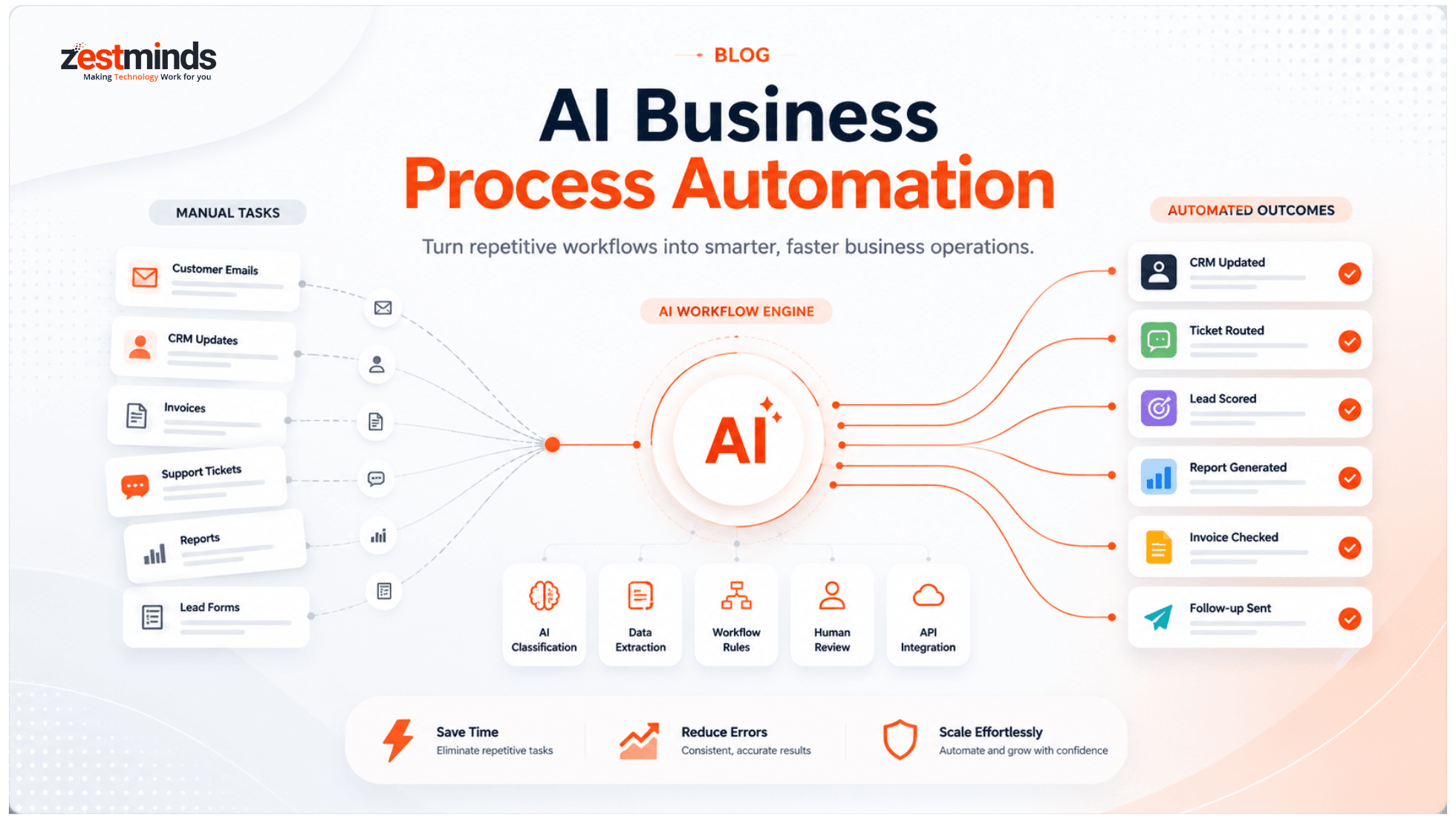
AI automation is no longer just a fancy idea for big tech companies. Today, growing businesses use AI to reduce repetitive work, speed up operations, improve customer response time, and connect everyday workflows across tools like CRMs, emails, documents, reports, and support systems.
In this guide, we'll break down how AI business process automation works, which workflows are best suited for AI, where human review is still important, and how to start with one practical automation pilot before scaling it across your business.

Introduction: AI Is Changing How Businesses Handle Repetitive Work
Imagine you run a growing business. Your team handles customer questions, order updates, sales follow-ups, invoices, reports, marketing tasks, and CRM entries every day. Some of this work needs human thinking. But a lot of it is repetitive, rule-based, and time-consuming.
That is where AI automation can help.
AI is no longer useful only for tech giants. Small businesses, startups, SaaS companies, service businesses, and enterprise teams are now using AI to reduce manual work, improve response time, and make business operations easier to manage.
But here is the important part: AI automation is not about adding a chatbot everywhere and hoping magic happens. The best results come when businesses first understand their workflows, identify repetitive steps, and then use AI where it can create measurable value.
By the end of this guide, you will understand:
- What AI business process automation means
- How AI automates business workflows
- Which business processes AI can automate
- How to decide what to automate first
- When simple tools are enough and when custom AI automation makes sense
- How to start safely without overcomplicating things
What Is AI Business Process Automation?
AI business process automation means using artificial intelligence to automate repetitive, data-heavy, or rule-based workflows inside a business.
These workflows may include customer support, lead qualification, CRM updates, invoice processing, document review, reporting, marketing follow-ups, HR screening, and internal task routing.
Traditional automation usually follows fixed rules. For example, “when a form is submitted, send an email.” AI automation goes further. It can understand text, classify intent, extract information, summarize data, detect patterns, suggest decisions, and trigger actions across connected business tools.
For broader context, IBM explains business process automation as a way to automate repetitive business processes and streamline day-to-day operations.
Think of AI automation like giving your business a smart assistant that can read, understand, organize, and route work. It still needs clear instructions, good data, and human supervision for sensitive decisions, but it can reduce a lot of daily manual effort.
Simple Example
Suppose your sales team receives 200 website leads every week. Without AI, someone has to read each form, check the company size, understand the requirement, update the CRM, assign a salesperson, and write a follow-up email.
With AI automation, the system can read each lead, classify it, score it, update the CRM, assign it to the right person, and prepare a personalized first response. Your team still handles the real conversation, but the boring first layer is already done.
How Does AI Automate Business Processes?
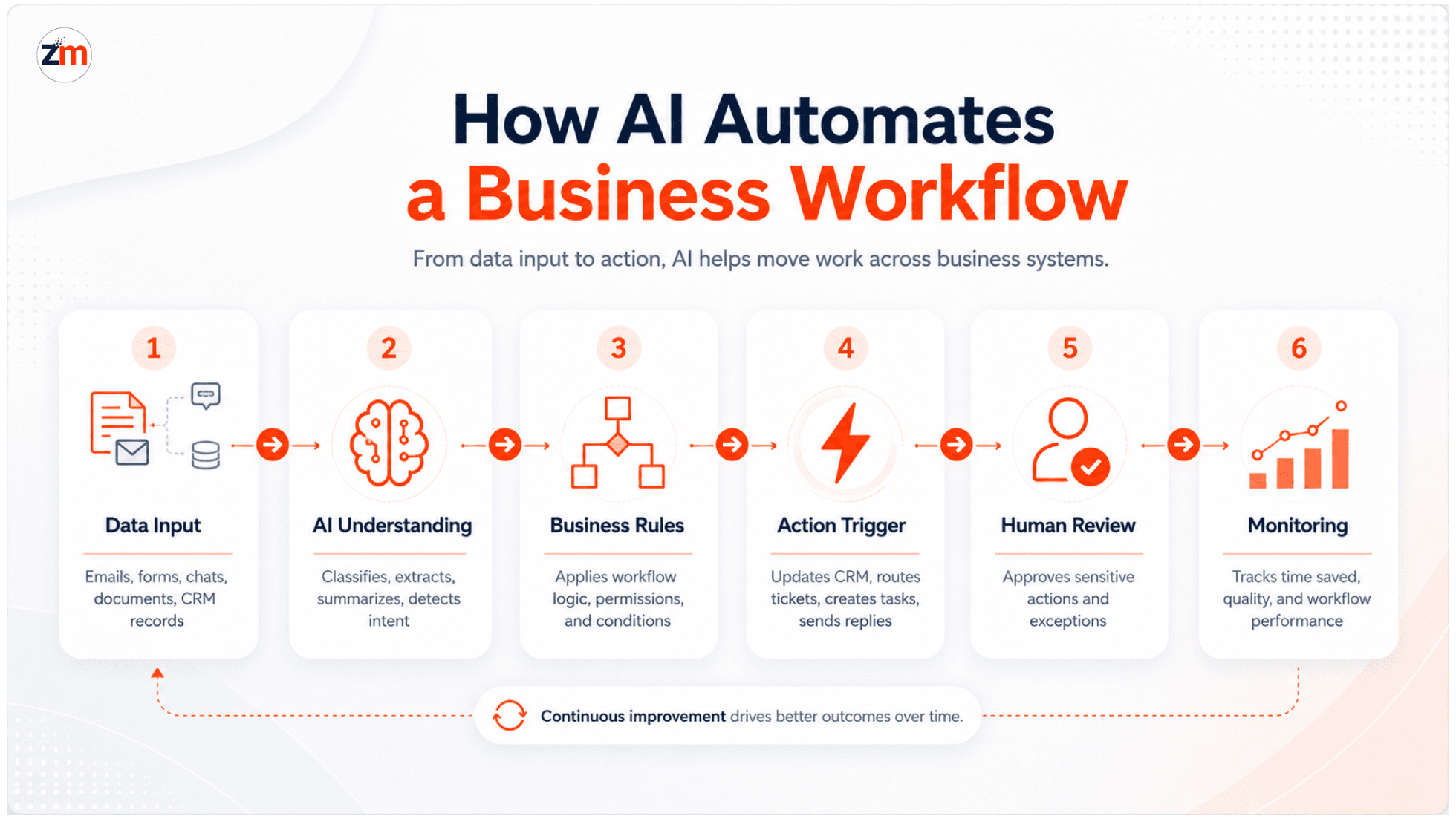
AI automation usually works by connecting business data, AI models, and workflow actions. The goal is not only to answer questions, but to move work from one step to the next.
- Data comes in: This can be from emails, forms, chats, support tickets, documents, CRM records, spreadsheets, or internal systems.
- AI understands the input: It can classify a request, extract key details, summarize a message, detect urgency, or identify the next action.
- The system applies business logic: Rules, permissions, risk levels, and workflow conditions decide what should happen next.
- An action is triggered: The system may update a CRM, create a task, send a reply, route a ticket, generate a report, or notify a team member.
- Humans review sensitive steps: Refunds, hiring decisions, legal responses, pricing changes, and financial actions should usually keep human approval.
- The workflow is monitored: The business tracks time saved, errors reduced, response speed, and output quality.
This is why AI automation is often a mix of AI, APIs, workflow tools, databases, dashboards, and human approval steps. The real value comes from connecting AI to business operations, not just using AI in isolation.
Benefits of AI Business Process Automation
1. AI Saves Time on Repetitive Work
Time is one of the biggest reasons businesses explore AI automation. Teams often spend hours on copy-paste tasks, manual data entry, basic customer replies, report preparation, document review, and CRM updates.
AI can reduce that workload by handling the first layer of repetitive processing. The actual time savings depend on the complexity of the workflow, data quality, integrations, and review requirements.
- Support teams can use AI to classify tickets and suggest replies.
- Sales teams can use AI to qualify leads and update CRM records.
- Finance teams can use AI to extract invoice data and flag mismatches.
- Managers can use AI to generate weekly summaries from multiple tools.
2. AI Reduces Manual Errors
Humans make mistakes, especially when the same task has to be repeated hundreds of times. A wrong email, missed follow-up, duplicate entry, or incorrect invoice field can create unnecessary delays.
AI automation can reduce these errors by standardizing repetitive steps. For example, it can pull information from a document, check required fields, compare records, or flag missing data before the task moves forward.
AI should not be treated as perfect. It still needs validation, especially in workflows involving money, personal data, legal language, or customer trust.
3. AI Improves Customer and Team Experience
Customers do not like waiting for basic answers. Teams do not like spending their whole day on repetitive admin work. AI automation helps both sides.
- Customers get faster answers for common questions.
- Sales teams receive cleaner lead information.
- Support teams spend more time on complex issues.
- Managers get faster visibility into operations.
For example, an AI assistant can answer order status questions, route refund requests to the right team, summarize support history, and update the CRM automatically. This improves speed without removing the need for human judgment.
What Business Processes Can AI Automate?
AI can automate many business processes, but the best candidates are usually repetitive, high-volume, rule-based, and supported by digital data.
Good AI automation opportunities often appear in these areas:
- Customer support: FAQ responses, ticket triage, response drafting, escalation routing, and customer history summaries.
- Sales: Lead qualification, lead scoring, follow-up reminders, CRM updates, and proposal preparation support.
- Marketing: Email personalization, campaign segmentation, content workflow support, and performance summaries.
- Finance: Invoice extraction, payment reminders, expense checks, fraud flags, and reconciliation support.
- HR: Resume screening support, candidate sorting, onboarding task reminders, and internal policy assistants.
- Operations: Task routing, approval workflows, internal notifications, vendor updates, and process monitoring.
- Reporting: Weekly summaries, dashboard updates, trend detection, and performance insights.
- Document processing: Extracting data from invoices, contracts, forms, receipts, and uploaded files.
- E-commerce: Product recommendations, order updates, return request routing, and customer query handling.
- SaaS and internal platforms: User onboarding, churn signals, feature usage summaries, and support automation.
The goal is not to automate everything. The goal is to identify the workflows where AI can save time, reduce friction, and support better decision-making.
If you are exploring this for your own operations, Zestminds’ AI workflow automation services can help you identify which workflows are worth automating first.
AI Automation Examples by Business Function
1. AI in Customer Support
Customer support is one of the easiest places to see AI automation in action. Many teams receive the same questions every day, such as order status, refund policy, account access, billing issues, or product details.
AI can help by:
- Answering common questions instantly.
- Classifying tickets by topic, urgency, or customer type.
- Drafting suggested replies for support agents.
- Summarizing previous customer conversations.
- Routing complex issues to the right person.
This does not mean every support interaction should be fully automated. A better approach is to let AI handle repetitive first-level work while humans manage sensitive or complex conversations.
For a practical example, see how Zestminds built an AI chatbot and CRM automation case study to support customer communication and lead capture.
2. AI in Sales and Lead Qualification
Sales teams often lose time reading every lead manually, checking fit, updating CRM fields, and deciding who should follow up. AI can make this process faster and cleaner.
AI can help sales teams by:
- Reading lead forms and identifying buyer intent.
- Scoring leads based on business rules.
- Suggesting the right follow-up message.
- Updating CRM fields automatically.
- Assigning leads to the right salesperson or team.
For example, if a real estate business receives leads from website forms, ads, WhatsApp, and landing pages, AI can qualify those leads and send only the most relevant ones to the sales team.
You can also review this AI lead qualification automation example to see how AI can support sales workflows.
3. AI in Marketing
Marketing teams use AI automation to understand audience behavior, personalize communication, and reduce manual campaign work.
AI can support marketing by:
- Segmenting contacts based on behavior or interest.
- Creating first drafts for email campaigns.
- Personalizing product or service recommendations.
- Summarizing campaign performance.
- Identifying which leads need follow-up.
This works best when AI is connected to reliable customer data. Without clean data, AI may create poor recommendations or irrelevant messaging.
4. AI in Finance and Document Processing
Finance teams often handle repetitive document-heavy work. Invoices, receipts, purchase orders, and payment records usually follow patterns, making them good candidates for AI-assisted automation.
AI can help by:
- Extracting invoice details from PDFs or images.
- Matching invoices with purchase orders.
- Flagging missing or unusual values.
- Sending payment reminders.
- Preparing finance summaries for review.
AI should not approve sensitive financial actions blindly. It should prepare, check, and route work while humans approve high-risk decisions.
For document-heavy workflows, this AI document processing automation example is a useful proof point.
5. AI in HR and Recruitment
HR teams can use AI to reduce repetitive screening and onboarding work. For example, AI can help sort resumes, summarize candidate profiles, prepare interview notes, and answer common employee questions.
AI can support HR by:
- Organizing candidate applications.
- Highlighting skills that match the role.
- Preparing onboarding task lists.
- Answering common policy questions.
- Sending reminders for internal HR workflows.
Hiring decisions should not be fully delegated to AI. It is safer to use AI as a support layer, not the final decision-maker.
6. AI in Reporting and Operations
Many founders, managers, and operations teams spend time pulling data from different tools just to understand what happened during the week.
AI automation can help by:
- Pulling data from CRM, helpdesk, spreadsheets, and dashboards.
- Summarizing weekly performance.
- Highlighting unusual changes.
- Creating internal task alerts.
- Sending reports to the right stakeholders.
This is especially useful for businesses that already use multiple tools but still rely on manual reporting.
For a workflow-level example, see this AI workflow automation case study.
How to Decide What to Automate First
One of the biggest mistakes businesses make is starting with the most exciting AI idea instead of the most practical workflow.
The safest starting point is usually a workflow that is easy to understand, easy to measure, and painful enough to matter.
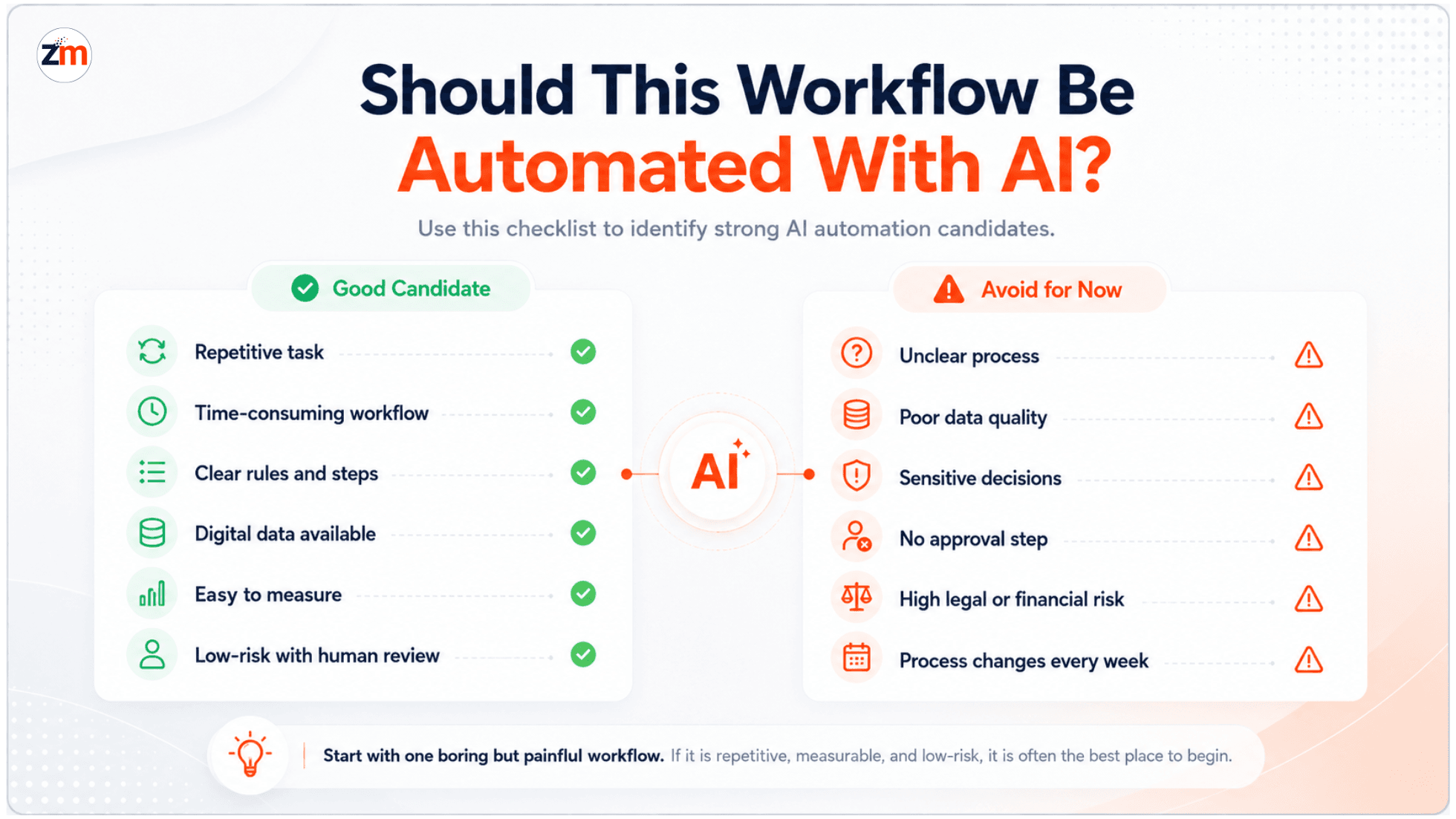
Good AI Automation Candidates
- The task happens repeatedly every day or every week.
- The task consumes noticeable team time.
- The workflow has clear steps and rules.
- The required data is already available digitally.
- The task does not require deep emotional or legal judgment.
- The result can be measured through time saved, faster response, fewer errors, or better follow-up.
- The workflow can include human approval where needed.
Tasks You Should Not Automate First
- Processes that are unclear or constantly changing.
- Workflows with poor or incomplete data.
- Sensitive decisions with no human review.
- Broken processes that need redesign before automation.
- Tasks where mistakes can create serious legal, financial, or customer trust issues.
For AI risk planning and governance, the NIST AI Risk Management Framework is a useful external reference for teams that need a more structured approach.
A simple rule works well: start with a boring but painful workflow. If your team hates doing it repeatedly, and the steps are clear, it may be a good AI automation candidate.
AI Automation Tools vs Custom AI Automation
Not every business needs a custom AI system from day one. Sometimes a simple workflow tool is enough. The right choice depends on the complexity of the workflow, the systems involved, and the level of control you need.
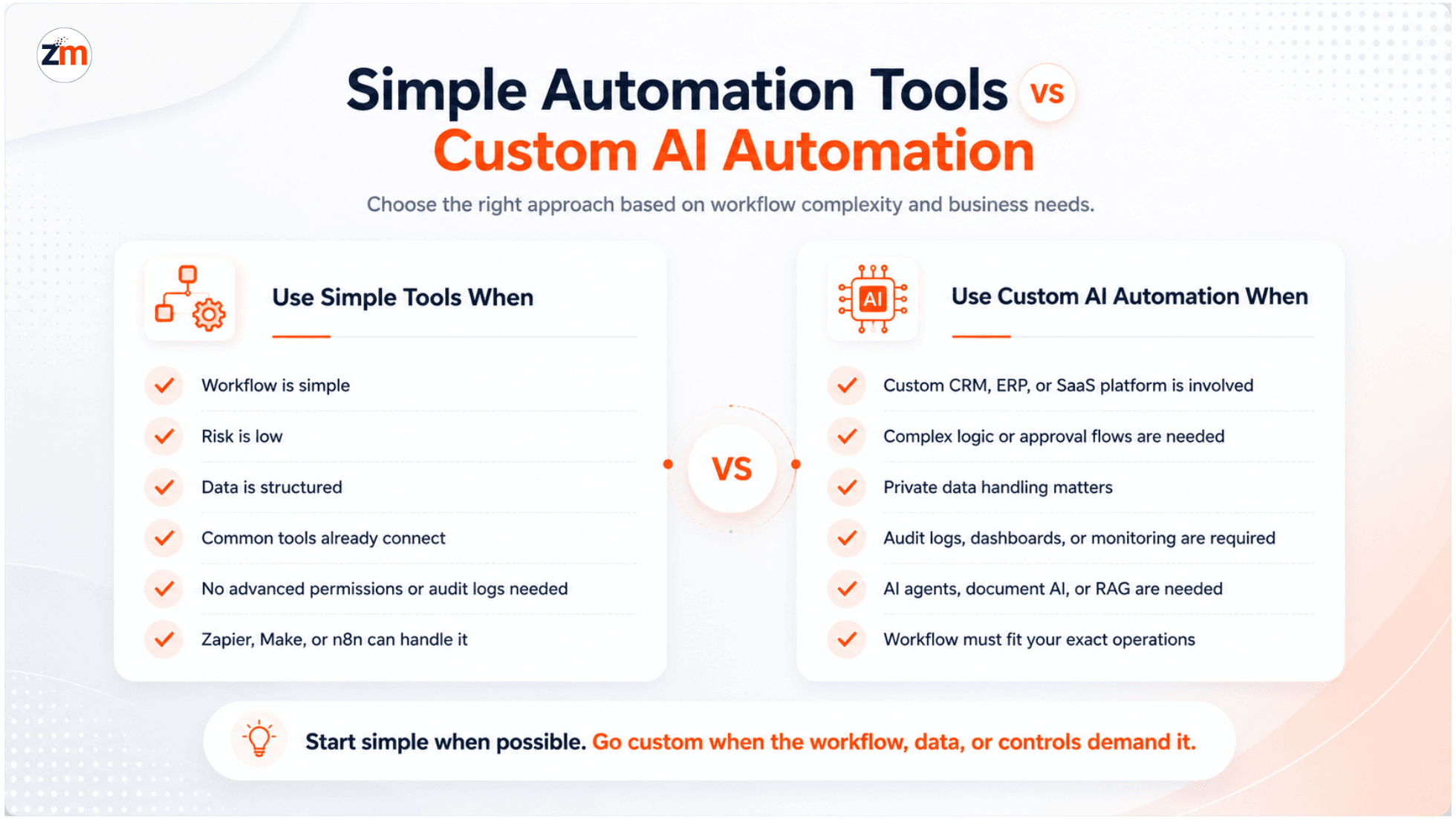
When Simple Automation Tools May Be Enough
- You only need to connect two or three common tools.
- The workflow is simple and low-risk.
- The data is clean and structured.
- You do not need advanced permissions, audit logs, or custom dashboards.
- The workflow can be handled with tools like Zapier, Make, or n8n.
When Custom AI Automation Makes More Sense
- You need to connect with a custom CRM, ERP, SaaS platform, or internal system.
- The workflow has complex rules or multiple approval steps.
- You need private data handling or stronger access control.
- You need AI inside an existing product or dashboard.
- You need audit logs, reporting, monitoring, or role-based permissions.
- You want AI agents, document processing, RAG-based assistants, or custom workflow orchestration.
For more advanced use cases, such as AI agents, custom models, document AI, or AI-powered product features, custom AI development services may be more suitable.
Common Mistakes to Avoid With AI Automation
AI automation can be powerful, but it can also create confusion if implemented without planning. A poor workflow with AI added on top is still a poor workflow.
1. Automating Before Understanding the Process
Before adding AI, map the current workflow. Identify who does what, where data comes from, where delays happen, and what the final outcome should be.
2. Using AI When Simple Rules Are Enough
Not every workflow needs AI. If a simple rule-based automation can solve the problem, use that. AI should be added where understanding, classification, summarization, prediction, or decision support is needed.
3. Ignoring Data Quality
AI depends on the quality of the data it receives. If your CRM is messy, documents are inconsistent, or fields are missing, automation can produce weak results.
4. Removing Human Review Too Early
AI should not automatically approve refunds, hiring decisions, legal responses, financial actions, or sensitive customer communication without review.
5. Not Measuring Results
AI automation should be measured. Track practical metrics like response time, manual hours saved, error reduction, conversion improvement, ticket resolution speed, and report preparation time.
How to Get Started With AI Automation
Want to start using AI but do not know where to begin? Keep it simple. You do not need to automate the whole company in one go.
Step 1: Map One Repetitive Workflow
Choose one workflow that takes time every week. It could be support triage, CRM updates, invoice extraction, lead qualification, or reporting.
Document the current process:
- Where does the work start?
- Who handles it?
- Which tools are involved?
- What decisions are made?
- Where does the workflow end?
Step 2: Check the Data and Systems
AI automation needs access to the right data. Check whether the data is available in emails, forms, documents, CRM records, spreadsheets, APIs, or databases.
Also check if the tools can be connected safely through APIs, webhooks, or exports.
Step 3: Decide the Automation Type
Some workflows need only simple automation. Others need AI classification, document extraction, response generation, or custom system integration.
Do not start with the most complex setup. Start with the simplest version that can prove value.
Step 4: Build a Small Pilot
A pilot helps you test the workflow before scaling. For example, automate ticket classification for one support category or lead qualification for one campaign.
Keep humans involved during the pilot so the team can review AI output and improve the rules.
Step 5: Measure Results
Track simple business metrics:
- How much manual time was reduced?
- Did response speed improve?
- Did fewer tasks get missed?
- Did the team trust the AI output?
- Were customers or internal users happier with the workflow?
Step 6: Scale Carefully
Once the pilot works, expand to more workflows. Add monitoring, approval rules, dashboards, and fallback paths. Scaling AI automation should feel controlled, not chaotic.
How Zestminds Helps Businesses With AI Workflow Automation
At Zestminds, we look at AI automation as a workflow and systems problem, not just a chatbot problem.
Before building anything, the important questions are simple:
- Which manual process is slowing the team down?
- Which tools and data are involved?
- Where can AI safely reduce effort?
- Where should humans stay in control?
- How will the result be measured?
Zestminds helps businesses with workflow discovery, AI automation planning, custom AI development, CRM and API integrations, document processing, AI agents, reporting automation, and pilot-to-scale implementation.
Not sure which process to automate first? Zestminds can help you map one workflow, identify the highest-value automation opportunity, and build a practical AI automation pilot.
Conclusion: Start With the Workflow, Not the Tool
AI automation can save time, reduce manual errors, and improve business operations. But the best results come when businesses start with a real workflow problem, not with a random AI tool.
Start small. Pick one repetitive process. Check the data. Add AI where it actually helps. Keep humans involved for sensitive decisions. Measure the result before scaling.
If you want to explore what this could look like in your business, start with one question: which workflow wastes the most time every week?
That answer is often the best place to begin.
FAQs on AI Business Process Automation
1. What is AI business process automation?
AI business process automation means using AI to handle repetitive workflows such as customer support, lead qualification, document processing, reporting, CRM updates, and internal task routing. It works best when the process is clear, data is available, and outcomes can be measured.
2. What business processes can AI automate?
AI can automate support tickets, FAQs, sales follow-ups, lead scoring, invoice processing, document extraction, HR screening, reporting, email routing, CRM updates, and customer communication. The best candidates are high-volume, repetitive tasks with clear rules and digital data.
3. How does AI automate business workflows?
AI reads data from sources like emails, forms, chats, documents, or CRM records, understands intent or patterns, recommends an action, and then triggers the next step through connected tools or APIs. Sensitive actions should still include human review.
4. How do I know what to automate first with AI?
Start with a workflow that is repetitive, time-consuming, low-risk, and easy to measure. Good first projects include support triage, lead qualification, invoice extraction, CRM updates, or weekly reporting. Avoid automating unclear or broken processes first.
5. Can AI automation integrate with my CRM, ERP, or existing tools?
Yes. AI automation can connect with CRMs, ERPs, helpdesks, accounting systems, spreadsheets, email tools, and internal dashboards using APIs, webhooks, or custom integrations. The complexity depends on your workflow, data quality, permissions, and existing system access.
6. Is AI automation better than using tools like Zapier, Make, or n8n?
Zapier, Make, or n8n are useful for simple workflows. Custom AI automation is better when you need complex logic, private data handling, CRM or ERP integration, role-based access, approval flows, audit logs, or AI features inside an existing product or platform.
7. What are the risks of AI automation in business?
Common risks include poor data quality, wrong AI outputs, over-automation, privacy issues, weak access control, and no human approval for sensitive decisions. Businesses should start with a controlled pilot, monitor results, and keep humans involved where risk is high.
8. How can AI automation scale with business growth?
AI automation scales well when workflows are documented, integrations are stable, data is clean, and performance is monitored. As volume grows, businesses can add more workflows, approval rules, dashboards, and AI agents without rebuilding everything from scratch.
Table of Contents
- Introduction
- What Is AI Business Process Automation?
- How Does AI Automate Business Processes?
- Benefits of AI Business Process Automation
- What Business Processes Can AI Automate?
- AI Automation Examples by Business Function
- How to Decide What to Automate First
- AI Automation Tools vs Custom AI Automation
- Common Mistakes to Avoid With AI Automation
- How to Get Started With AI Automation
- How Zestminds Helps Businesses With AI Workflow Automation
- FAQs on AI Business Process Automation
Shivam Sharma
Before You Scale Further, Review the Architecture.
Let’s evaluate where your system stands — and where it may break under growth.
Schedule an Architecture Review 30-minute technical discussion. No obligation.